%7B.s%7Banimation%3Ab%201.5s%20ease-out%20both%7D.d%7Banimation-delay%3A.16s%7D%7D%40keyframes%20b%7B0%25%7Bfill%3A%23F4F6FA%7D18%25%7Bfill%3A%23FFE08A%7D34%25%2C70%25%7Bfill%3A%23FF8A1F%7D80%25%7Bfill%3A%23FFE08A%7D100%25%7Bfill%3A%23FF8A1F%7D%7D%3C%2Fstyle%3E%3Cg%20transform%3D%22translate(143%20428.93)%20scale(3.885906)%22%3E%3Cg%20transform%3D%22translate(0%202)%22%20fill%3D%22%23706EF0%22%3E%3Cpath%20d%3D%22M0%200%20H48%20A40%2040%200%200%201%2048%2080%20V100%20H0%20Z%22%2F%3E%3Cpath%20transform%3D%22translate(91.75%200)%22%20d%3D%22M0%200%20L48%200%20L48%2050%20L76%2050%20L76%20100%20L0%20100%20Z%22%2F%3E%3Cpath%20transform%3D%22translate(173%200)%22%20d%3D%22M0%20100%20L58%20-4%20L116%20100%20Z%22%2F%3E%3Cpath%20transform%3D%22translate(264.25%200)%22%20d%3D%22M0%200%20L104%200%20L76%2050%20L76%20100%20L28%20100%20L28%2050%20Z%22%2F%3E%3Cg%20transform%3D%22translate(375%200)%22%3E%3Cpath%20d%3D%22M0%200%20L50%2038%20L50%200%20L100%200%20L100%20100%20L0%20100%20Z%22%20fill%3D%22%23F4F6FA%22%2F%3E%3Crect%20class%3D%22s%22%20x%3D%2247%22%20y%3D%2263%22%20width%3D%2219%22%20height%3D%2230%22%2F%3E%3Crect%20class%3D%22s%20d%22%20x%3D%2274%22%20y%3D%2263%22%20width%3D%2219%22%20height%3D%2230%22%2F%3E%3C%2Fg%3E%3Cpath%20transform%3D%22translate(484.75%200)%22%20d%3D%22M0%200%20L48%200%20L48%2037%20L52%2037%20L52%200%20L100%200%20L100%20100%20L52%20100%20L52%2063%20L48%2063%20L48%20100%20L0%20100%20Z%22%2F%3E%3Cpath%20transform%3D%22translate(588.5%200)%22%20d%3D%22M0%2050%20A53%2053%200%201%200%20106%2050%20A53%2053%200%201%200%200%2050%20Z%22%2F%3E%3Cpath%20transform%3D%22translate(698.25%200)%22%20d%3D%22M25%200%20H102%20V50%20H77%20A25%2025%200%200%201%2077%20100%20H0%20V50%20H25%20A25%2025%200%200%201%2025%200%20Z%22%2F%3E%3Cpath%20transform%3D%22translate(804%200)%22%20d%3D%22M0%200%20L90%200%20L90%2050%20L69%2050%20L69%20100%20L21%20100%20L21%2050%20L0%2050%20Z%22%2F%3E%3C%2Fg%3E%3C%2Fg%3E%3C%2Fsvg%3E)


The easiest way to download your Rust world is a backup: make one on Backups, then choose Download in its menu. The world itself is in the folder server/rust, which you can also zip in Files or copy over SFTP.
What the world is
Your world lives in server/rust:
- The map and its save, named like
proceduralmap.3000.123456.289.mapand.sav. The numbers are the world size, the seed and the save version. - The player files: blueprints, deaths, identities, states, clans and the other
.dbfiles. - The
cfgfolder:server.cfg,users.cfg(owners and moderators) andbans.cfg.
Plugins, with their settings and data, are in the oxide or carbon folder at the top of your server's files.
Download a backup
A backup holds the world, the cfg folder and your plugins, without the game's own files.
- Stop the server and wait for Offline, so Rust has written a complete save.
- Click Backups in the left menu and click Start backup.
- When it has finished, open the menu Actions for the backup and choose Download.
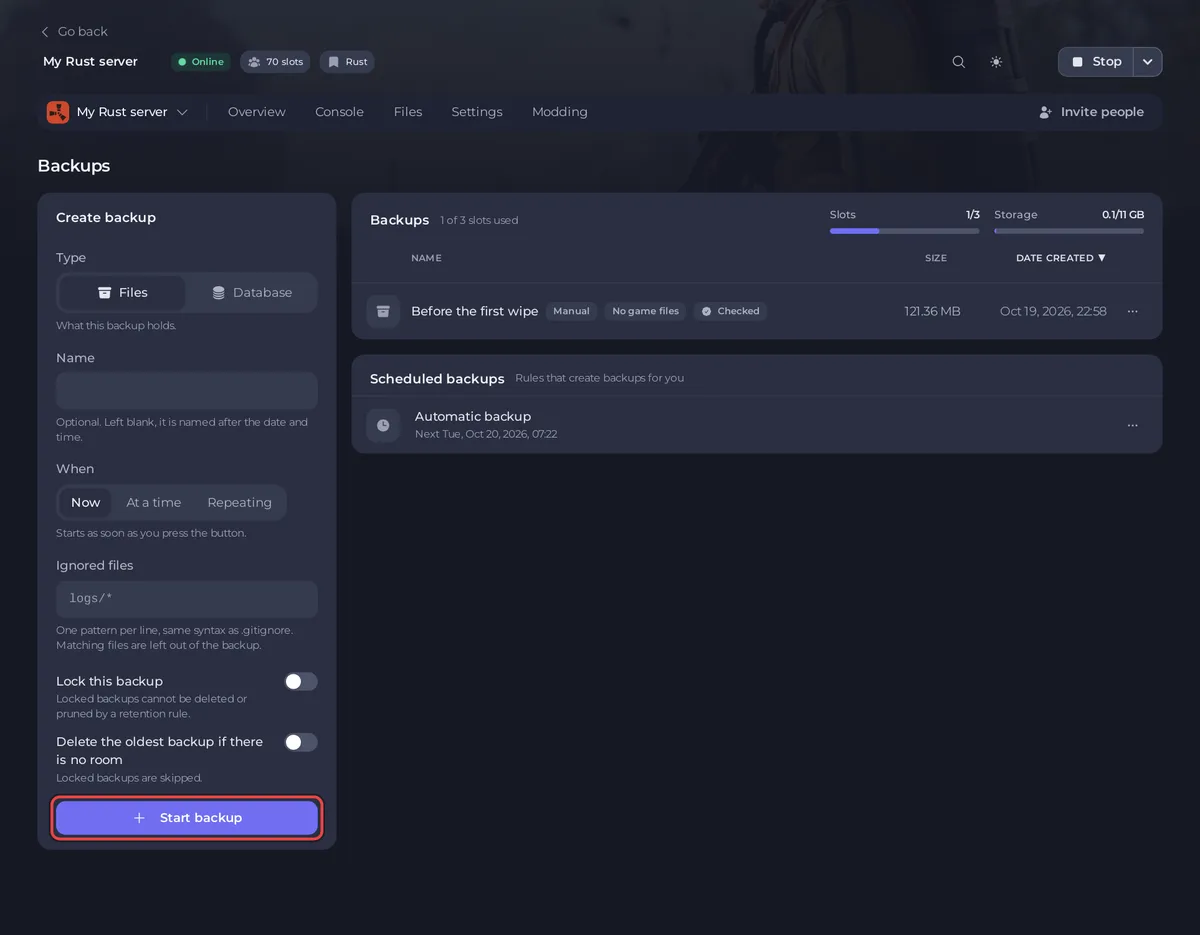
- Start the server again.
See How to back up and restore your Rust world.
Zip the world folder in Files
- Stop the server and wait for Offline.
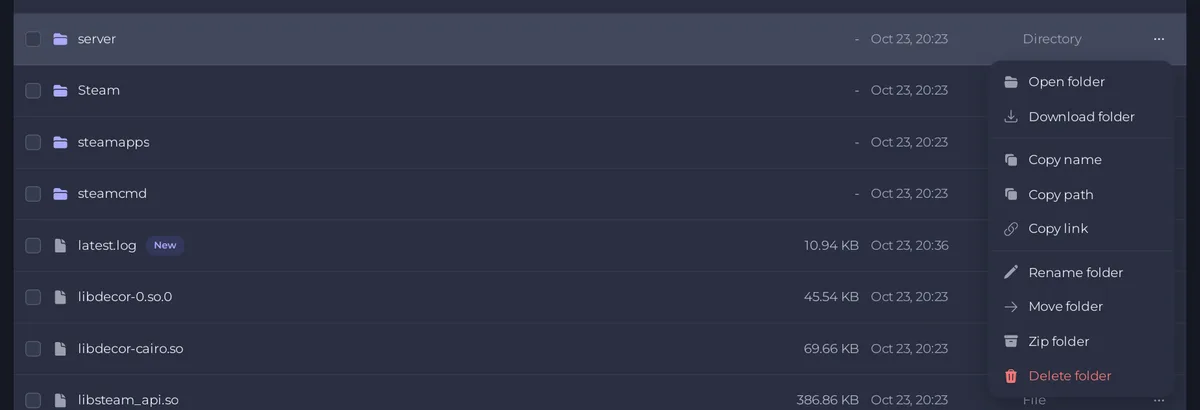
- Open the Files tab and go to the
serverfolder. - Open the row menu of the
rustfolder and choose Zip folder. An archive of the folder appears in the same place. - Open the archive's row menu and choose Download file.
- Delete the archive afterwards, so it does not take up space on your server.
Copy it over SFTP
For a big world, an SFTP program such as FileZilla is often quicker. Copy the server/rust folder to your computer: How to connect to your server files with SFTP.
Good to know
- Stop the server first. Rust saves every Save Interval, so a copy taken while it runs can miss the last minutes.
- A save only loads on the Rust build it was made for. After Facepunch's forced wipe, an old save no longer matches the game.
- To put a world back on a server, see How to upload your own Rust world.
- For a friend with a panel role: zipping needs Files: Compress and extract, downloading a file needs Read contents, and downloading a backup needs Backups: Download. See How to let a friend help run your Rust server.





