%7B.s%7Banimation%3Ab%201.5s%20ease-out%20both%7D.d%7Banimation-delay%3A.16s%7D%7D%40keyframes%20b%7B0%25%7Bfill%3A%23F4F6FA%7D18%25%7Bfill%3A%23FFE08A%7D34%25%2C70%25%7Bfill%3A%23FF8A1F%7D80%25%7Bfill%3A%23FFE08A%7D100%25%7Bfill%3A%23FF8A1F%7D%7D%3C%2Fstyle%3E%3Cg%20transform%3D%22translate(143%20428.93)%20scale(3.885906)%22%3E%3Cg%20transform%3D%22translate(0%202)%22%20fill%3D%22%23706EF0%22%3E%3Cpath%20d%3D%22M0%200%20H48%20A40%2040%200%200%201%2048%2080%20V100%20H0%20Z%22%2F%3E%3Cpath%20transform%3D%22translate(91.75%200)%22%20d%3D%22M0%200%20L48%200%20L48%2050%20L76%2050%20L76%20100%20L0%20100%20Z%22%2F%3E%3Cpath%20transform%3D%22translate(173%200)%22%20d%3D%22M0%20100%20L58%20-4%20L116%20100%20Z%22%2F%3E%3Cpath%20transform%3D%22translate(264.25%200)%22%20d%3D%22M0%200%20L104%200%20L76%2050%20L76%20100%20L28%20100%20L28%2050%20Z%22%2F%3E%3Cg%20transform%3D%22translate(375%200)%22%3E%3Cpath%20d%3D%22M0%200%20L50%2038%20L50%200%20L100%200%20L100%20100%20L0%20100%20Z%22%20fill%3D%22%23F4F6FA%22%2F%3E%3Crect%20class%3D%22s%22%20x%3D%2247%22%20y%3D%2263%22%20width%3D%2219%22%20height%3D%2230%22%2F%3E%3Crect%20class%3D%22s%20d%22%20x%3D%2274%22%20y%3D%2263%22%20width%3D%2219%22%20height%3D%2230%22%2F%3E%3C%2Fg%3E%3Cpath%20transform%3D%22translate(484.75%200)%22%20d%3D%22M0%200%20L48%200%20L48%2037%20L52%2037%20L52%200%20L100%200%20L100%20100%20L52%20100%20L52%2063%20L48%2063%20L48%20100%20L0%20100%20Z%22%2F%3E%3Cpath%20transform%3D%22translate(588.5%200)%22%20d%3D%22M0%2050%20A53%2053%200%201%200%20106%2050%20A53%2053%200%201%200%200%2050%20Z%22%2F%3E%3Cpath%20transform%3D%22translate(698.25%200)%22%20d%3D%22M25%200%20H102%20V50%20H77%20A25%2025%200%200%201%2077%20100%20H0%20V50%20H25%20A25%2025%200%200%201%2025%200%20Z%22%2F%3E%3Cpath%20transform%3D%22translate(804%200)%22%20d%3D%22M0%200%20L90%200%20L90%2050%20L69%2050%20L69%20100%20L21%20100%20L21%2050%20L0%2050%20Z%22%2F%3E%3C%2Fg%3E%3C%2Fg%3E%3C%2Fsvg%3E)


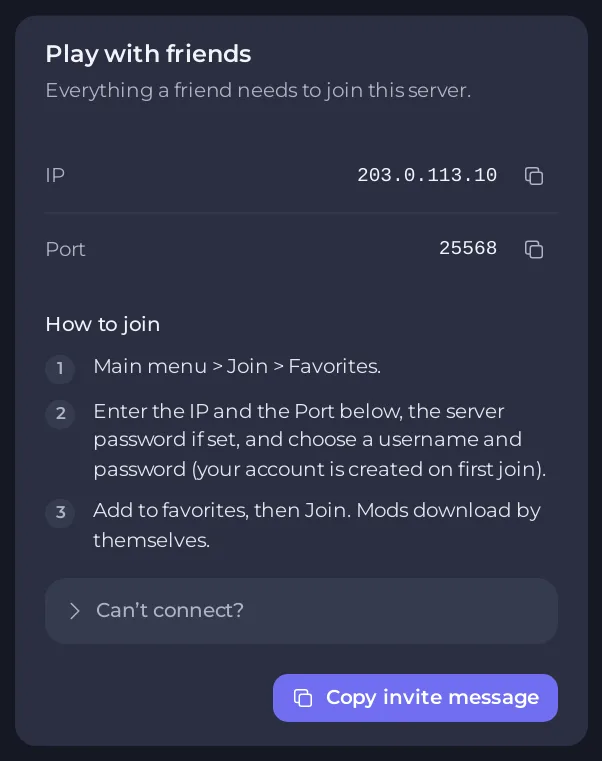
Join from the Steam version of Project Zomboid with Main menu, then Join, then Favorites. Type the IP and the Port from the Play with friends card, enter the server password if there is one, choose your username and password, add the server to your favorites and join.
Before you start
- The server is Online in the panel.
- You run the same build as the server. A new server runs Build 42. To change the branch in Steam, right-click the game in your library, open Properties, then Betas, and pick the matching branch. See How to choose Build 41 or Build 42 for your Project Zomboid server.
- You have the IP, the port and the password. The server owner finds the IP and the port on the Play with friends card on the Overview page and copies them with Copy invite message: How to invite friends to your Project Zomboid server.
Join
- Start Project Zomboid.
- Go to Main menu, then Join, then Favorites.
- Enter the IP and the port. The port is the number after the colon in the Server Address on the Overview page, or the Port row on the card.
- Enter the server password if the server has one. Choose a username and a password. These are your own account on this server, and the account is created the first time you join.
- Add the server to your favorites, then join.
- Mods download by themselves. A server with many mods takes a while the first time.
Good to know
- Use the same username and password every time. They belong to your account on this server only.
- If the server owner closed the server to new accounts, you cannot make an account by joining. Ask the owner to add you: How to run a whitelist-only Project Zomboid server.
- The game's own server list shows the server only when the owner turned on Show in the in-game server list. The panel says servers always appear in the Steam server browser either way: How to make your Project Zomboid server public or private.
If it does not work
Open Can’t connect? on the card, or read Players cannot join your Project Zomboid server. The usual causes are a server that is still starting, a different game build, a different mod list and a password with a different capital letter.





