%7B.s%7Banimation%3Ab%201.5s%20ease-out%20both%7D.d%7Banimation-delay%3A.16s%7D%7D%40keyframes%20b%7B0%25%7Bfill%3A%23F4F6FA%7D18%25%7Bfill%3A%23FFE08A%7D34%25%2C70%25%7Bfill%3A%23FF8A1F%7D80%25%7Bfill%3A%23FFE08A%7D100%25%7Bfill%3A%23FF8A1F%7D%7D%3C%2Fstyle%3E%3Cg%20transform%3D%22translate(143%20428.93)%20scale(3.885906)%22%3E%3Cg%20transform%3D%22translate(0%202)%22%20fill%3D%22%23706EF0%22%3E%3Cpath%20d%3D%22M0%200%20H48%20A40%2040%200%200%201%2048%2080%20V100%20H0%20Z%22%2F%3E%3Cpath%20transform%3D%22translate(91.75%200)%22%20d%3D%22M0%200%20L48%200%20L48%2050%20L76%2050%20L76%20100%20L0%20100%20Z%22%2F%3E%3Cpath%20transform%3D%22translate(173%200)%22%20d%3D%22M0%20100%20L58%20-4%20L116%20100%20Z%22%2F%3E%3Cpath%20transform%3D%22translate(264.25%200)%22%20d%3D%22M0%200%20L104%200%20L76%2050%20L76%20100%20L28%20100%20L28%2050%20Z%22%2F%3E%3Cg%20transform%3D%22translate(375%200)%22%3E%3Cpath%20d%3D%22M0%200%20L50%2038%20L50%200%20L100%200%20L100%20100%20L0%20100%20Z%22%20fill%3D%22%23F4F6FA%22%2F%3E%3Crect%20class%3D%22s%22%20x%3D%2247%22%20y%3D%2263%22%20width%3D%2219%22%20height%3D%2230%22%2F%3E%3Crect%20class%3D%22s%20d%22%20x%3D%2274%22%20y%3D%2263%22%20width%3D%2219%22%20height%3D%2230%22%2F%3E%3C%2Fg%3E%3Cpath%20transform%3D%22translate(484.75%200)%22%20d%3D%22M0%200%20L48%200%20L48%2037%20L52%2037%20L52%200%20L100%200%20L100%20100%20L52%20100%20L52%2063%20L48%2063%20L48%20100%20L0%20100%20Z%22%2F%3E%3Cpath%20transform%3D%22translate(588.5%200)%22%20d%3D%22M0%2050%20A53%2053%200%201%200%20106%2050%20A53%2053%200%201%200%200%2050%20Z%22%2F%3E%3Cpath%20transform%3D%22translate(698.25%200)%22%20d%3D%22M25%200%20H102%20V50%20H77%20A25%2025%200%200%201%2077%20100%20H0%20V50%20H25%20A25%2025%200%200%201%2025%200%20Z%22%2F%3E%3Cpath%20transform%3D%22translate(804%200)%22%20d%3D%22M0%200%20L90%200%20L90%2050%20L69%2050%20L69%20100%20L21%20100%20L21%2050%20L0%2050%20Z%22%2F%3E%3C%2Fg%3E%3C%2Fg%3E%3C%2Fsvg%3E)


A Project Zomboid server on PlayNHost has three names, and each one is changed in a different place. Server Name under Game Settings is the name of the save, and changing it starts a different world. Server name in the list is what players see in the server browser. The name on your Overview page is only for you.
1. Server Name: the save
This is the one that matters most. The game names its world folder and its settings files after it, so a new name means a new world.
- Open Settings, then Game Settings.
- Change Server Name. Use letters and digits only, up to 64. The default is
PlayNHost. - Restart the server.
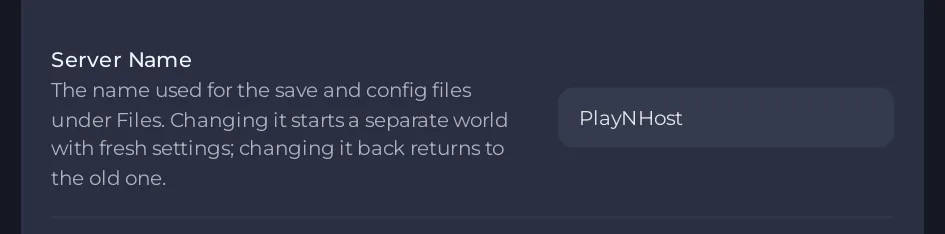
Your old world is not deleted. It stays in .cache/Saves/Multiplayer/<old name>/ under Files, and setting the old name back and restarting returns to it. The new name starts a fresh world with its own settings files. Read How to switch between Project Zomboid worlds on your server before you do it on a world that matters, and take a backup first.
2. Server name in the list: what players see
- Stop the server. Open Settings, then Server Settings under Config files.
- In the Listing and joining group, change Server name in the list and, if you like, Server description.
- Click Save only or Save & start.
This does not rename the save. The editor's own text says so. It is the name shown in the game's and in Steam's server browsers. See How to change the listing and joining settings of your Project Zomboid server.
3. The name in the panel
The Server Name row on the Overview page is the name of the server in your panel. It is not sent to the game and players never see it. Change it there when you want to tell servers apart: How to rename your server and change player slots.
Which one do I change?
| I want to | Change |
|---|---|
| Start a new world | Server Name under Game Settings |
| Change what the server browser shows | Server name in the list in Server Settings |
| Tell my servers apart in the panel | The name on the Overview page |





