%7B.s%7Banimation%3Ab%201.5s%20ease-out%20both%7D.d%7Banimation-delay%3A.16s%7D%7D%40keyframes%20b%7B0%25%7Bfill%3A%23F4F6FA%7D18%25%7Bfill%3A%23FFE08A%7D34%25%2C70%25%7Bfill%3A%23FF8A1F%7D80%25%7Bfill%3A%23FFE08A%7D100%25%7Bfill%3A%23FF8A1F%7D%7D%3C%2Fstyle%3E%3Cg%20transform%3D%22translate(143%20428.93)%20scale(3.885906)%22%3E%3Cg%20transform%3D%22translate(0%202)%22%20fill%3D%22%23706EF0%22%3E%3Cpath%20d%3D%22M0%200%20H48%20A40%2040%200%200%201%2048%2080%20V100%20H0%20Z%22%2F%3E%3Cpath%20transform%3D%22translate(91.75%200)%22%20d%3D%22M0%200%20L48%200%20L48%2050%20L76%2050%20L76%20100%20L0%20100%20Z%22%2F%3E%3Cpath%20transform%3D%22translate(173%200)%22%20d%3D%22M0%20100%20L58%20-4%20L116%20100%20Z%22%2F%3E%3Cpath%20transform%3D%22translate(264.25%200)%22%20d%3D%22M0%200%20L104%200%20L76%2050%20L76%20100%20L28%20100%20L28%2050%20Z%22%2F%3E%3Cg%20transform%3D%22translate(375%200)%22%3E%3Cpath%20d%3D%22M0%200%20L50%2038%20L50%200%20L100%200%20L100%20100%20L0%20100%20Z%22%20fill%3D%22%23F4F6FA%22%2F%3E%3Crect%20class%3D%22s%22%20x%3D%2247%22%20y%3D%2263%22%20width%3D%2219%22%20height%3D%2230%22%2F%3E%3Crect%20class%3D%22s%20d%22%20x%3D%2274%22%20y%3D%2263%22%20width%3D%2219%22%20height%3D%2230%22%2F%3E%3C%2Fg%3E%3Cpath%20transform%3D%22translate(484.75%200)%22%20d%3D%22M0%200%20L48%200%20L48%2037%20L52%2037%20L52%200%20L100%200%20L100%20100%20L52%20100%20L52%2063%20L48%2063%20L48%20100%20L0%20100%20Z%22%2F%3E%3Cpath%20transform%3D%22translate(588.5%200)%22%20d%3D%22M0%2050%20A53%2053%200%201%200%20106%2050%20A53%2053%200%201%200%200%2050%20Z%22%2F%3E%3Cpath%20transform%3D%22translate(698.25%200)%22%20d%3D%22M25%200%20H102%20V50%20H77%20A25%2025%200%200%201%2077%20100%20H0%20V50%20H25%20A25%2025%200%200%201%2025%200%20Z%22%2F%3E%3Cpath%20transform%3D%22translate(804%200)%22%20d%3D%22M0%200%20L90%200%20L90%2050%20L69%2050%20L69%20100%20L21%20100%20L21%2050%20L0%2050%20Z%22%2F%3E%3C%2Fg%3E%3C%2Fg%3E%3C%2Fsvg%3E)


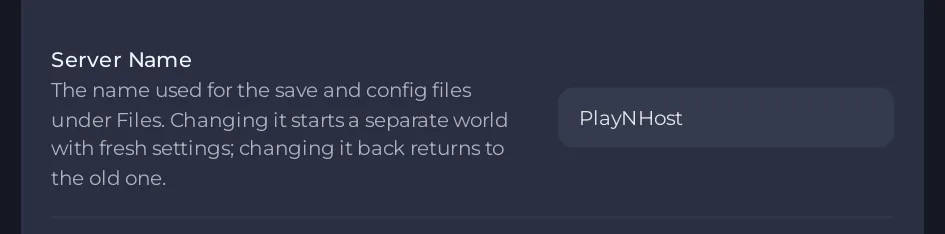
Each Project Zomboid world on your server is named by Server Name. To switch worlds, change Server Name under Settings, then Game Settings, and restart. A name the server has not seen starts a new world. A name it has seen returns to that world. Nothing is deleted when you switch.
Switch
- Make a backup first: How to back up and restore your Project Zomboid world.
- Open Settings, then Game Settings. Change Server Name to the other world's name, letters and digits only.
- Restart the server. The Console prints
server name is "<name>".
What each world has of its own
- The world folder in
.cache/Saves/Multiplayer/<name>/. - Its own settings files
.cache/Server/<name>.iniand<name>_SandboxVars.lua, so a new world starts with fresh settings and the game's defaults. The Server Settings and Sandbox Settings editors show the files of the current name only. - Its own accounts database
.cache/db/<name>.db: a new world means new accounts, bans and a new admin account.
What is shared by all worlds
The values on Game Settings and the Workshop tab belong to the server, not to a world: the mod lists, the map folders, PVP, Zombie Population, the admin and RCON passwords, and Beta Branch. When you switch, check that the mods and maps suit the world you switch to. A map folder that a world was not made with can damage it: How to add a map mod to your Project Zomboid server.
Careful with World Wipe
The World Wipe task deletes every world in .cache/Saves/Multiplayer and every database in .cache/db, not only the current name. If you keep spare worlds on the server, do not run it: How to delete a Project Zomboid world or start fresh.
Other ways to keep two worlds
- Instances keep a whole setup, files and settings included, and let you switch with one click: How to use instances to switch between worlds on one server.
- For a Build 41 world next to a Build 42 world: How to keep a Build 41 world and a Build 42 world on one server.





