

To change base and guild limits on a Palworld server, open Settings, Gameplay Settings and edit the Base, guild and limits group: Pals working per base (default 15, up to 50), Bases per guild (default 4, up to 10), Players per guild (default 20) and the others. Save and restart. Higher limits make the server work harder.
Change a limit
- Open your server in the panel, click the Settings tab, then Gameplay Settings under Config files.
- Scroll to Base, guild and limits, or search for the setting by name.
- Type the new whole number.
- Click Save & restart, or Save only to apply it at the next start.
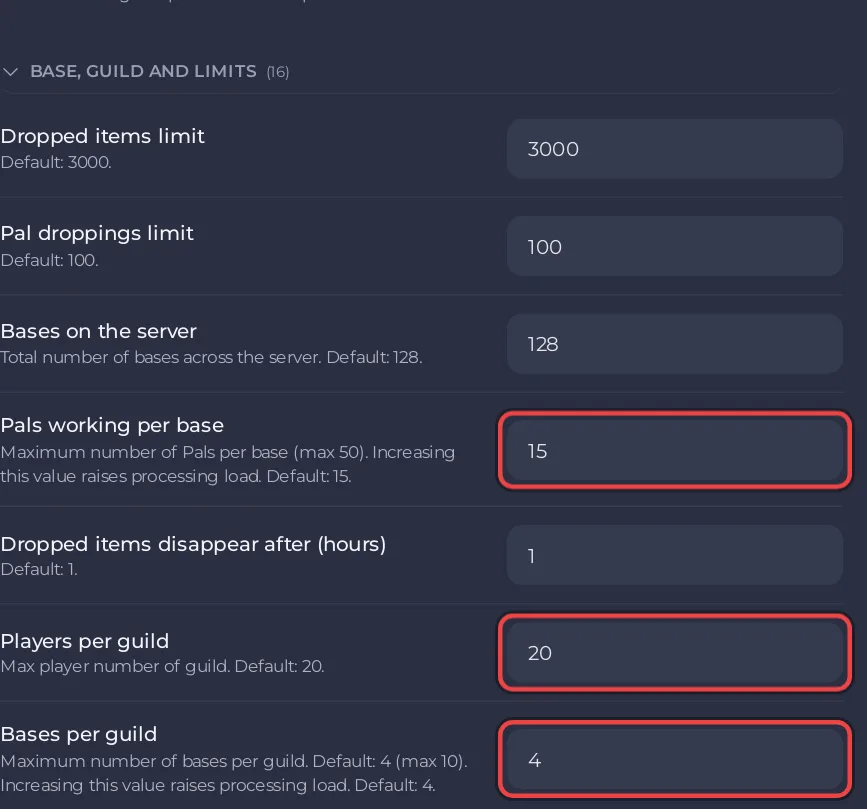
The limits
| Setting | What it does | Default |
|---|---|---|
| Pals working per base | Maximum number of Pals per base, up to 50. Raising it raises processing load | 15 |
| Bases per guild | Maximum number of bases per guild, up to 10. Raising it raises processing load | 4 |
| Bases on the server | Total number of bases across the server | 128 |
| Players per guild | Maximum number of players in a guild | 20 |
| Dropped items limit | How many dropped items the world keeps | 3000 |
| Dropped items disappear after (hours) | How long a dropped item stays | 1 |
| Building limit | Per-player building count cap, 0 = unlimited | 0 |
| Guild rejoin cooldown (minutes) | Wait before rejoining a guild | 0 |
| Hand over guild leadership after (days offline) | Days offline before guild leadership moves on | 14 |
| Autosave interval (seconds) | How often the world is saved | 30 |
The limits of 50 and 10 and the notes about load come from Pocketpair's settings page.
Keep a busy server smooth
More Pals working and more bases mean more for the server to simulate. The Lighter server preset lowers Pals working per base to 10, Dropped items limit to 1500 and dropped item lifetime to half an hour, and spawns 20% fewer wild Pals: How to make your Palworld server run smoother.
Every setting of the group: Palworld server settings: every option explained.


