

To change a Necesse server's server.cfg on PlayNHost, open the Settings tab and click cfg/server.cfg under Config files. Each line of the file is a row with a switch, a number or a text box. Stop the server, change the rows, click Save only, then start it again.
Change the settings
- Open your server in the panel and click Stop. Wait for the badge to say Offline.
- Click the Settings tab.
- In the left list, under Config files, click
cfg/server.cfg. A card titledcfg/server.cfgopens with the description "The settings in cfg/server.cfg, without editing the file by hand." - Change the rows you want. The line under the list counts them, for example "1 unsaved change. The server must restart to apply it."
- Click Save only. The panel says "Saved. Changes take effect the next time the server starts."
- Click Start and wait for Online.
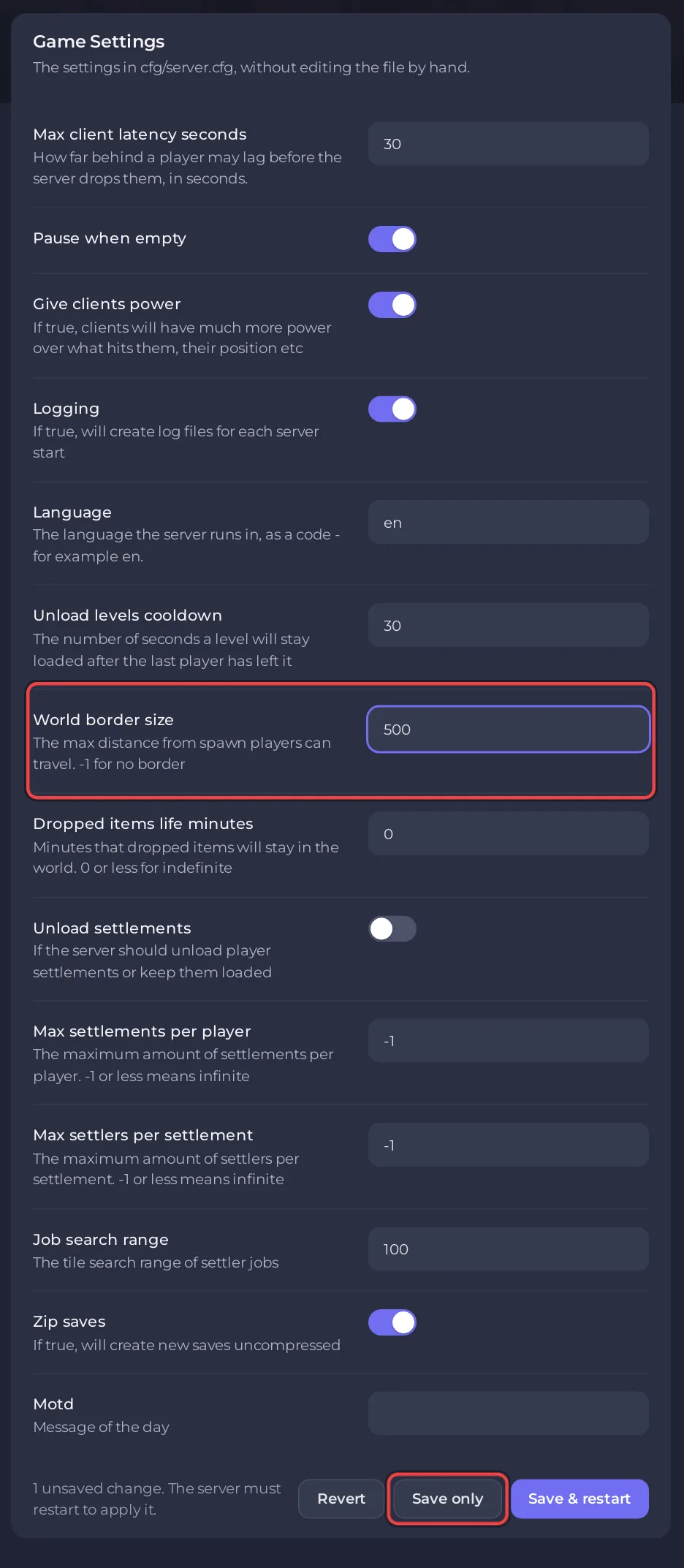
The official Necesse wiki says: "Before editing any configuration files, you should ALWAYS stop your server first." That is why step 1 stops it. Save & restart saves and restarts in one click, but the wiki's advice is still to stop first. Revert throws away the changes you have not saved.
Which options are in the file?
The panel lists every line of the file, and each row's description is the game's own comment from the file, except Zip saves, where the panel replaces a comment that says the opposite of what the setting does. A new server has 14 rows: Max client latency seconds, Pause when empty, Give clients power, Logging, Language, Unload levels cooldown, World border size, Dropped items life minutes, Unload settlements, Max settlements per player, Max settlers per settlement, Job search range, Zip saves and Motd. What each one does and its value on a new server: Necesse server settings reference.
Port, slots and password are not in the list: the panel fills those in from Game Settings and your plan at every start. Necesse may add lines of its own after it has run; they show up as rows too.
Which values are refused?
The panel refuses a value it cannot write safely into Necesse's format, and says why:
- a comma: "cannot contain a comma, which Necesse uses to separate settings."
//, for example in a web link: "cannot contain '//', because Necesse's config format cannot tell that apart from the comment which follows it."- a line break.
Who can change it?
Reading the rows needs the Read contents file permission and saving needs Edit and rename, the same as editing the file under Files. The Activity log records which settings changed, never their values.
Related: How to set a message of the day on your Necesse server, How to pause your Necesse world when nobody is online and Necesse server settings reference.


