

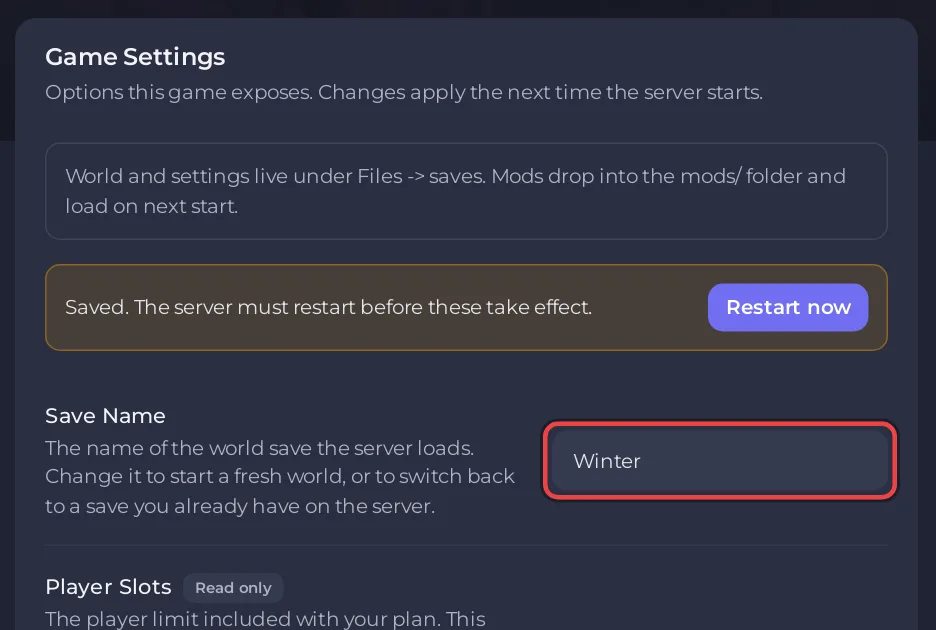
To switch worlds on a Necesse server on PlayNHost, set Save Name under Settings, Game Settings to the name of another world's zip in the saves folder and restart the server. Each world is its own .zip, so the world you leave stays as it was and you can switch back the same way.
Switch to another world
- Open your server in the panel, click the Files tab and open
savesto see the worlds you have, for exampleSave1.zipandWinter.zip. - Click the Settings tab.
- In Save Name, type the name of the world without
.zip, for exampleWinter, and press Enter. - Click Restart now in the message "Saved. The server must restart before these take effect."
- Check the Console line
Started server using port ... on world "Winter.zip".
Stop and restart save the world you leave first, because the panel stops Necesse with stop, which "Saves and stops the server" (official Necesse wiki).
What happens if I type a name that is not in saves?
Necesse makes a brand-new world with that name. That is how you start a fresh world: How to start a new Necesse world on your server. If you meant an existing world, the name was spelled differently; names must match exactly, capitals included.
Do settings follow the world?
Two kinds of settings, two answers:
- Game Settings and
cfg/server.cfg(password, slots, message of the day, world border and the rest) belong to the server. They stay the same whichever world runs. - Difficulty, death penalty, raids and the other world settings belong to each world: How to change the difficulty of your Necesse server.
Mods in mods load with every world. Back up before you switch if the worlds were played with different mods.


