

Hardcore is set when a world is created and cannot be switched on or off for a world that already exists. On a new server, switch on Hardcore on the Your world step of the setup. On a server you already play on, switch Hardcore on in Server Properties (Java) and make a new world.
What hardcore means
As the setup says: One life each. The difficulty is locked to Hard, and a player who dies can only watch. A player who dies can spectate the world or leave. They are not banned.
On a new server
- In the setup, on the Your world step, switch Hardcore on.
- Difficulty locks to Hard and Game mode to Survival.
- Finish the setup. The world is made as a hardcore world.
See How to set up your new Minecraft server.
On a server you already have
Your current world stays a normal world. To play hardcore, make a new world:
- Back up your current world if you may want it again: How to back up, restore and reset your Minecraft world.
- Open the Settings tab and click Server Properties (Java) under Config files.
- Switch Hardcore on. Its description in the panel says players are permanently banned when they die. On current Minecraft versions that is not what happens: a player who dies can only watch, as described above.
- Change World name to a name you have not used, for example
hardcore. This makes a new world and keeps the old one on the server. - Click Save & restart. The server creates the new hardcore world.
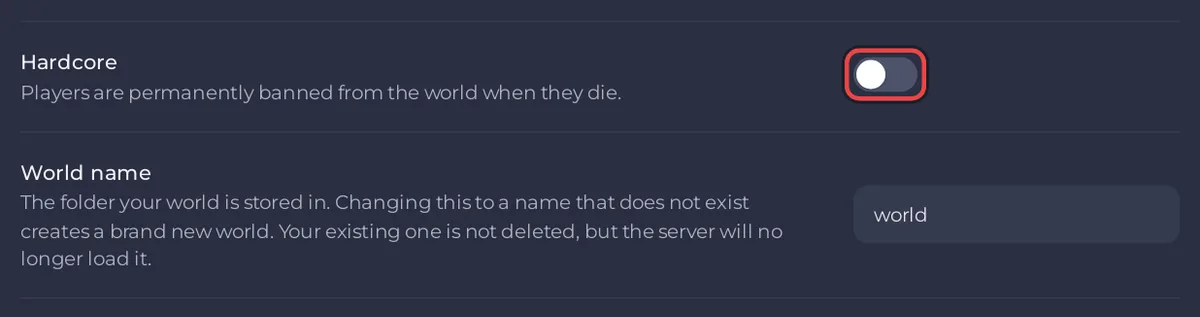
To go back to your old world, set World name back to its old name and restart: How to switch to another world on your Minecraft server.
Good to know
- A hardcore world stays on hard difficulty: the Difficulty setting does not change it.
- Pair it with a seed or world type if you like: How to use a seed and world type on your Minecraft server.
- Starting over after everyone has died: How to reset your Minecraft world.


