%7B.s%7Banimation%3Ab%201.5s%20ease-out%20both%7D.d%7Banimation-delay%3A.16s%7D%7D%40keyframes%20b%7B0%25%7Bfill%3A%23F4F6FA%7D18%25%7Bfill%3A%23FFE08A%7D34%25%2C70%25%7Bfill%3A%23FF8A1F%7D80%25%7Bfill%3A%23FFE08A%7D100%25%7Bfill%3A%23FF8A1F%7D%7D%3C%2Fstyle%3E%3Cg%20transform%3D%22translate(143%20428.93)%20scale(3.885906)%22%3E%3Cg%20transform%3D%22translate(0%202)%22%20fill%3D%22%23706EF0%22%3E%3Cpath%20d%3D%22M0%200%20H48%20A40%2040%200%200%201%2048%2080%20V100%20H0%20Z%22%2F%3E%3Cpath%20transform%3D%22translate(91.75%200)%22%20d%3D%22M0%200%20L48%200%20L48%2050%20L76%2050%20L76%20100%20L0%20100%20Z%22%2F%3E%3Cpath%20transform%3D%22translate(173%200)%22%20d%3D%22M0%20100%20L58%20-4%20L116%20100%20Z%22%2F%3E%3Cpath%20transform%3D%22translate(264.25%200)%22%20d%3D%22M0%200%20L104%200%20L76%2050%20L76%20100%20L28%20100%20L28%2050%20Z%22%2F%3E%3Cg%20transform%3D%22translate(375%200)%22%3E%3Cpath%20d%3D%22M0%200%20L50%2038%20L50%200%20L100%200%20L100%20100%20L0%20100%20Z%22%20fill%3D%22%23F4F6FA%22%2F%3E%3Crect%20class%3D%22s%22%20x%3D%2247%22%20y%3D%2263%22%20width%3D%2219%22%20height%3D%2230%22%2F%3E%3Crect%20class%3D%22s%20d%22%20x%3D%2274%22%20y%3D%2263%22%20width%3D%2219%22%20height%3D%2230%22%2F%3E%3C%2Fg%3E%3Cpath%20transform%3D%22translate(484.75%200)%22%20d%3D%22M0%200%20L48%200%20L48%2037%20L52%2037%20L52%200%20L100%200%20L100%20100%20L52%20100%20L52%2063%20L48%2063%20L48%20100%20L0%20100%20Z%22%2F%3E%3Cpath%20transform%3D%22translate(588.5%200)%22%20d%3D%22M0%2050%20A53%2053%200%201%200%20106%2050%20A53%2053%200%201%200%200%2050%20Z%22%2F%3E%3Cpath%20transform%3D%22translate(698.25%200)%22%20d%3D%22M25%200%20H102%20V50%20H77%20A25%2025%200%200%201%2077%20100%20H0%20V50%20H25%20A25%2025%200%200%201%2025%200%20Z%22%2F%3E%3Cpath%20transform%3D%22translate(804%200)%22%20d%3D%22M0%200%20L90%200%20L90%2050%20L69%2050%20L69%20100%20L21%20100%20L21%2050%20L0%2050%20Z%22%2F%3E%3C%2Fg%3E%3C%2Fg%3E%3C%2Fsvg%3E)


Most often the Show dedicated server filter is off, or the name searched is not the one the game shows. Work through the checks below, then add the server through Steam if it is still missing.
Check 1: is the server online
Open your server in the panel. The badge must say Online. If it says Offline, click Start. A new or restarted server can take a few minutes to show up in the public list.
Check 2: the server filter
- In the game, go to Play, then Join game.
- In the Server Filter on the right, switch on Show dedicated server. Dedicated servers are hidden otherwise.
- Look at the other filters. Keen Games lists filters for password protection, empty servers and a minimum number of free slots. A filter that hides empty servers hides a server nobody is on yet.
Check 3: search for the right name
Search for the name on the Play with friends card on Overview, the Server name row. It is the Server Name under Settings, Game Settings. It is not the name at the top of the Overview page, which is only for you in the panel. See How to change your Enshrouded server name and password.
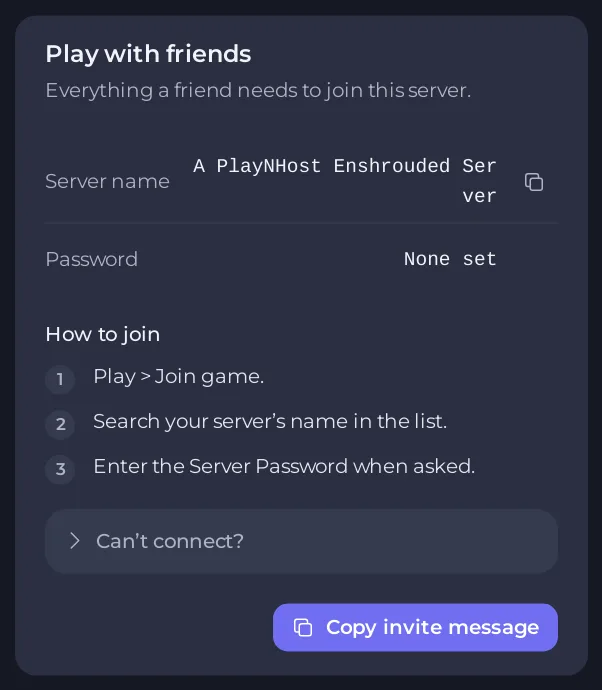
If you changed the name, restart the server first. The new name reaches the game when the server starts.
Check 4: add the server through Steam
- On Overview, copy the Server Address.
- In the Steam client, open View, then Game Servers, then the Favorites tab.
- Click + and paste the address.
- Back in Enshrouded, open the server list again and look for your server. Favorites are sorted to the top.
Check 5: the game version
Everyone needs the same game version as the server. See Players on the newest game version cannot join your Enshrouded server.
Still missing
Open the Can’t connect? section of the Play with friends card and click Ask support, or open a ticket with the last lines of the Console. See also How to join your Enshrouded server.





