%7B.s%7Banimation%3Ab%201.5s%20ease-out%20both%7D.d%7Banimation-delay%3A.16s%7D%7D%40keyframes%20b%7B0%25%7Bfill%3A%23F4F6FA%7D18%25%7Bfill%3A%23FFE08A%7D34%25%2C70%25%7Bfill%3A%23FF8A1F%7D80%25%7Bfill%3A%23FFE08A%7D100%25%7Bfill%3A%23FF8A1F%7D%7D%3C%2Fstyle%3E%3Cg%20transform%3D%22translate(143%20428.93)%20scale(3.885906)%22%3E%3Cg%20transform%3D%22translate(0%202)%22%20fill%3D%22%23706EF0%22%3E%3Cpath%20d%3D%22M0%200%20H48%20A40%2040%200%200%201%2048%2080%20V100%20H0%20Z%22%2F%3E%3Cpath%20transform%3D%22translate(91.75%200)%22%20d%3D%22M0%200%20L48%200%20L48%2050%20L76%2050%20L76%20100%20L0%20100%20Z%22%2F%3E%3Cpath%20transform%3D%22translate(173%200)%22%20d%3D%22M0%20100%20L58%20-4%20L116%20100%20Z%22%2F%3E%3Cpath%20transform%3D%22translate(264.25%200)%22%20d%3D%22M0%200%20L104%200%20L76%2050%20L76%20100%20L28%20100%20L28%2050%20Z%22%2F%3E%3Cg%20transform%3D%22translate(375%200)%22%3E%3Cpath%20d%3D%22M0%200%20L50%2038%20L50%200%20L100%200%20L100%20100%20L0%20100%20Z%22%20fill%3D%22%23F4F6FA%22%2F%3E%3Crect%20class%3D%22s%22%20x%3D%2247%22%20y%3D%2263%22%20width%3D%2219%22%20height%3D%2230%22%2F%3E%3Crect%20class%3D%22s%20d%22%20x%3D%2274%22%20y%3D%2263%22%20width%3D%2219%22%20height%3D%2230%22%2F%3E%3C%2Fg%3E%3Cpath%20transform%3D%22translate(484.75%200)%22%20d%3D%22M0%200%20L48%200%20L48%2037%20L52%2037%20L52%200%20L100%200%20L100%20100%20L52%20100%20L52%2063%20L48%2063%20L48%20100%20L0%20100%20Z%22%2F%3E%3Cpath%20transform%3D%22translate(588.5%200)%22%20d%3D%22M0%2050%20A53%2053%200%201%200%20106%2050%20A53%2053%200%201%200%200%2050%20Z%22%2F%3E%3Cpath%20transform%3D%22translate(698.25%200)%22%20d%3D%22M25%200%20H102%20V50%20H77%20A25%2025%200%200%201%2077%20100%20H0%20V50%20H25%20A25%2025%200%200%201%2025%200%20Z%22%2F%3E%3Cpath%20transform%3D%22translate(804%200)%22%20d%3D%22M0%200%20L90%200%20L90%2050%20L69%2050%20L69%20100%20L21%20100%20L21%2050%20L0%2050%20Z%22%2F%3E%3C%2Fg%3E%3C%2Fg%3E%3C%2Fsvg%3E)


Restart your server. With Auto Update on, which is the default, every start checks Steam and installs the newest server version before the game loads. Players on a newer game version cannot join an older server, so restart after a patch.
Update after a game patch
- Open your server in the panel.
- Click Restart, or Stop and then Start. See How to start, stop, restart and force-stop your server.
- Open the Console and watch it. Steam's lines show the download, and the server is ready at
[Session] 'HostOnline' (up)!.
A start after an update takes longer than usual. Players are disconnected when you restart, so tell them first.
The daily restart
New servers come with a schedule called Daily restart. It restarts the server early every morning while it is running, so the server picks up the latest update without you doing anything. See How to restart your Enshrouded server on a schedule.
Check that Auto Update is on
- Click the Settings tab, then Game Settings.
- Click Show advanced (2).
- Check that Auto Update is on. It updates the server every time it starts.
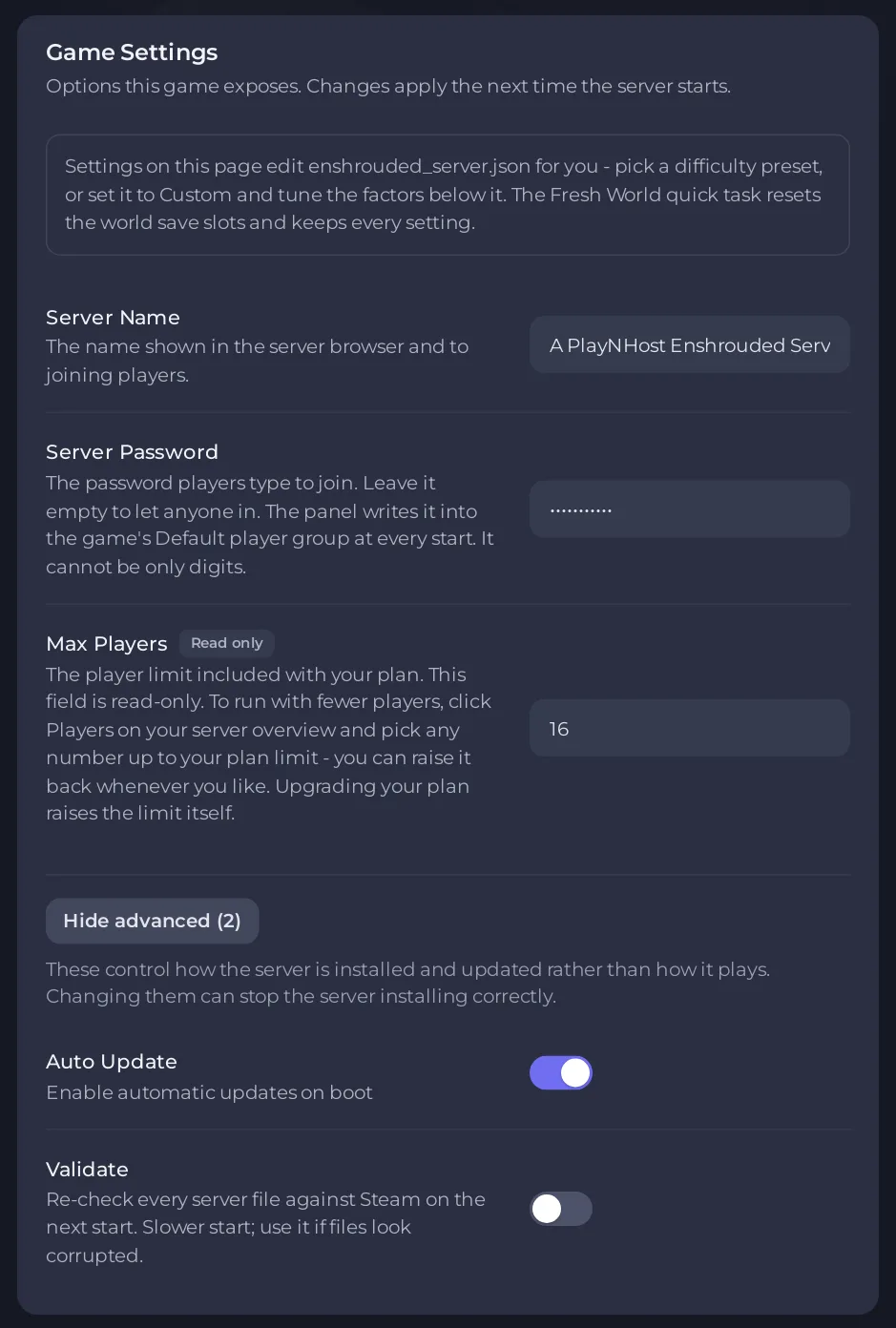
If it is off, the server never updates by itself and players on the new game version cannot join. Turn it on and restart.
Validate
Validate checks every server file against Steam on the next start. It is slower, so it is off by default. Turn it on for one start if the server crashes right after an update or its files look damaged, and turn it off afterwards. Validate only works while Auto Update is on, because the check runs as part of the update.
If an update fails
If Steam's update does not report success, the server prints Update failed, retrying without the old build record and repairs its files before it starts the game. Keen Games sometimes replaces a server build soon after publishing it, and this repair step handles that. Let it finish. If the server still does not come up, see Enshrouded server problems and fixes.
Good to know
- Your world and settings are not touched by an update. Make a backup before big updates anyway: see How to back up and restore your Enshrouded world.
- Keen Games notes that an older config file can sometimes be changed wrongly by a new version: see Your Enshrouded config file looks wrong after an update.
- For Enshrouded 1.0, see Enshrouded 1.0 on your server.





