

Ree6 is an all-in-one Discord bot: moderation, levels with rank cards, welcome messages, tickets, suggestions, giveaways, temporary voice channels and social media alerts. It keeps its data in your plan's MySQL database and needs a plan with at least 1 GB of memory. You create the database, copy its details into the Bot tab, paste the token and start it.
- In the Discord Developer Portal, create the bot, copy its token, and on the Bot page switch on Server Members Intent and Message Content Intent.
- In the panel, make the server run Ree6 (Change what runs).
- Paste the token in the Set up your bot card on Overview, and invite the bot.
- Open Databases and create a database.
- Copy its Host, Port, Database and Username to Bot, Code, Settings, and its Password to Bot, Environment, Credentials.
- Press Start bot.
Each step in detail below.
Before you start
- Create the bot and copy its token: How to create a Discord bot and get its token.
- On the application's Bot page, switch on Server Members Intent and Message Content Intent and press Save Changes. Ree6 asks Discord for both when it logs in.
- Your plan needs 1 GB of memory or more. On a smaller plan Ree6 is not offered: move up on My plan, Change plan.
1. Make the server run Ree6
- Open your server in the panel. On Overview, in the Set up your bot card, click the step What runs. It says "This bot runs Ree6." when the type is already right.
- If not, click Change what runs, choose Ree6, press Next step, tick the confirmation and press Change server type. The install downloads Ree6 and its language files.
2. Connect it to Discord
- Step Connect to Discord: paste the token in Paste your bot token, press Connect, then Yes, continue if the name and picture are your bot's.
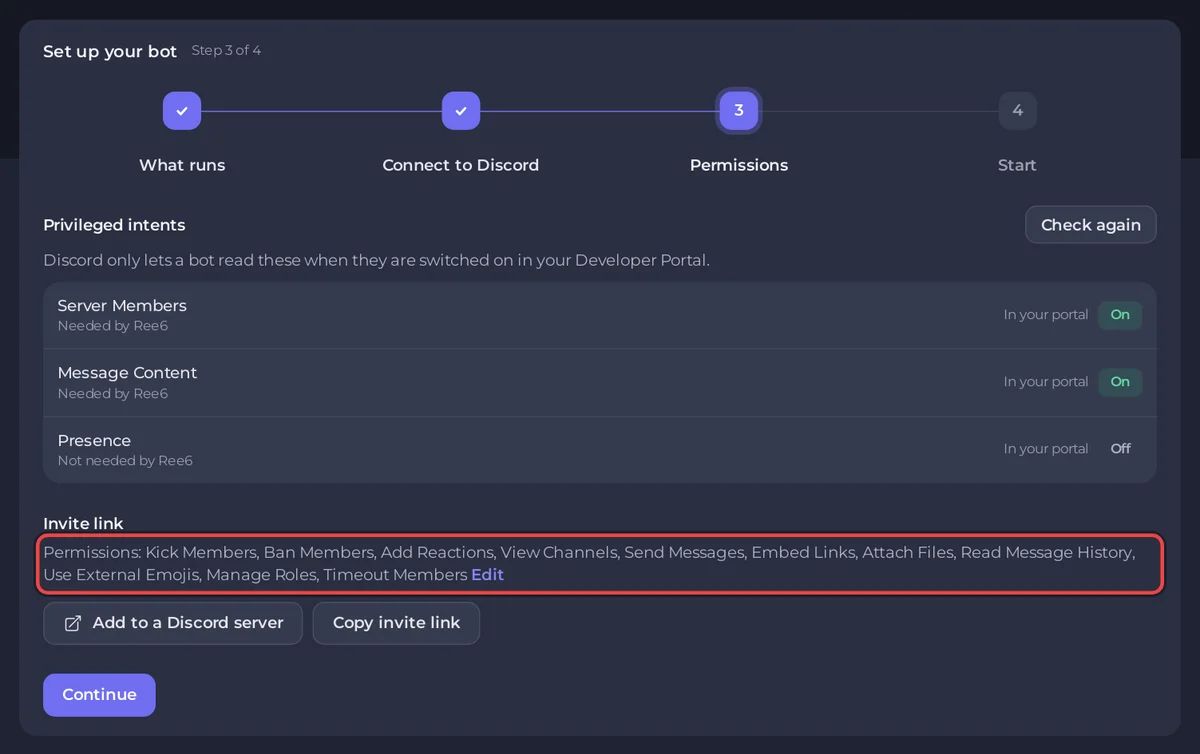
- Step Permissions: the Privileged intents table marks Server Members and Message Content as Needed by Ree6. Both must show On under In your portal; without them Ree6 does not connect. After you change them in the Portal, press Check again.
- Under Invite link, press Add to a Discord server. The link already asks for what Ree6's moderation and role features use: Kick Members, Ban Members, Timeout Members and Manage Roles, on top of reading and writing messages. Invited it before with fewer permissions? Press it again and pick the same server: Discord updates the bot's permissions.
3. Create the database
- Open Databases in the server menu and press New database, then Create database.
- Click the new database in Your databases. Keep this page open: you copy four values and a password from it.
4. Copy the database details to the Bot tab
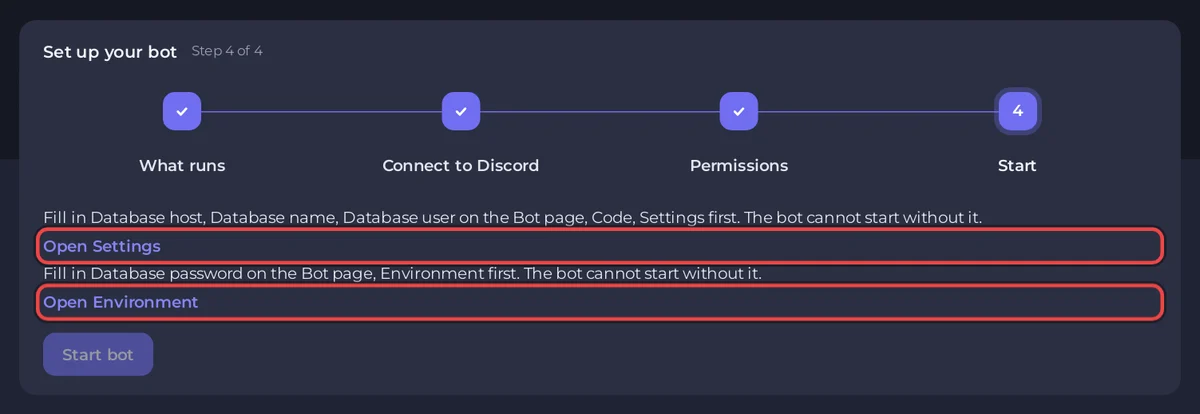
The setup card's last step, Start, keeps Start bot off until everything Ree6 needs is filled in. It says "Fill in Database host, Database name, Database user on the Bot page, Code, Settings first. The bot cannot start without it." with an Open Settings link, and "Fill in Database password on the Bot page, Environment first. The bot cannot start without it." with an Open Environment link.
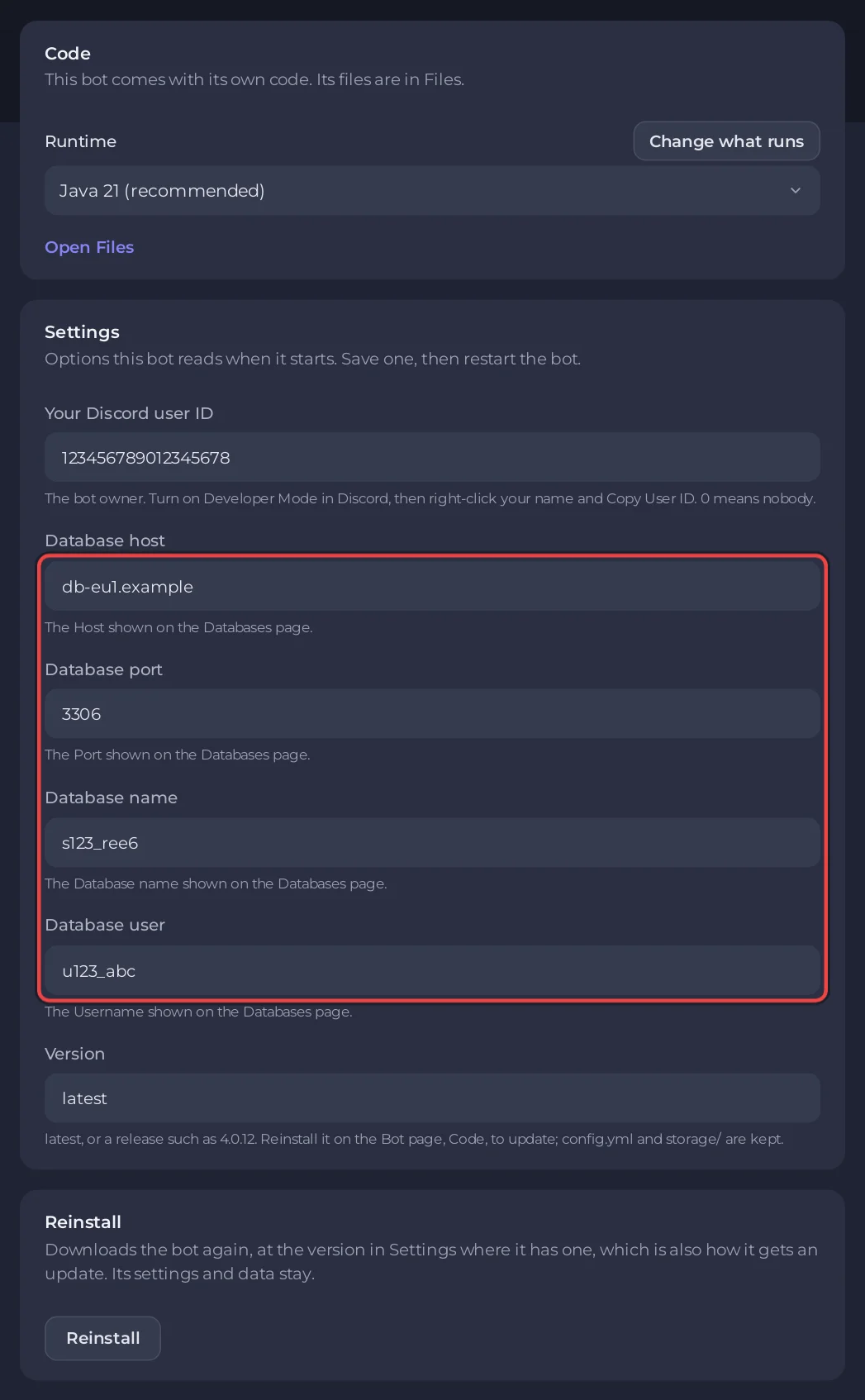
- On the Bot tab, click Code. On the Settings card, fill in each field and press its Save:
Settings field Copy from Databases Database host Host Database port Port ( 3306is already there; change it only if the page shows another)Database name Database Database user Username - Also on Settings, put your own Discord user ID in Your Discord user ID to be Ree6's owner.
0, the default, means nobody. - Click Environment. On the Credentials card, Database password shows Required. Press Set, paste the database's Password and press Save.
The token and the database password never sit in config.yml. The file holds placeholders, and the panel fills in the real values only while Ree6 runs. The panel also writes the database fields into config.yml at every start, so change them on the Settings card, not in the file.
5. Start it
- Back on Overview, press Start bot in the setup card, or press Start on Console.
- The first start creates Ree6's tables in your database. The console then shows
[PlayNHost] Starting your botand Ree6's own log. - In your Discord server, type
/to see Ree6's commands./setupsets up welcome messages, logs and other features;/helplists everything.
Console lines you may see
[PlayNHost] Ree6 keeps its data in MySQL. Open the Databases page and create a database, then copy its Host, Port, Database and Username into the Bot page, Code, Settings, and its Password into the Bot page, Environment, then press Start.A database field or the password is still empty. Fill in steps 3 and 4, then press Start.
[PlayNHost] Ree6 is not set up yet: it needs your Discord bot token and a MySQL database.No token is saved. Paste it on the Bot tab, under Discord.
[PlayNHost] If the log stops after "Creating Instance" with a RejectedExecutionException, Discord refused the bot token: replace it on the Bot page.Printed at every start as a hint. If it happens, press Reset Token in the Portal and paste the new token with Replace token on the Bot tab, under Discord.
[PlayNHost] config.yml could not be read. Restore it from a backup, or delete it and press Start for a fresh one.An edit broke config.yml. Restore it from a backup, or delete it in Files and start again.
Good to know
- The Runtime under Code is Java 21 (recommended) or Java 25. Java's heap is capped at three quarters of your plan's memory.
- The social media alerts need API keys from those services. They go in
config.ymlunder Files; restart Ree6 after editing it. - A server backup does not include the database. To keep a copy, export it in phpMyAdmin (Open in phpMyAdmin on the database's page): How to use databases with your server.
- Updating: the install takes the newest Ree6 release, or the one in Version (for example
4.0.12). To update, press Reinstall on the Reinstall card under Code and confirm.config.ymland thestoragefolder stay, and your data is in the database.
Every option of every ready-made bot: How to change a ready-made bot's settings.


