

To wipe your ARK: Survival Ascended server, open Quick Tasks, find World Reset and click Run. It stops the server, deletes the world of every map, and starts it again with a fresh map. Your settings and your mod list are kept. Leave Back up the server first ticked, because only a backup can bring the old world back.
Reset the world now
- Open your server in the panel and click Quick Tasks in the left menu.
- Under All tasks, find World Reset. Its description:
Deletes the world - tamed dinos, structures, player characters and tribes - so the next start generates a fresh map. Server settings and your mod list are kept. - Click Run. The window Run World Reset? opens. Under Deleted from Files it shows
ShooterGame/Saved/SavedArks/*.
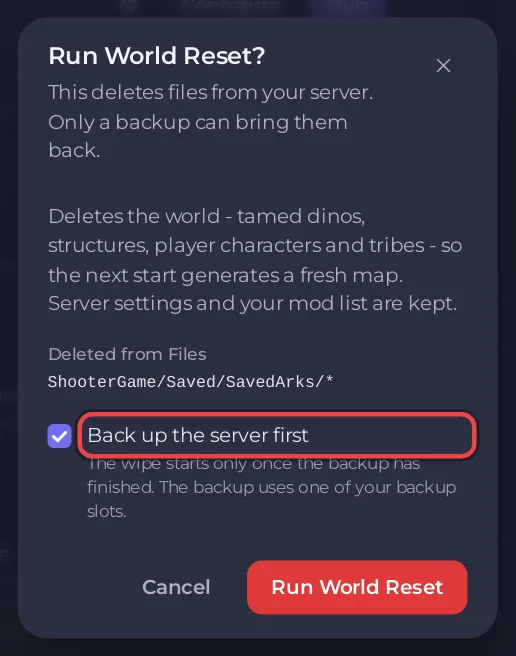
- Keep Back up the server first ticked. The wipe starts only once that backup has finished.
- Click Run World Reset. The page says the reset runs as the schedule World reset, and the Console shows each step.
The steps: the server is told to stop and saves. The world is deleted only once the server says Offline, and not before 150 seconds after the start of the run: from then on the panel looks every 15 seconds. The start is sent 60 seconds after the delete. The new world is then built as the server starts, which took about 2 minutes on an empty The Island test server. Expect about 6 minutes plus the backup.
Do I have to stop the server first?
No. The reset stops the server itself and waits for it to be Offline before it deletes anything, so a long save on a big world cannot be cut short and the start does not land while the server is still stopping. A big world can take longer than an empty one to stop. If the server is still not Offline 10 minutes after the delete was due, nothing is deleted and the step fails. The panel sends you a notification that the World reset wipe step failed and that nothing after it was run. Check the server on Overview, then run World Reset again.
What is deleted and what is kept
| Deleted | Kept |
|---|---|
Every map's world in ShooterGame/Saved/SavedArks: tames, structures, player characters and tribes | Game Settings: name, passwords, map, mods |
GameUserSettings.ini and Game.ini with your rates and rules | |
| Your mods, your backups, your schedules |
Every map folder is in SavedArks, so a reset clears all maps you have played, not only the current one. To keep another map's world, download it first: How to download your ARK: Survival Ascended world.
How do I wipe on a schedule?
You have two ways. Both make a schedule that stops the server, waits for Offline, deletes the world and starts it again, so you never add the stop and the start yourself.
Use the ready-made World reset schedule
Quick Tasks has a World reset schedule in the Ready-made for ARK: Survival Ascended list: on day 1 of every month at 04:00. It arrives switched off.
- Under Schedules, click Add next to World reset.
- Turn it on with its switch when you want it to run.
Choose your own day and hour with Schedule…
- Under All tasks, find World Reset and open its menu.
- Choose Schedule…. The window Schedule task opens.
- Type a Name, click Next step, and choose Once or Repeats and the time.
- Keep Enabled on to let it run, or switch it off to save it for later, and click Schedule.
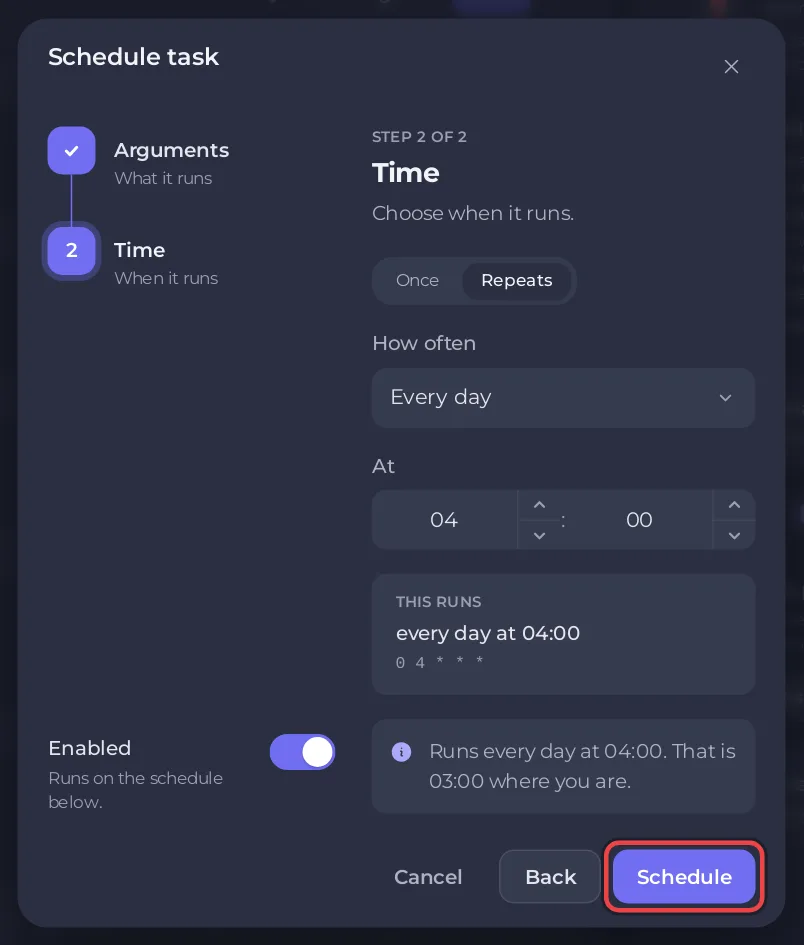
The page says Created the schedule with your name, and the new schedule opens with its three steps: a stop, the wipe and a start. It is the same ready-made reset, with the name, time and switch you chose. Dragging World Reset onto a schedule, or onto the area that says Drop a task here to schedule it, opens Schedule… too, instead of adding a lone delete.
The panel cannot change the time of a schedule after it is made. To move one, make a new schedule with Schedule… and delete the old one.
A scheduled reset does not take a backup by itself: schedule Backup Server before it, for example at 03:00 on day 1 of every month. See How to use Quick Tasks on your ARK: Survival Ascended server.
Other kinds of fresh start
- Only the wild creatures: How to respawn wild dinos on your ARK: Survival Ascended server.
- A different map, keeping the old world for later: How to change the map of your ARK: Survival Ascended server.
- Changed your mind: restore the backup made before the reset: How to back up and restore your ARK: Survival Ascended world.


