

The Console tab of your ARK: Survival Ascended server shows the game's log and has a box that sends commands straight to the game as an admin. Type commands without cheat and without enablecheats, for example saveworld or broadcast Restart in 5 minutes. The box works once the server is Online.
Send a command
- Open your server in the panel and click the Console tab.
- Check that the badge says Online. The line
Waiting commands for 127.0.0.1:27020 (or type :q to exit)means the box is connected to the game. - Type a command in the box at the bottom and press Enter.
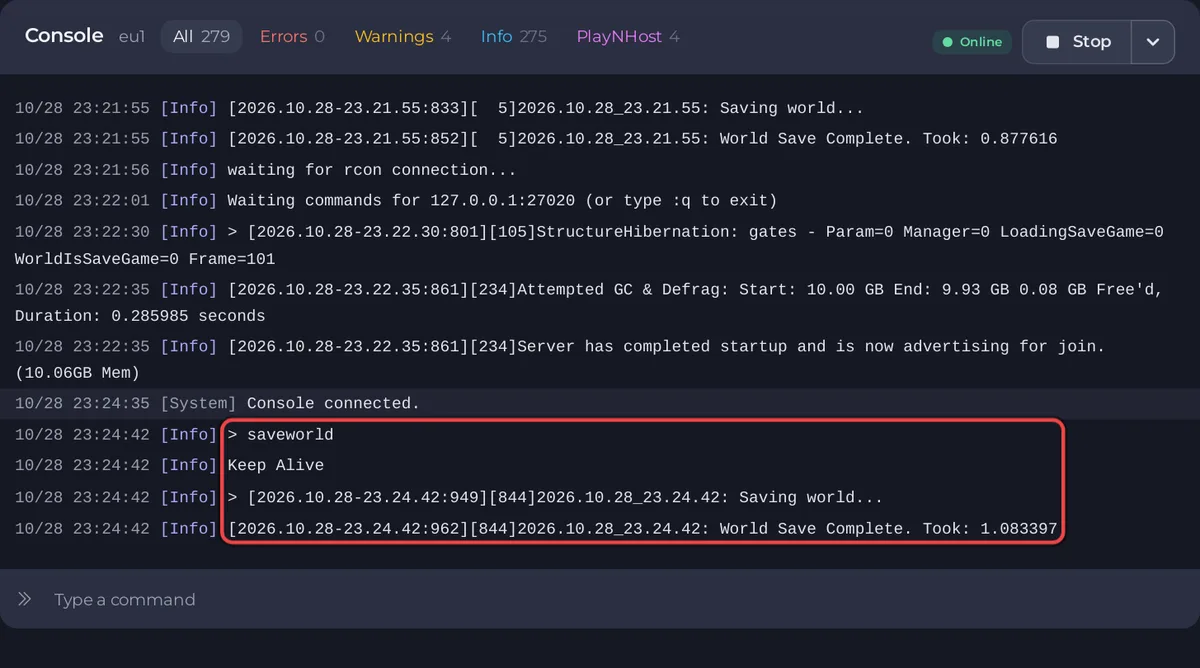
The Console prints your command back. ARK often answers only with Keep Alive, which means it took the command. What the command does shows in the game's own log lines below it. For example, saveworld is followed by Saving world... and World Save Complete. Took: and the seconds.
Commands that work here
These are ARK commands from the ARK wiki console command list. The panel's own tasks send the first three, and the Active players card sends the kick, ban and unban commands.
| Command | What it does |
|---|---|
saveworld | Saves the world to disk now. |
broadcast <message> | Shows a message to every player. |
DestroyWildDinos | Destroys all untamed creatures on the map. Tamed creatures are not touched. |
KickPlayer <EOS ID> | Disconnects a player. |
BanPlayer <EOS ID> | Bans a player. |
UnbanPlayer <EOS ID> | Lifts a ban. |
serverchat <message> | Sends a chat message to every player. The log shows SERVER: and your text. |
getchat | Returns the latest chat messages. |
getgamelog | Returns the latest admin log entries. Your server starts with the admin log on. |
Commands that act on yourself or on what you look at, such as spawning an item in front of you, only make sense in the game, where you are a player. Use them there with cheat in front: How to become admin on your ARK: Survival Ascended server.
Do not type DoExit. The panel's Stop runs saveworld first and then DoExit; typed alone, DoExit skips that save, and the panel sees the game end on its own and starts it again. Use Stop instead: How to stop and save your ARK: Survival Ascended server safely.
If the box seems disconnected
- While the server starts, the Console prints
waiting for rcon connection...every few seconds, sometimes withconnection refused. That is normal: the box connects when the game is ready. - If you type
:q, the box disconnects and reconnects by itself about 5 seconds later, withwaiting for rcon connection.... The server keeps running.
Good to know
- The Errors and Warnings filters at the top pick out lines with those words. ARK prints many harmless ones: ARK: Survival Ascended console lines that look like errors but are normal.
- To run a command on a timer, use Send Command or a ready task on Quick Tasks: How to use Quick Tasks on your ARK: Survival Ascended server.
- Using the Console needs the Use the console permission. The general guide: How to use the console and run commands.


