

Clicking Stop on your ARK: Survival Ascended server saves the world before the game shuts down. The Console shows Saving world and stopping server and ends with Server Closed. Wait for Offline before you change files or start a backup. Kill skips the save, so use it only when Stop is stuck.
Stop the server
- Warn your players: How to send a message to every player on your ARK: Survival Ascended server.
- Open your server in the panel and click Stop. The badge says Stopping.
- Wait. Do not click again.
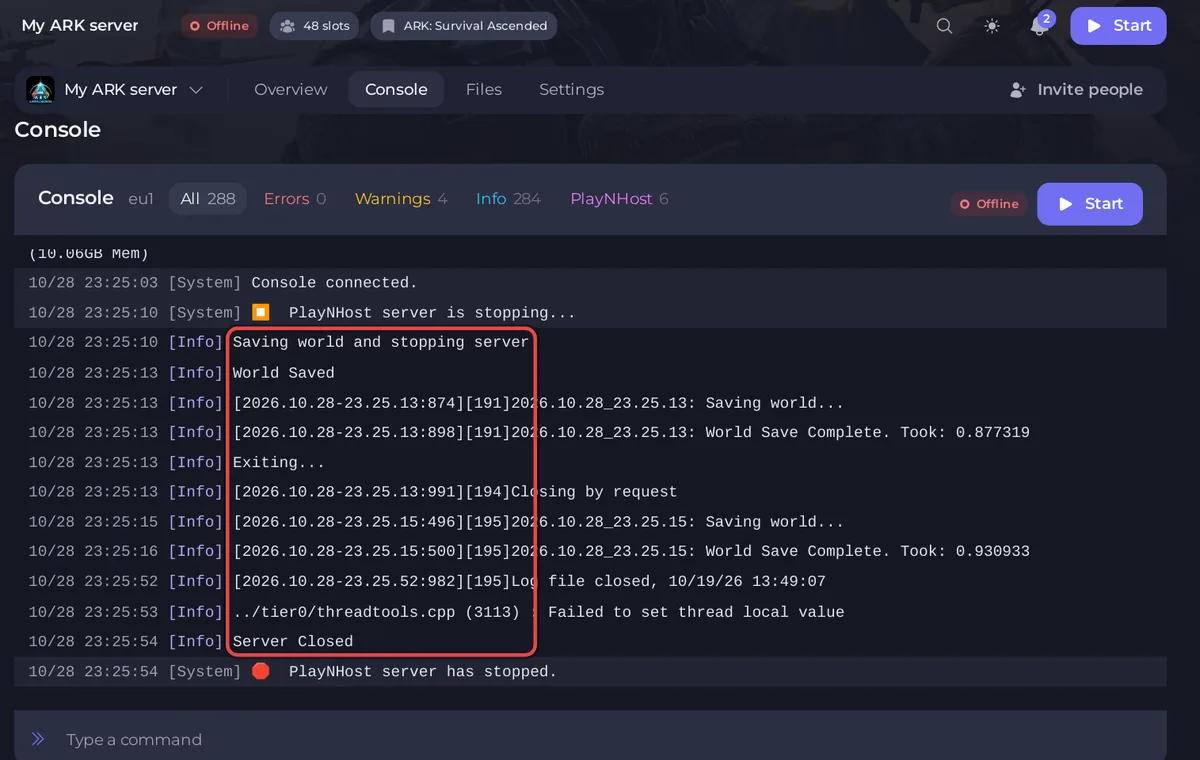
What the Console shows
Saving world and stopping server: the panel asks the game to save.World Saved, thenSaving world...andWorld Save Complete. Took:with the seconds.Exiting...andClosing by request: the game shuts itself down.Server Closed. The badge says Offline.
On an empty test world on PlayNHost this took 44 seconds. A big world takes longer: the panel gives the save up to 2 minutes, the shutdown command up to 30 seconds, and the game up to 1 more minute to close, so a stop can take about 3.5 minutes. Restart runs the same stop first, so it saves too.
Save without stopping
- Type
saveworldin the Console, or run Save World on Quick Tasks:Writes the world to disk now, without waiting for the next autosave. - Do this before a risky change, or before a backup while players are on.
Kill only as a last resort
Kill ends the game at once, without the save. Anything since the last save can be lost. Use it only when the server stays on Stopping for several minutes. See How to start, stop, restart and force-stop your server.
If the game stops by itself
If the game process ends on its own while the server runs, the Console says [PlayNHost] The ARK server process stopped on its own; restarting the server. and the server starts again. Progress since the last save can be lost in that case. If it happens often, see ARK: Survival Ascended server problems and fixes.
Good to know
- The save on Stop talks to the game with the admin password the server started with, so it works even right after you change the Admin Password. The new password is used from the next start.
- Before a backup, stop the server or type
saveworld, so the backup holds the latest world: How to back up and restore your ARK: Survival Ascended world.


