

The Console tab of a Vintage Story server on PlayNHost is the game's own server console: type a command in the Type a command box and press Enter, and it runs with full admin rights. Vintage Story commands start with a slash, for example /announce Hello or /autosavenow. The server must be Online.
How do I run a command?
- Open your server in the panel and click the Console tab.
- Check the badge says Online. While it says Starting, the game is still loading, and while it says Offline nothing is running to answer.
- Click the Type a command box at the bottom.
- Type the command, starting with a slash, for example
/list clients. - Press Enter. The game's answer appears in the output above.
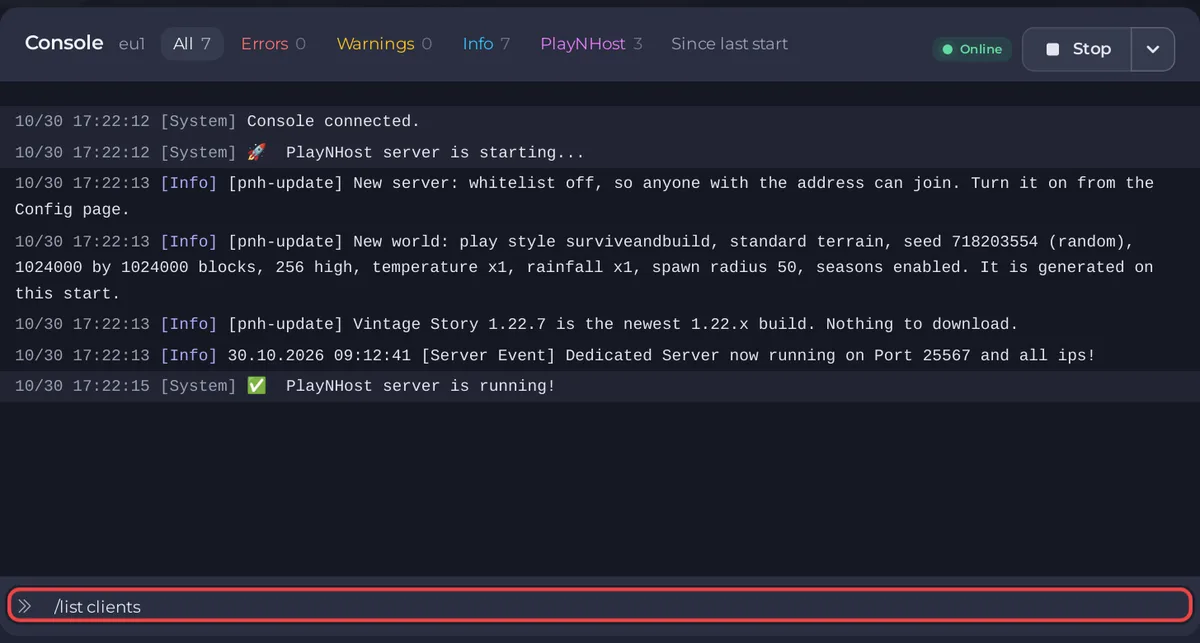
Vintage Story has no RCON, and it does not need one: the Console reaches the game directly. Type /help to list every command the game knows.
Which commands do owners use most?
From the official list of server commands:
| Command | What it does |
|---|---|
/help | Lists every server command. |
/list clients | Shows who is connected. |
/op playername | Gives a player the admin role. |
/player playername role rolename | Sets a player's role. |
/player playername whitelist on | Adds a player to the whitelist. |
/kick playername reason | Removes a player. |
/ban playername reason | Bans a player. |
/unban playername | Lifts a ban. |
/announce message | Sends a message to everyone, in all chat groups. |
/autosavenow | Saves the world now. |
/genbackup filename | Writes a full copy of the world into the game's own backups folder, data/Backups. Panel backups leave that folder out. |
/serverconfig password yourpassword | Sets the join password. |
/serverconfig WhitelistMode on | Turns the whitelist on (off turns it off). |
/time | Shows the game time. /time set, /time stop and /time resume change it. |
/stop | Stops the server. Use the panel's Stop button instead, which sends the same command. |
The official list was last checked by its authors on an older game version, so a command can answer differently on yours. /help on your own server is the up-to-date list.
How do I find something in the output?
- Use the output filters, such as Errors, Warnings or Since last start.
- Click the search icon (Search the console) and type a word, for example a player name.
- Lines from PlayNHost itself start with
[pnh-update]. They say what happened before the game started: updates, the world settings, the whitelist.
Can I run commands on a timer?
Yes. Quick Tasks in the left menu has ready tasks for Vintage Story, Save World and Announce to Players, plus Send Command for any command. You can run them now or put them on a schedule: How to restart your Vintage Story server on a schedule.
For the Console page in general (download or share the log), see How to use the console and run commands.


