%7B.s%7Banimation%3Ab%201.5s%20ease-out%20both%7D.d%7Banimation-delay%3A.16s%7D%7D%40keyframes%20b%7B0%25%7Bfill%3A%23F4F6FA%7D18%25%7Bfill%3A%23FFE08A%7D34%25%2C70%25%7Bfill%3A%23FF8A1F%7D80%25%7Bfill%3A%23FFE08A%7D100%25%7Bfill%3A%23FF8A1F%7D%7D%3C%2Fstyle%3E%3Cg%20transform%3D%22translate(143%20428.93)%20scale(3.885906)%22%3E%3Cg%20transform%3D%22translate(0%202)%22%20fill%3D%22%23706EF0%22%3E%3Cpath%20d%3D%22M0%200%20H48%20A40%2040%200%200%201%2048%2080%20V100%20H0%20Z%22%2F%3E%3Cpath%20transform%3D%22translate(91.75%200)%22%20d%3D%22M0%200%20L48%200%20L48%2050%20L76%2050%20L76%20100%20L0%20100%20Z%22%2F%3E%3Cpath%20transform%3D%22translate(173%200)%22%20d%3D%22M0%20100%20L58%20-4%20L116%20100%20Z%22%2F%3E%3Cpath%20transform%3D%22translate(264.25%200)%22%20d%3D%22M0%200%20L104%200%20L76%2050%20L76%20100%20L28%20100%20L28%2050%20Z%22%2F%3E%3Cg%20transform%3D%22translate(375%200)%22%3E%3Cpath%20d%3D%22M0%200%20L50%2038%20L50%200%20L100%200%20L100%20100%20L0%20100%20Z%22%20fill%3D%22%23F4F6FA%22%2F%3E%3Crect%20class%3D%22s%22%20x%3D%2247%22%20y%3D%2263%22%20width%3D%2219%22%20height%3D%2230%22%2F%3E%3Crect%20class%3D%22s%20d%22%20x%3D%2274%22%20y%3D%2263%22%20width%3D%2219%22%20height%3D%2230%22%2F%3E%3C%2Fg%3E%3Cpath%20transform%3D%22translate(484.75%200)%22%20d%3D%22M0%200%20L48%200%20L48%2037%20L52%2037%20L52%200%20L100%200%20L100%20100%20L52%20100%20L52%2063%20L48%2063%20L48%20100%20L0%20100%20Z%22%2F%3E%3Cpath%20transform%3D%22translate(588.5%200)%22%20d%3D%22M0%2050%20A53%2053%200%201%200%20106%2050%20A53%2053%200%201%200%200%2050%20Z%22%2F%3E%3Cpath%20transform%3D%22translate(698.25%200)%22%20d%3D%22M25%200%20H102%20V50%20H77%20A25%2025%200%200%201%2077%20100%20H0%20V50%20H25%20A25%2025%200%200%201%2025%200%20Z%22%2F%3E%3Cpath%20transform%3D%22translate(804%200)%22%20d%3D%22M0%200%20L90%200%20L90%2050%20L69%2050%20L69%20100%20L21%20100%20L21%2050%20L0%2050%20Z%22%2F%3E%3C%2Fg%3E%3C%2Fg%3E%3C%2Fsvg%3E)


While Public Server is on, Valheim refuses to run if the server password appears anywhere inside the World Name. Capitals count. Change the password or the world name so the password is no longer part of the world name, then start the server.
What you see
The server goes Offline a few seconds after you start it. The Console shows this message:
Valheim will not start: with Public Server on, the Server Password must not appear inside the World Name (capitals count). Change one of them in Game Settings, then start the server.
On a server whose start command is older, the Console may instead show Error bad password:Invalid password, followed by many error lines, and the server restarts once and then stays offline. The cause and the fix are the same.
On the Worlds page, the panel refuses such a name before it gets that far: switching to, making or uploading a world whose name contains the password says Valheim will not start a public server whose password is part of the world name. Choose another world name. The page checks without regard to capitals, so it is stricter than the game.
Why it happens
With the world name Dedicated, the password Dedic is inside it and stops the server. The password dedic does not, because capitals count for the game. A password inside the server name is fine. Only the world name matters.
Fix it
- Click Settings, then Game Settings.
- Look at Server Password and World Name. Find the part of the password that is in the world name.
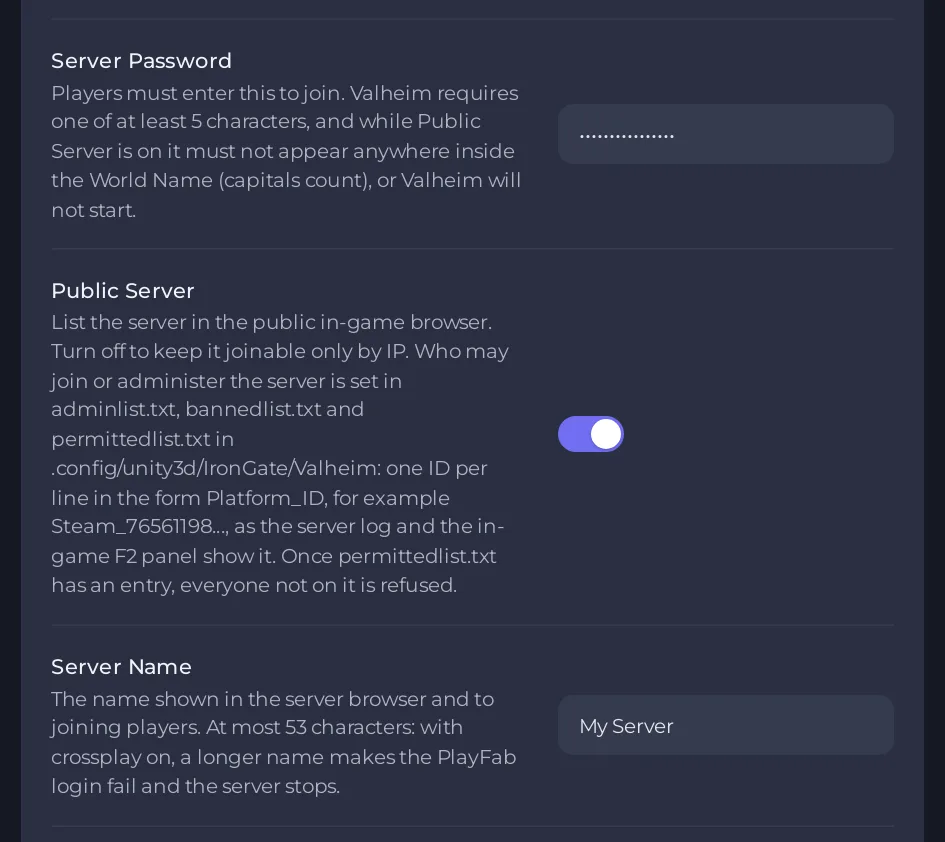
- Change the password. That is easier, and a long password with no part of the world name in it is safer. The rules are 5 to 20 characters, no double quote or backslash. To use another world instead, switch on the Worlds page: How to switch between Valheim worlds on your server.
- Click Start.
Or turn Public Server off
The check only runs while Public Server is on. Turning it off lets you keep both values, but your server is then not listed. See How to make your Valheim server public or private.
Related
How to change your Valheim server name and password and How to fix a server that will not start.





