%7B.s%7Banimation%3Ab%201.5s%20ease-out%20both%7D.d%7Banimation-delay%3A.16s%7D%7D%40keyframes%20b%7B0%25%7Bfill%3A%23F4F6FA%7D18%25%7Bfill%3A%23FFE08A%7D34%25%2C70%25%7Bfill%3A%23FF8A1F%7D80%25%7Bfill%3A%23FFE08A%7D100%25%7Bfill%3A%23FF8A1F%7D%7D%3C%2Fstyle%3E%3Cg%20transform%3D%22translate(143%20428.93)%20scale(3.885906)%22%3E%3Cg%20transform%3D%22translate(0%202)%22%20fill%3D%22%23706EF0%22%3E%3Cpath%20d%3D%22M0%200%20H48%20A40%2040%200%200%201%2048%2080%20V100%20H0%20Z%22%2F%3E%3Cpath%20transform%3D%22translate(91.75%200)%22%20d%3D%22M0%200%20L48%200%20L48%2050%20L76%2050%20L76%20100%20L0%20100%20Z%22%2F%3E%3Cpath%20transform%3D%22translate(173%200)%22%20d%3D%22M0%20100%20L58%20-4%20L116%20100%20Z%22%2F%3E%3Cpath%20transform%3D%22translate(264.25%200)%22%20d%3D%22M0%200%20L104%200%20L76%2050%20L76%20100%20L28%20100%20L28%2050%20Z%22%2F%3E%3Cg%20transform%3D%22translate(375%200)%22%3E%3Cpath%20d%3D%22M0%200%20L50%2038%20L50%200%20L100%200%20L100%20100%20L0%20100%20Z%22%20fill%3D%22%23F4F6FA%22%2F%3E%3Crect%20class%3D%22s%22%20x%3D%2247%22%20y%3D%2263%22%20width%3D%2219%22%20height%3D%2230%22%2F%3E%3Crect%20class%3D%22s%20d%22%20x%3D%2274%22%20y%3D%2263%22%20width%3D%2219%22%20height%3D%2230%22%2F%3E%3C%2Fg%3E%3Cpath%20transform%3D%22translate(484.75%200)%22%20d%3D%22M0%200%20L48%200%20L48%2037%20L52%2037%20L52%200%20L100%200%20L100%20100%20L52%20100%20L52%2063%20L48%2063%20L48%20100%20L0%20100%20Z%22%2F%3E%3Cpath%20transform%3D%22translate(588.5%200)%22%20d%3D%22M0%2050%20A53%2053%200%201%200%20106%2050%20A53%2053%200%201%200%200%2050%20Z%22%2F%3E%3Cpath%20transform%3D%22translate(698.25%200)%22%20d%3D%22M25%200%20H102%20V50%20H77%20A25%2025%200%200%201%2077%20100%20H0%20V50%20H25%20A25%2025%200%200%201%2025%200%20Z%22%2F%3E%3Cpath%20transform%3D%22translate(804%200)%22%20d%3D%22M0%200%20L90%200%20L90%2050%20L69%2050%20L69%20100%20L21%20100%20L21%2050%20L0%2050%20Z%22%2F%3E%3C%2Fg%3E%3C%2Fg%3E%3C%2Fsvg%3E)


To copy a world, download it from the Worlds page and upload the file again, on the same server under a new name or on another server. To rename a world, stop the server, rename its folder in Files, then switch to it on the Worlds page.
Copy a world to another PlayNHost server
- On the first server, open Worlds, open the world's menu and choose Download. You get a
.tar.gzof the world folder. - On the second server, open Worlds and click Upload a world.
- Click Choose files and pick the
.tar.gzyou downloaded. - Set World name on this server. The name is taken from the file, which includes the download time, so type the name you want.
- Leave Make it the active world ticked if the second server should play it, and click Upload and check.

If the second server already has a world with that name, it is kept as a copy you can undo to, and the upload takes its place.
Copy a world under a new name on the same server
Do the same on one server: Download, then Upload a world with a new World name on this server. Both worlds are then on the Your worlds list.
Rename a world
The Worlds page has no rename button, so you rename the folder:
- Stop the server and wait for Offline.
- Click Files and open
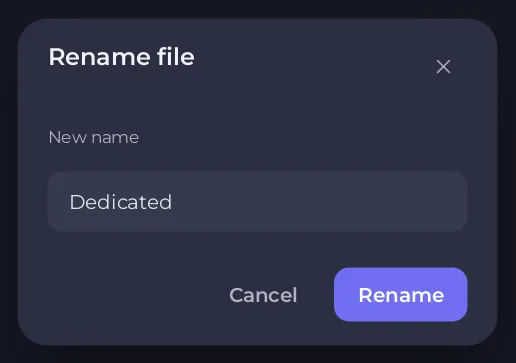
.config/unity3d/IronGate/Valheim/worlds_local/. - Open the menu of the world's folder and choose Rename folder. Type the new name in New name and click Rename. Up to 20 characters, no quote, backslash or slash.
- Click Worlds and Switch to this on the renamed world, so the server runs it under its new name. See How to switch between Valheim worlds on your server.
The game's copies of the world are separate folders named after the old name, so they stay on the timeline of the old name. The copy-and-upload way above avoids that.
Move a world to another server for good
Copy it as above, check it loaded on the second server, then delete it from the first: How to delete a Valheim world or start fresh.





