%7B.s%7Banimation%3Ab%201.5s%20ease-out%20both%7D.d%7Banimation-delay%3A.16s%7D%7D%40keyframes%20b%7B0%25%7Bfill%3A%23F4F6FA%7D18%25%7Bfill%3A%23FFE08A%7D34%25%2C70%25%7Bfill%3A%23FF8A1F%7D80%25%7Bfill%3A%23FFE08A%7D100%25%7Bfill%3A%23FF8A1F%7D%7D%3C%2Fstyle%3E%3Cg%20transform%3D%22translate(143%20428.93)%20scale(3.885906)%22%3E%3Cg%20transform%3D%22translate(0%202)%22%20fill%3D%22%23706EF0%22%3E%3Cpath%20d%3D%22M0%200%20H48%20A40%2040%200%200%201%2048%2080%20V100%20H0%20Z%22%2F%3E%3Cpath%20transform%3D%22translate(91.75%200)%22%20d%3D%22M0%200%20L48%200%20L48%2050%20L76%2050%20L76%20100%20L0%20100%20Z%22%2F%3E%3Cpath%20transform%3D%22translate(173%200)%22%20d%3D%22M0%20100%20L58%20-4%20L116%20100%20Z%22%2F%3E%3Cpath%20transform%3D%22translate(264.25%200)%22%20d%3D%22M0%200%20L104%200%20L76%2050%20L76%20100%20L28%20100%20L28%2050%20Z%22%2F%3E%3Cg%20transform%3D%22translate(375%200)%22%3E%3Cpath%20d%3D%22M0%200%20L50%2038%20L50%200%20L100%200%20L100%20100%20L0%20100%20Z%22%20fill%3D%22%23F4F6FA%22%2F%3E%3Crect%20class%3D%22s%22%20x%3D%2247%22%20y%3D%2263%22%20width%3D%2219%22%20height%3D%2230%22%2F%3E%3Crect%20class%3D%22s%20d%22%20x%3D%2274%22%20y%3D%2263%22%20width%3D%2219%22%20height%3D%2230%22%2F%3E%3C%2Fg%3E%3Cpath%20transform%3D%22translate(484.75%200)%22%20d%3D%22M0%200%20L48%200%20L48%2037%20L52%2037%20L52%200%20L100%200%20L100%20100%20L52%20100%20L52%2063%20L48%2063%20L48%20100%20L0%20100%20Z%22%2F%3E%3Cpath%20transform%3D%22translate(588.5%200)%22%20d%3D%22M0%2050%20A53%2053%200%201%200%20106%2050%20A53%2053%200%201%200%200%2050%20Z%22%2F%3E%3Cpath%20transform%3D%22translate(698.25%200)%22%20d%3D%22M25%200%20H102%20V50%20H77%20A25%2025%200%200%201%2077%20100%20H0%20V50%20H25%20A25%2025%200%200%201%2025%200%20Z%22%2F%3E%3Cpath%20transform%3D%22translate(804%200)%22%20d%3D%22M0%200%20L90%200%20L90%2050%20L69%2050%20L69%20100%20L21%20100%20L21%2050%20L0%2050%20Z%22%2F%3E%3C%2Fg%3E%3C%2Fg%3E%3C%2Fsvg%3E)


Change Modding Framework on the Modding tab and restart the server. The panel restores the game files that Oxide changed when you leave Oxide, which takes a minute or two at the next start. Then move your plugins to the new framework's folder and check their permissions.
Back up first. See How to back up and restore your Rust world.
Switch
- Open your server in the panel and click the Modding tab.
- In the Oxide (uMod) and Carbon card, change Modding Framework to Oxide, Carbon or Vanilla.
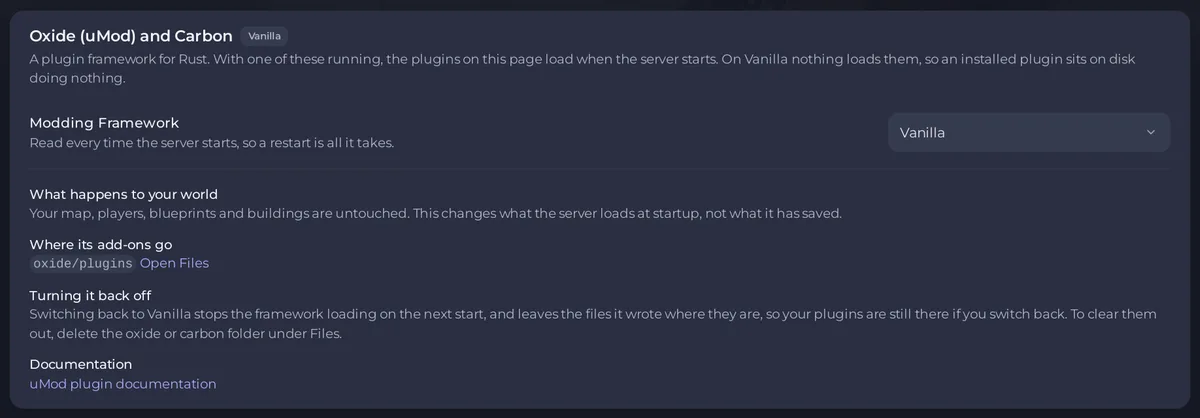
- Click Restart to apply in the box Saved, and not applied yet.
- Watch the Console. When you leave Oxide, you see a line like
[PlayNHost] The game files still carry Oxide from before. Restoring them for carbon; this takes a minute or two.Let it finish. - The server is ready when the Console shows Server startup complete.
Your map, players, blueprints and buildings are untouched. The switch changes what the server loads at startup, not what it has saved.
You need the Change startup permission to change the framework.
Move your plugins
Oxide and Carbon use different folders, and a plugin in the wrong one never loads.
- Open Files.
- From Oxide to Carbon: copy the plugin files from
oxide/pluginstocarbon/plugins. Carbon usescarbon/configswhere Oxide usesoxide/config. Carbon's own guide says it copies config, data, language and user and group data on its first start. - From Carbon to Oxide: copy them from
carbon/pluginstooxide/plugins. - Open the Installed list on the Modding tab and check your plugins are there.
Check permissions
Check that your permissions are still in place after the switch. The commands use o. or oxide. on Oxide and c. on Carbon. To give a permission again, see How to change plugin settings and permissions on your Rust server. To check which framework is running, type oxide.version or c.version in the Console.
Switch back to Vanilla
Vanilla runs no framework. Your plugins stay on disk, so they are there if you switch back. To clear them out, delete the oxide or carbon folder in Files. On Vanilla the panel refuses to install plugins.
Good to know
- Pick one framework only.
- The Not running badge on the Installed list reads Oxide's log, so it only appears on Oxide.
- Right after a Rust update the new framework may not be ready: How to update your Rust server.
- To try it first on a copy, see How to make a copy of your server and try a change on it first.
- Overview: How to add mods to your Rust server.





