%7B.s%7Banimation%3Ab%201.5s%20ease-out%20both%7D.d%7Banimation-delay%3A.16s%7D%7D%40keyframes%20b%7B0%25%7Bfill%3A%23F4F6FA%7D18%25%7Bfill%3A%23FFE08A%7D34%25%2C70%25%7Bfill%3A%23FF8A1F%7D80%25%7Bfill%3A%23FFE08A%7D100%25%7Bfill%3A%23FF8A1F%7D%7D%3C%2Fstyle%3E%3Cg%20transform%3D%22translate(143%20428.93)%20scale(3.885906)%22%3E%3Cg%20transform%3D%22translate(0%202)%22%20fill%3D%22%23706EF0%22%3E%3Cpath%20d%3D%22M0%200%20H48%20A40%2040%200%200%201%2048%2080%20V100%20H0%20Z%22%2F%3E%3Cpath%20transform%3D%22translate(91.75%200)%22%20d%3D%22M0%200%20L48%200%20L48%2050%20L76%2050%20L76%20100%20L0%20100%20Z%22%2F%3E%3Cpath%20transform%3D%22translate(173%200)%22%20d%3D%22M0%20100%20L58%20-4%20L116%20100%20Z%22%2F%3E%3Cpath%20transform%3D%22translate(264.25%200)%22%20d%3D%22M0%200%20L104%200%20L76%2050%20L76%20100%20L28%20100%20L28%2050%20Z%22%2F%3E%3Cg%20transform%3D%22translate(375%200)%22%3E%3Cpath%20d%3D%22M0%200%20L50%2038%20L50%200%20L100%200%20L100%20100%20L0%20100%20Z%22%20fill%3D%22%23F4F6FA%22%2F%3E%3Crect%20class%3D%22s%22%20x%3D%2247%22%20y%3D%2263%22%20width%3D%2219%22%20height%3D%2230%22%2F%3E%3Crect%20class%3D%22s%20d%22%20x%3D%2274%22%20y%3D%2263%22%20width%3D%2219%22%20height%3D%2230%22%2F%3E%3C%2Fg%3E%3Cpath%20transform%3D%22translate(484.75%200)%22%20d%3D%22M0%200%20L48%200%20L48%2037%20L52%2037%20L52%200%20L100%200%20L100%20100%20L52%20100%20L52%2063%20L48%2063%20L48%20100%20L0%20100%20Z%22%2F%3E%3Cpath%20transform%3D%22translate(588.5%200)%22%20d%3D%22M0%2050%20A53%2053%200%201%200%20106%2050%20A53%2053%200%201%200%200%2050%20Z%22%2F%3E%3Cpath%20transform%3D%22translate(698.25%200)%22%20d%3D%22M25%200%20H102%20V50%20H77%20A25%2025%200%200%201%2077%20100%20H0%20V50%20H25%20A25%2025%200%200%201%2025%200%20Z%22%2F%3E%3Cpath%20transform%3D%22translate(804%200)%22%20d%3D%22M0%200%20L90%200%20L90%2050%20L69%2050%20L69%20100%20L21%20100%20L21%2050%20L0%2050%20Z%22%2F%3E%3C%2Fg%3E%3C%2Fg%3E%3C%2Fsvg%3E)


Open Backups, open the menu Actions for your backup, choose Restore to server, and confirm. The server stops while files are replaced, players are disconnected, and the world, settings and accounts from the backup come back. A Project Zomboid restore keeps the game files already on the server and does not delete files that are not in the backup.
Take a fresh backup of the current state first if you may want it back. A restore replaces what you have now.
Restore
- Open your server in the panel and click Backups in the left menu.
- Find the backup. Open the menu Actions for its name and choose Restore to server.
- Read the window. It says "This puts your server back the way it was when the backup was taken. Anything changed since then, including your world, is replaced." For a Project Zomboid backup it adds that the backup holds your configs and saves, not the game files, and that the restore keeps the game files already on your server.
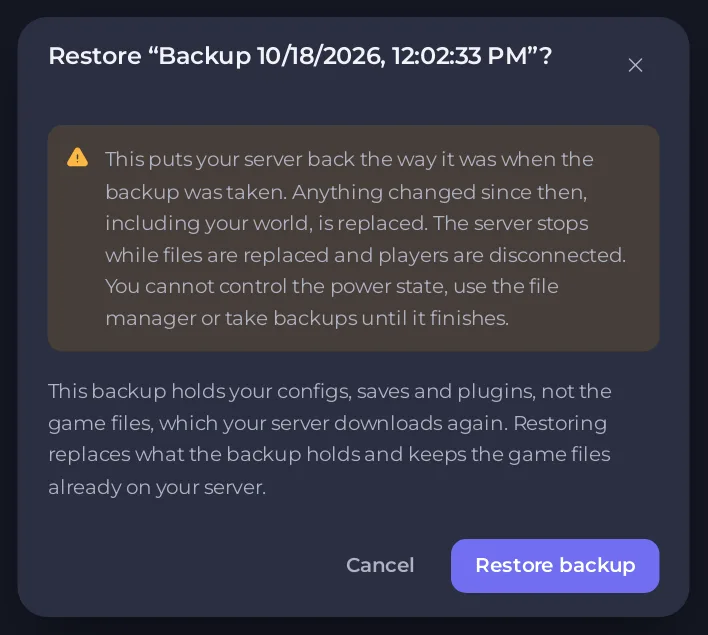
- Click Restore backup. You cannot use the power controls, the file manager or take backups until it finishes.
- Start the server when it is done and check that it loaded the world: How to check which world your Project Zomboid server loaded.
Why there is no "Delete files that are not in the backup" box
On other games the restore window has the box Delete files that are not in the backup, ticked by default. A Project Zomboid backup has no game files in it, so emptying the server first would delete the game. The panel does not offer that choice for these backups and refuses it.
The result: the restore writes the backup's files over the files on the server, and files that exist now but are not in the backup stay. In a world, that means map files for areas that were explored after the backup stay as they are now, while the rest goes back to the backup.
Get exactly the world of the backup
If you need the world exactly as it was, with nothing newer:
- Make a backup of the current state, in case you change your mind.
- Stop the server.
- Open Files, then
.cache,Saves,Multiplayer, and delete the world folder named like your Server Name with Delete folder. - Restore the backup, then start the server.
This is the reasoning from how the restore works, and we have not run it on a live Project Zomboid server. Keep your fresh backup until you have checked the world.
If you only need part of a backup
Restore just the settings, or just the accounts, without touching the world: How to restore only the settings or players of your Project Zomboid server.





