%7B.s%7Banimation%3Ab%201.5s%20ease-out%20both%7D.d%7Banimation-delay%3A.16s%7D%7D%40keyframes%20b%7B0%25%7Bfill%3A%23F4F6FA%7D18%25%7Bfill%3A%23FFE08A%7D34%25%2C70%25%7Bfill%3A%23FF8A1F%7D80%25%7Bfill%3A%23FFE08A%7D100%25%7Bfill%3A%23FF8A1F%7D%7D%3C%2Fstyle%3E%3Cg%20transform%3D%22translate(143%20428.93)%20scale(3.885906)%22%3E%3Cg%20transform%3D%22translate(0%202)%22%20fill%3D%22%23706EF0%22%3E%3Cpath%20d%3D%22M0%200%20H48%20A40%2040%200%200%201%2048%2080%20V100%20H0%20Z%22%2F%3E%3Cpath%20transform%3D%22translate(91.75%200)%22%20d%3D%22M0%200%20L48%200%20L48%2050%20L76%2050%20L76%20100%20L0%20100%20Z%22%2F%3E%3Cpath%20transform%3D%22translate(173%200)%22%20d%3D%22M0%20100%20L58%20-4%20L116%20100%20Z%22%2F%3E%3Cpath%20transform%3D%22translate(264.25%200)%22%20d%3D%22M0%200%20L104%200%20L76%2050%20L76%20100%20L28%20100%20L28%2050%20Z%22%2F%3E%3Cg%20transform%3D%22translate(375%200)%22%3E%3Cpath%20d%3D%22M0%200%20L50%2038%20L50%200%20L100%200%20L100%20100%20L0%20100%20Z%22%20fill%3D%22%23F4F6FA%22%2F%3E%3Crect%20class%3D%22s%22%20x%3D%2247%22%20y%3D%2263%22%20width%3D%2219%22%20height%3D%2230%22%2F%3E%3Crect%20class%3D%22s%20d%22%20x%3D%2274%22%20y%3D%2263%22%20width%3D%2219%22%20height%3D%2230%22%2F%3E%3C%2Fg%3E%3Cpath%20transform%3D%22translate(484.75%200)%22%20d%3D%22M0%200%20L48%200%20L48%2037%20L52%2037%20L52%200%20L100%200%20L100%20100%20L52%20100%20L52%2063%20L48%2063%20L48%20100%20L0%20100%20Z%22%2F%3E%3Cpath%20transform%3D%22translate(588.5%200)%22%20d%3D%22M0%2050%20A53%2053%200%201%200%20106%2050%20A53%2053%200%201%200%200%2050%20Z%22%2F%3E%3Cpath%20transform%3D%22translate(698.25%200)%22%20d%3D%22M25%200%20H102%20V50%20H77%20A25%2025%200%200%201%2077%20100%20H0%20V50%20H25%20A25%2025%200%200%201%2025%200%20Z%22%2F%3E%3Cpath%20transform%3D%22translate(804%200)%22%20d%3D%22M0%200%20L90%200%20L90%2050%20L69%2050%20L69%20100%20L21%20100%20L21%2050%20L0%2050%20Z%22%2F%3E%3C%2Fg%3E%3C%2Fg%3E%3C%2Fsvg%3E)


The Loot group has one multiplier per kind of item, from 0 to 4: a higher number means more of that kind of item, and the table shows the value a new server starts with. The group also sets how many buildings are already looted when the world starts. Loot that comes back after a while is Loot Respawn (hours) under Game Settings, and items you never want to see are Banned Item IDs there.
Open the editor
- Open your server in the panel and click the Settings tab.
- In the list on the left, under Config files, click Sandbox Settings. The file name is shown at the top.
- If the list says No config files yet, start the server once. The game writes its sandbox file the first time it runs.
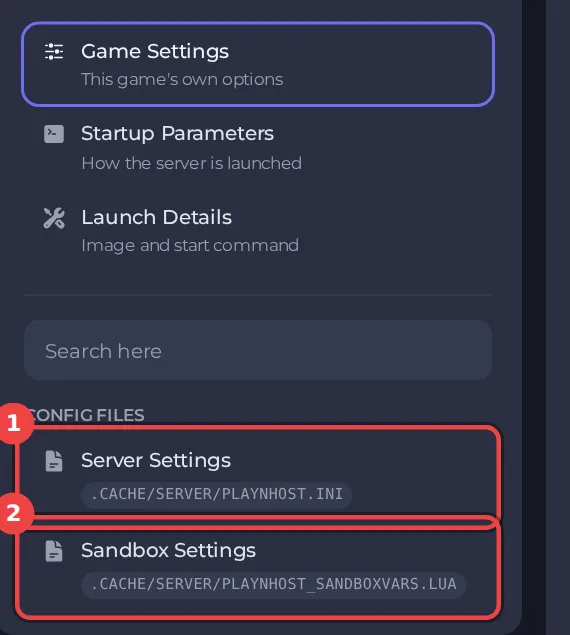
The editor only saves while the server is stopped. Stop the server, change the settings below, then click Save only or Save & start. The full steps are in How to change Project Zomboid sandbox settings in the panel. Headings such as Loot appear in capitals in the editor. The editor shows Build 42 files only: on a Build 41 server it opens with a message that the file is from a different build, see Project Zomboid Sandbox Settings says the file is from a different build.
Every setting in Loot
| Setting | What it does | Values | A new server starts with |
|---|---|---|---|
| Perishable food | Any food that can rot or spoil. | A number from 0 to 4 | 0.8 |
| Canned food and drinks | Canned and dried food, beverages. | A number from 0 to 4 | 0.6 |
| Melee weapons | Weapons that are not tools in other categories. | A number from 0 to 4 | 0.6 |
| Guns | Firearms, including weapon attachments. | A number from 0 to 4 | 1.2 |
| Ammunition | Loose ammo, boxes and magazines. | A number from 0 to 4 | 0.6 |
| Medical supplies | Medicine, bandages and first aid tools. | A number from 0 to 4 | 0.6 |
| Reading material | All other items that can be read, including books, fliers, and newspapers. | A number from 0 to 4 | 0.6 |
| Skill books | Books that provide skill XP multipliers. | A number from 0 to 4 | 0.6 |
| Recipe magazines | Items that teach recipes. | A number from 0 to 4 | 0.6 |
| Survival gear | Fishing Rods, Tents, camping gear etc. | A number from 0 to 4 | 0.6 |
| Vehicle parts | Vehicle parts and the tools needed to install them. | A number from 0 to 4 | 0.6 |
| Tools | Items and weapons which are Tools but don't fit in other categories such as Mechanics or Farming. | A number from 0 to 4 | 0.6 |
| Building materials | Items and weapons that are used as ingredients for crafting or building. This is a general category that does not include items belonging to other categories such as Cookware or Medical. Does not include Tools. | A number from 0 to 4 | 0.6 |
| Farming supplies | Items and weapons which are used in both animal and plant agriculture, such as Seeds, Trowels, or Shovels. | A number from 0 to 4 | 0.6 |
| Cookware | Items that are used in cooking, including those (eg. knives) which can be weapons. Does not include food. Includes both usable and unusable items. | A number from 0 to 4 | 0.6 |
| Clothing | All wearable items that are not containers. | A number from 0 to 4 | 0.6 |
| Bags and containers | Backpacks and other wearable/equippable containers, eg. cases. | A number from 0 to 4 | 0.6 |
| Keys | Keys for buildings/cars, key rings, and locks. | A number from 0 to 4 | 0.4 |
| Tapes and CDs | VHS tapes and CDs. | A number from 0 to 4 | 0.6 |
| Keepsakes | Spiffo items, plushies, and other collectible keepsake items eg. Photos. | A number from 0 to 4 | 0.6 |
| Everything else | Everything else. Also affects foraging for all items in Town/Road zones. | A number from 0 to 4 | 0.8 |
| Already-looted buildings (%) | The chance that a building has already been looted when players find it. | A whole number from 0 to 200 | 25 |
| Days until the most buildings are looted | How long it takes for Maximum Looted Building Chance to be reached. | A whole number from 0 to 3650 | 90 |
| Rural looted chance | The chance that a building in the countryside has already been looted when players find it. | A number from 0 to 2 | 0.5 |
| Full containers do not respawn | Containers with a number of items greater, or equal to, this setting will not respawn. | A whole number from 0 to 2147483647 | 5 |
| No respawn in player-built houses | Items will not respawn in buildings that players have barricaded or built in. | On or off | On |
| No respawn in recently visited areas (hours) | When greater than 0, loot will not respawn in zones that have been visited within this number of in-game hours. | A whole number from 0 to 2147483647 | 0 |
Related guides
- How to change zombie population, respawn and loot respawn on your Project Zomboid server
- How to ban items from loot on your Project Zomboid server
Good to know
- Most sandbox rules apply from the next start. A few, such as the start date and the months since the outbreak, only matter when a new world is created.
- Four sandbox values are not in this editor, because the panel writes them at every start: Zombie Population, Zombie Respawn, Loot Respawn (hours) and Banned Item IDs. They are under Settings, then Game Settings: How to change zombie population, respawn and loot respawn on your Project Zomboid server.
- The column "A new server starts with" shows the value a new server has before you change anything (the game's Apocalypse rules). If you applied a preset, your values differ: How to choose a sandbox preset for your Project Zomboid server.
- Back up first if the world has progress in it: How to back up and restore your Project Zomboid world.





