%7B.s%7Banimation%3Ab%201.5s%20ease-out%20both%7D.d%7Banimation-delay%3A.16s%7D%7D%40keyframes%20b%7B0%25%7Bfill%3A%23F4F6FA%7D18%25%7Bfill%3A%23FFE08A%7D34%25%2C70%25%7Bfill%3A%23FF8A1F%7D80%25%7Bfill%3A%23FFE08A%7D100%25%7Bfill%3A%23FF8A1F%7D%7D%3C%2Fstyle%3E%3Cg%20transform%3D%22translate(143%20428.93)%20scale(3.885906)%22%3E%3Cg%20transform%3D%22translate(0%202)%22%20fill%3D%22%23706EF0%22%3E%3Cpath%20d%3D%22M0%200%20H48%20A40%2040%200%200%201%2048%2080%20V100%20H0%20Z%22%2F%3E%3Cpath%20transform%3D%22translate(91.75%200)%22%20d%3D%22M0%200%20L48%200%20L48%2050%20L76%2050%20L76%20100%20L0%20100%20Z%22%2F%3E%3Cpath%20transform%3D%22translate(173%200)%22%20d%3D%22M0%20100%20L58%20-4%20L116%20100%20Z%22%2F%3E%3Cpath%20transform%3D%22translate(264.25%200)%22%20d%3D%22M0%200%20L104%200%20L76%2050%20L76%20100%20L28%20100%20L28%2050%20Z%22%2F%3E%3Cg%20transform%3D%22translate(375%200)%22%3E%3Cpath%20d%3D%22M0%200%20L50%2038%20L50%200%20L100%200%20L100%20100%20L0%20100%20Z%22%20fill%3D%22%23F4F6FA%22%2F%3E%3Crect%20class%3D%22s%22%20x%3D%2247%22%20y%3D%2263%22%20width%3D%2219%22%20height%3D%2230%22%2F%3E%3Crect%20class%3D%22s%20d%22%20x%3D%2274%22%20y%3D%2263%22%20width%3D%2219%22%20height%3D%2230%22%2F%3E%3C%2Fg%3E%3Cpath%20transform%3D%22translate(484.75%200)%22%20d%3D%22M0%200%20L48%200%20L48%2037%20L52%2037%20L52%200%20L100%200%20L100%20100%20L52%20100%20L52%2063%20L48%2063%20L48%20100%20L0%20100%20Z%22%2F%3E%3Cpath%20transform%3D%22translate(588.5%200)%22%20d%3D%22M0%2050%20A53%2053%200%201%200%20106%2050%20A53%2053%200%201%200%200%2050%20Z%22%2F%3E%3Cpath%20transform%3D%22translate(698.25%200)%22%20d%3D%22M25%200%20H102%20V50%20H77%20A25%2025%200%200%201%2077%20100%20H0%20V50%20H25%20A25%2025%200%200%201%2025%200%20Z%22%2F%3E%3Cpath%20transform%3D%22translate(804%200)%22%20d%3D%22M0%200%20L90%200%20L90%2050%20L69%2050%20L69%20100%20L21%20100%20L21%2050%20L0%2050%20Z%22%2F%3E%3C%2Fg%3E%3C%2Fg%3E%3C%2Fsvg%3E)


The Vehicles group decides whether cars exist on your server and how they behave: how many there are, how much fuel they start with and use, how often they are locked, how damaged they are and whether crashes hurt players.
Open the editor
- Open your server in the panel and click the Settings tab.
- In the list on the left, under Config files, click Sandbox Settings. The file name is shown at the top.
- If the list says No config files yet, start the server once. The game writes its sandbox file the first time it runs.
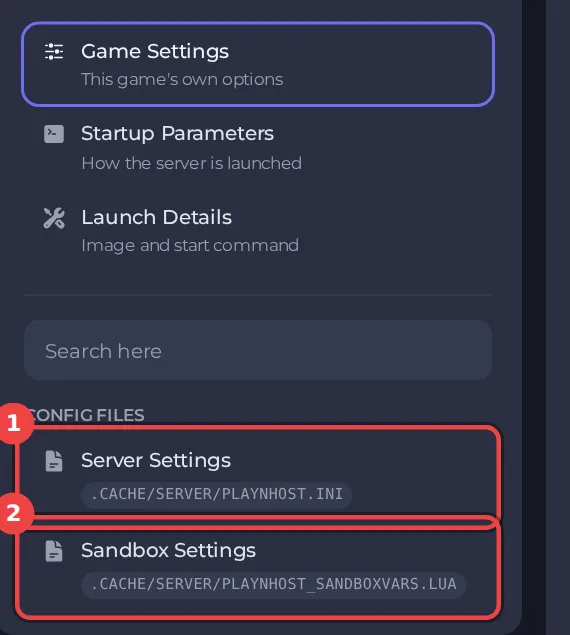
The editor only saves while the server is stopped. Stop the server, change the settings below, then click Save only or Save & start. The full steps are in How to change Project Zomboid sandbox settings in the panel. Headings such as Vehicles appear in capitals in the editor. The editor shows Build 42 files only: on a Build 41 server it opens with a message that the file is from a different build, see Project Zomboid Sandbox Settings says the file is from a different build.
Every setting in Vehicles
| Setting | What it does | Values | A new server starts with |
|---|---|---|---|
| Vehicles | If vehicles will spawn. | On or off | On |
| How many vehicles | How frequently vehicles can be discovered on the map. | None, Very Low, Low, Normal, High | Low |
| Vehicles with fuel | The chance of finding a vehicle with gas in its tank. | Low, Normal, High | Normal |
| Starting fuel | How full the gas tank of discovered vehicles will be. | Very Low, Low, Normal, High, Very High, Full | Low |
| Endless fuel at gas stations | If enabled, gas pumps will never run out of fuel. | On or off | Off |
| Fuel consumption | How gas-hungry vehicles are. | A number from 0 to 100 | 1.0 |
| Locked vehicles | How likely cars will be locked. | Never, Extremely Rare, Rare, Sometimes, Often, Very Often | Sometimes |
| Vehicle condition | General condition discovered vehicles will be in. | Very Low, Low, Normal, High, Very High | Normal |
| Crash damage to vehicles | The amount of damage dealt to vehicles that crash. | Very Low, Low, Normal, High, Very High | Normal |
| Players hurt in crashes | If the player can get injured from being in a car accident. | On or off | On |
| Car alarms | How frequently discovered vehicles have active alarms. | Never, Extremely Rare, Rare, Sometimes, Often, Very Often | Rare |
| Traffic jams | If traffic jams consisting of wrecked cars will appear on main roads. | On or off | On |
| Easy vehicles | Whether found vehicles are locked, need keys to start etc. | On or off | Off |
| Cared-for vehicles | Whether a player can discover a car that has been cared for after the Knox infection struck. | None, Low, Normal, High | Low |
If the server lags
Many vehicles in the world cost memory and processing. If a small plan struggles, lower How many vehicles or turn Vehicles off, then watch the Usage card. See Why is my Project Zomboid server lagging.
Good to know
- Most sandbox rules apply from the next start. A few, such as the start date and the months since the outbreak, only matter when a new world is created.
- Four sandbox values are not in this editor, because the panel writes them at every start: Zombie Population, Zombie Respawn, Loot Respawn (hours) and Banned Item IDs. They are under Settings, then Game Settings: How to change zombie population, respawn and loot respawn on your Project Zomboid server.
- The column "A new server starts with" shows the value a new server has before you change anything (the game's Apocalypse rules). If you applied a preset, your values differ: How to choose a sandbox preset for your Project Zomboid server.
- Back up first if the world has progress in it: How to back up and restore your Project Zomboid world.





