

To stop a Necesse server on PlayNHost without losing progress, click Stop or Restart. The panel sends Necesse's own stop command, which "Saves and stops the server", according to the official Necesse wiki. To save without stopping, type save in the Console. Avoid Kill, which ends the server without saving.
Stop the server safely
- Open your server in the panel.
- Click Stop. The badge changes to Stopping: Necesse is saving.
- Wait until the badge says Offline before you change files or restore a backup.
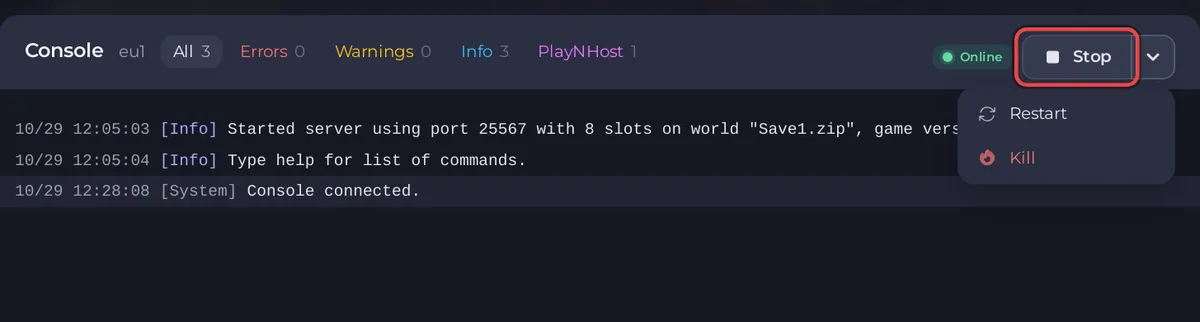
Restart does the same stop, then starts the server again, so it saves too. While the server runs, Restart and Kill are in the menu of the arrow next to Stop.
How do I save without stopping?
- Type
savein the Console. Necesse "Saves all data", according to the official Necesse wiki. - Or run Save World under Quick Tasks: "Writes the world to disk now, without waiting for the next autosave." It sends the same
save.
Save before you download the world or take a backup by hand: How to download your Necesse world and How to back up and restore your Necesse world.
When should I use Kill?
Only when the server does not stop on its own. Kill ends Necesse at once, without saving, and the panel warns: "Killing this server could result in irreversible data loss!" Anything since the last save is lost.
Does the server save on its own?
Necesse writes the world to disk by itself while it runs (the Save World task speaks of "the next autosave"), and the nightly Automatic backup sends save before it backs up. A save right before a stop costs nothing, so stop with Stop, not Kill.
Starting, stopping and the badges in general: How to start, stop, restart and force-stop your server.


