

A new Minecraft server does not restart by itself. On Quick Tasks, add the ready-made Nightly restart, or schedule Restart with Warning at the hour you choose. Both warn players in chat one minute and then ten seconds before, then restart the server.
Why restart on a schedule
- On Paper, the server installs the newest build of your Minecraft version when it starts, so a server that never restarts never gets those fixes.
- A restart gives the game a fresh start after a long run.
Many owners restart once a day at a quiet hour. A restart disconnects players for a short while, so warn them, or skip it while they play.
Add the ready-made Nightly restart
- Open your server in the panel and click Quick Tasks in the left menu.
- In the box Ready-made for your server type, find Nightly restart. It says it warns players in chat one minute and then ten seconds before, then restarts, and when it runs. It shows Arrives off.
- Click Add. The panel says it was added, switched off.
- Under Schedules, switch Nightly restart on.
It runs every day at 05:00 in the panel's time zone, Central European Time, which may differ from yours, and only while the server is running: a stopped server is left stopped. Its time cannot be changed. For another hour, build your own as below.
Build your own at the hour you choose
- On Quick Tasks, under All tasks, click Default tasks and find Restart with Warning.
- Open its menu and choose Schedule….
- Give it a Name, for example
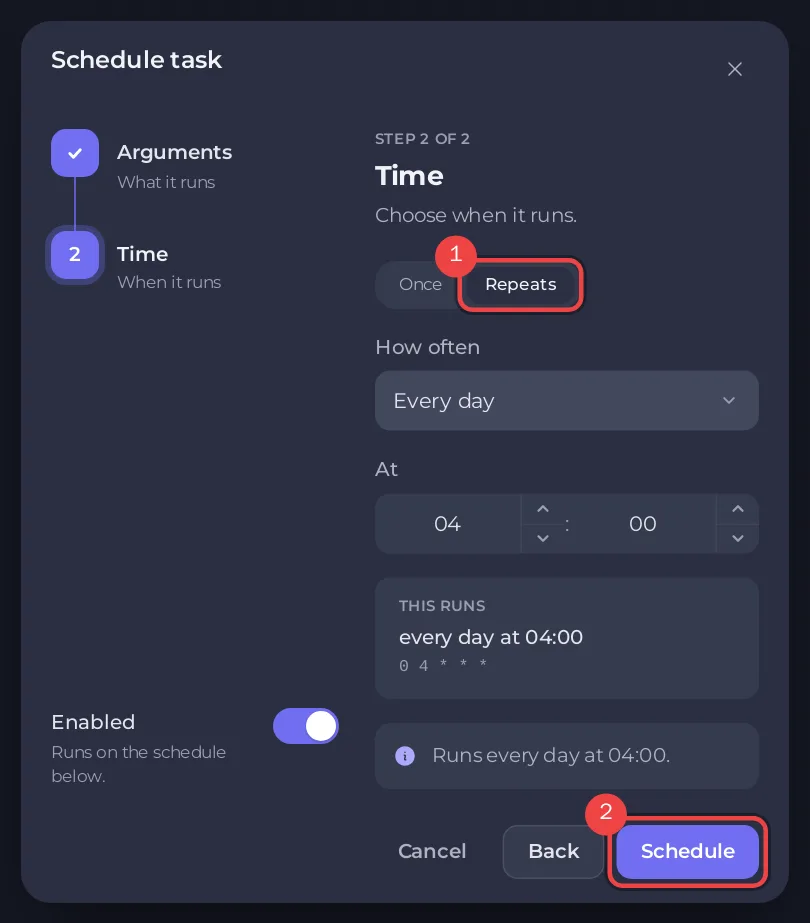
Daily restart, and click Next step. - Choose Repeats, set How often to Every day, and set the time under At. The window says what time that is where you are.
- Keep Enabled on and click Schedule.
The schedule has three steps: a warning 60 seconds before, a warning 10 seconds before, and the restart.
Skip it while people play
- Under Schedules, open your restart schedule.
- Switch on Skip while players are online.
- Under When players are online, choose Skip that run, or a wait such as
Wait up to 2 hours for the server to empty.
With a wait, the panel looks again every 5 minutes, restarts as soon as nobody is on, and restarts anyway when the wait is over. If the server cannot report its players, the schedule runs.
Switch it off, test it or delete it
- The switch on the schedule turns it off or on.
- Run now in its menu runs it at once, warnings included, so you can test it.
- Delete schedule in its menu removes it.
A schedule's time cannot be changed once it is made. For another time, build a new one and delete the old one.
Good to know
- Restart with Warning run by hand does not work while the server is stopped: there is nobody to warn.
- Put a Backup Server schedule a few minutes before the restart if you want a backup at the same hour. The Automatic backup already runs every night: How to set up automatic backups on your Minecraft server.
- Every part of the page: How to use Quick Tasks on your Minecraft server.


