

Game rules are switches and numbers stored in your Minecraft world, such as keep inventory, PvP, mob griefing and the day and night cycle. Change them on the Settings tab under Game Rules, click Save, and they apply straight away, with no restart.
Open Game Rules
- Open your server in the panel and click the Settings tab.
- In the left card, under Config files, click Game Rules. It is listed once your server has a world, so start the server once on a new server.
- To find a rule, type in the box at the top. It says
Searchand how many rules your world has, for exampleSearch 58 rules, and it matches names, keys and descriptions.
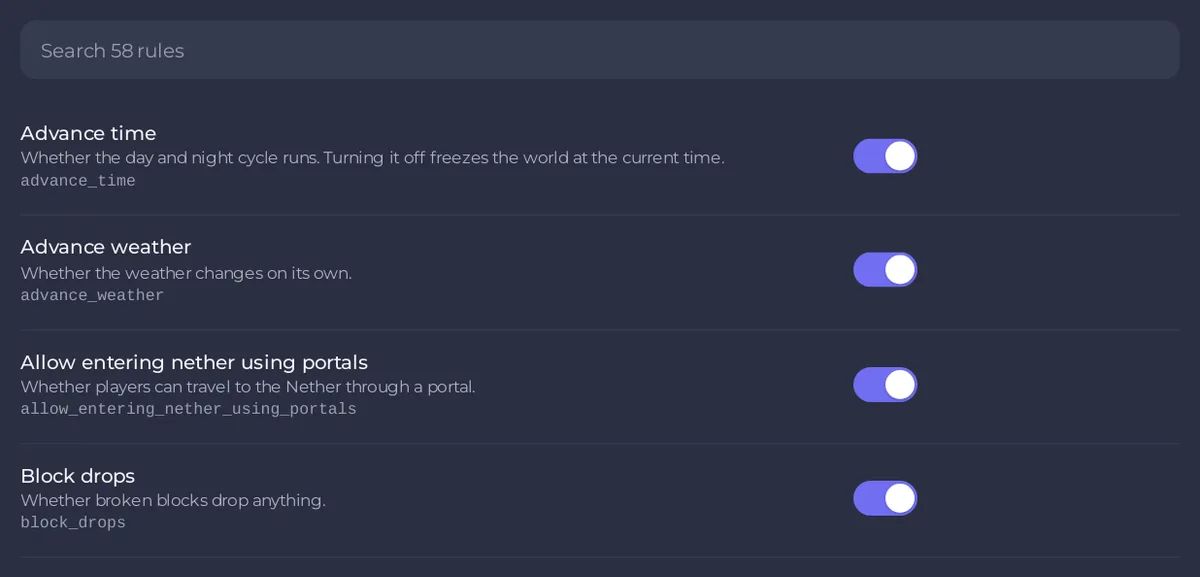
Each rule shows its name, a short description and its key in small letters, such as keep_inventory. A rule that is on or off has a switch. A rule that takes a number has a box.
Change a rule
- Flip the switch or type the number.
- The page counts your unsaved changes. Revert throws them away.
- Click Save. The page says
Game rules saved.
While the server runs, the panel sends the change to the game, so it applies at once. While it is stopped, the change is written into the world and applies when it starts. You need the Read contents permission to see the rules and Edit and rename to save them.
Rules people change most
The names below are those the page shows on Minecraft 1.21.11 and newer. Older versions name some rules differently, for example keepInventory and doDaylightCycle instead of keep_inventory and advance_time, so search for a word of the old name, such as daylight.
- Keep inventory (
keep_inventory): players keep their items and experience when they die. Off by default. See How to turn on keep inventory on your Minecraft server. - Pvp (
pvp): whether players can damage each other. On by default. See How to turn PvP on or off on your Minecraft server. - Command blocks work (
command_blocks_work): whether command blocks function at all. See How to turn on command blocks on your Minecraft server. - Mob griefing (
mob_griefing): whether mobs change the world: creepers blowing holes, endermen moving blocks, zombies breaking doors. - Advance time (
advance_time): whether the day and night cycle runs. Off freezes the world at the current time. - Advance weather (
advance_weather): whether the weather changes on its own. - Players sleeping percentage (
players_sleeping_percentage): the share of players who must sleep to skip the night. 100 by default. 0 lets one player skip it. - Spawn mobs (
spawn_mobs) and Spawn monsters (spawn_monsters): whether mobs, or only hostile mobs, spawn naturally. - Allow entering nether using portals (
allow_entering_nether_using_portals): whether players can travel to the Nether. - Show death messages (
show_death_messages) and Show advancement messages (show_advancement_messages): whether deaths and advancements are announced in chat. - Random tick speed (
random_tick_speed): how fast crops grow and leaves decay. 3 is normal, and large values overload the server. - Immediate respawn (
immediate_respawn): players respawn without the death screen.
With the gamerule command
You can also type the command in the Console, without a slash:
gamerule keep_inventory true
gamerule players_sleeping_percentage 50
In the game, operators of level 2 or more type it with a slash. Typing gamerule and a rule name without a value shows its current value. On Minecraft versions before 1.21.11, rules have camelCase names such as keepInventory: use the key the Game Rules page shows for your server.
If the page is empty or will not load
- Game Rules is not in the list: the server has no world yet. Start it once and let it finish starting.
- Could not load the game rules with
No game rules have been written yet.: the world has not been saved yet. Start the server, wait for theDoneline in the Console, then open the page again.
Good to know
- Game rules belong to the world. A new world starts with Minecraft's defaults, and switching to another world brings that world's rules.
- Some settings that used to be in Server Properties (Java), like PvP and command blocks, are game rules on Minecraft 1.21.9 and newer. See Minecraft server properties explained.
- Every save is recorded in Activity, with the names of the rules you changed.


