

On Minecraft 1.21.9 and newer, command blocks are controlled by a game rule that is on by default: check Command blocks work under Settings, Game Rules. On older versions they are off by default: switch Command blocks on in Server Properties (Java) and restart.
Recent versions: the game rule
- Open your server in the panel and click the Settings tab.
- Under Config files, click Game Rules.
- Type
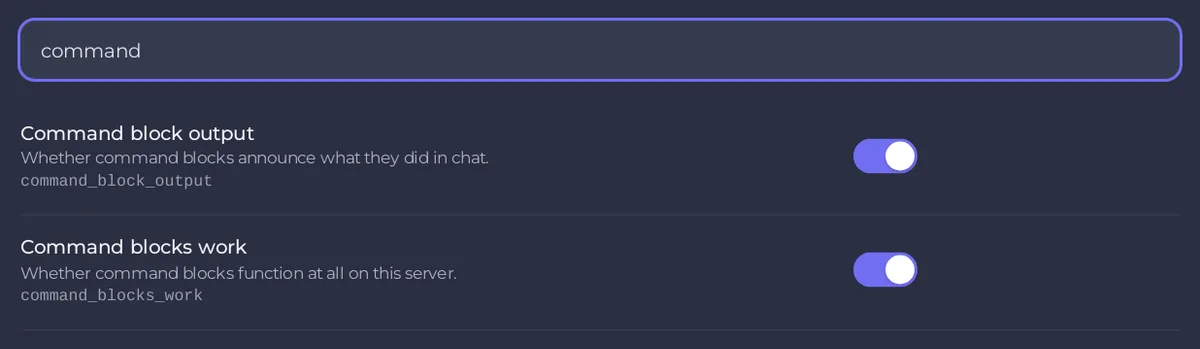
commandin the search box at the top. - Make sure Command blocks work is on. Its key is
command_blocks_work. On Minecraft 1.21.9 and 1.21.10 the same rule is called Command blocks enabled (commandBlocksEnabled). - If you changed it, click Save. It applies at once.
In the Console: gamerule command_blocks_work true (on 1.21.9 and 1.21.10: gamerule commandBlocksEnabled true).
The rule Command block output next to it decides whether command blocks announce what they did in chat.
Older versions: the switch
- Open the Settings tab and click Server Properties (Java).
- Switch Command blocks on.
- Click Save & restart.
The page only shows the settings your version has, so you see either the switch or the game rule.
Placing and editing command blocks
Command blocks cannot be obtained in survival without commands. Only an operator in creative mode can place, break or edit them, and on a server the operator needs level 2 or more:
- Make the player an operator: How to op yourself and manage permissions on your Minecraft server.
- In the game, type
/gamemode creative, then/give @s minecraft:command_block.
Commands inside a command block run at permission level 2.
Good to know
- More rules: How to change game rules on your Minecraft server.


