

To turn on RCON for a Factorio server on PlayNHost, open Settings, Game Settings, check that RCON Port has a number, set an RCON Password, switch RCON Enabled? on, and restart. New Factorio servers come with a second port for RCON, already in RCON Port. You only need RCON for outside tools such as a Discord bot; the panel Console works without it.
Turn it on
- Open your server in the panel and click the Settings tab above the page, then Game Settings.
- Look at RCON Port. New Factorio servers come with a second port, and its number is already there. Leave it as it is.
- Enter an RCON Password: up to 64 characters, letters, numbers and
! @ # % ^ ( ) _ + = . , : -. Spaces and quotes are refused. - Switch RCON Enabled? on.
- Restart the server.
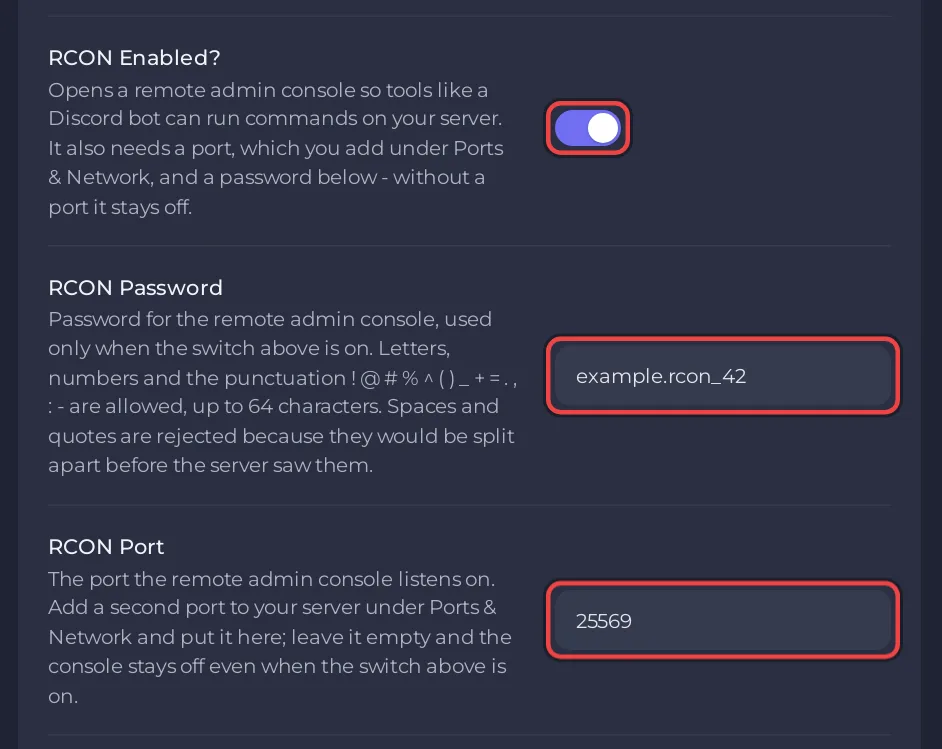
Your tool connects to the server's IP, the number in RCON Port and the password. Keep the password private: anyone with it can run admin commands.
Why does RCON stay off?
The server only opens RCON when all three are set: RCON Enabled? on, a port in RCON Port, and a password. Never enter the game port from Server Address in RCON Port.
What if RCON Port is empty?
Then your server has no port for RCON yet. Open a ticket and ask for one. To check which port RCON uses, click Ports & Network in the left menu: the RCON Port number is the second row under All ports. More about ports: Factorio ports and firewall explained.
Related: How to use the Console on your Factorio server, Factorio server settings: every option explained.


