%7B.s%7Banimation%3Ab%201.5s%20ease-out%20both%7D.d%7Banimation-delay%3A.16s%7D%7D%40keyframes%20b%7B0%25%7Bfill%3A%23F4F6FA%7D18%25%7Bfill%3A%23FFE08A%7D34%25%2C70%25%7Bfill%3A%23FF8A1F%7D80%25%7Bfill%3A%23FFE08A%7D100%25%7Bfill%3A%23FF8A1F%7D%7D%3C%2Fstyle%3E%3Cg%20transform%3D%22translate(143%20428.93)%20scale(3.885906)%22%3E%3Cg%20transform%3D%22translate(0%202)%22%20fill%3D%22%23706EF0%22%3E%3Cpath%20d%3D%22M0%200%20H48%20A40%2040%200%200%201%2048%2080%20V100%20H0%20Z%22%2F%3E%3Cpath%20transform%3D%22translate(91.75%200)%22%20d%3D%22M0%200%20L48%200%20L48%2050%20L76%2050%20L76%20100%20L0%20100%20Z%22%2F%3E%3Cpath%20transform%3D%22translate(173%200)%22%20d%3D%22M0%20100%20L58%20-4%20L116%20100%20Z%22%2F%3E%3Cpath%20transform%3D%22translate(264.25%200)%22%20d%3D%22M0%200%20L104%200%20L76%2050%20L76%20100%20L28%20100%20L28%2050%20Z%22%2F%3E%3Cg%20transform%3D%22translate(375%200)%22%3E%3Cpath%20d%3D%22M0%200%20L50%2038%20L50%200%20L100%200%20L100%20100%20L0%20100%20Z%22%20fill%3D%22%23F4F6FA%22%2F%3E%3Crect%20class%3D%22s%22%20x%3D%2247%22%20y%3D%2263%22%20width%3D%2219%22%20height%3D%2230%22%2F%3E%3Crect%20class%3D%22s%20d%22%20x%3D%2274%22%20y%3D%2263%22%20width%3D%2219%22%20height%3D%2230%22%2F%3E%3C%2Fg%3E%3Cpath%20transform%3D%22translate(484.75%200)%22%20d%3D%22M0%200%20L48%200%20L48%2037%20L52%2037%20L52%200%20L100%200%20L100%20100%20L52%20100%20L52%2063%20L48%2063%20L48%20100%20L0%20100%20Z%22%2F%3E%3Cpath%20transform%3D%22translate(588.5%200)%22%20d%3D%22M0%2050%20A53%2053%200%201%200%20106%2050%20A53%2053%200%201%200%200%2050%20Z%22%2F%3E%3Cpath%20transform%3D%22translate(698.25%200)%22%20d%3D%22M25%200%20H102%20V50%20H77%20A25%2025%200%200%201%2077%20100%20H0%20V50%20H25%20A25%2025%200%200%201%2025%200%20Z%22%2F%3E%3Cpath%20transform%3D%22translate(804%200)%22%20d%3D%22M0%200%20L90%200%20L90%2050%20L69%2050%20L69%20100%20L21%20100%20L21%2050%20L0%2050%20Z%22%2F%3E%3C%2Fg%3E%3C%2Fg%3E%3C%2Fsvg%3E)


Pick the preset under Settings, Gameplay Settings, Difficulty, then click Save & restart. The server restarts and uses the new difficulty.
Change the preset
- Open your server in the panel and click the Settings tab.
- Under Config files, click Gameplay Settings.
- Find the Difficulty heading and open Difficulty preset.
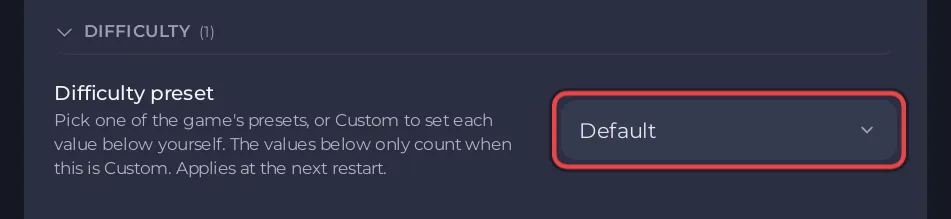
- Choose Default, Relaxed, Hard, Survival or Custom: use the settings below.
- Click Save & restart to apply now, or Save only to apply at the next restart.
Tell your players before you restart.
What each preset does
These descriptions come from Keen Games, the developer:
| Preset | What it does |
|---|---|
| Default | Sets every value to the game's default. Keen Games recommends it for players who are new to the game. |
| Relaxed | Reduces the number of enemies and gives players more resources and loot. |
| Hard | Increases the number of enemies and makes them more aggressive. |
| Survival | For players who want some punishment, with additional survival mechanics. |
| Custom | Lets you set each value yourself. |
Keen Games' settings guide does not list the exact numbers behind each preset.
Make Hard harder or softer
The values under the three Custom difficulty headings count only when the preset is Custom. With any other preset, the game ignores them.
When you switch to Custom, those values start at the game's normal setting, which is 1 for most multipliers. They do not start at what Hard uses. So to build your own hard game, set each value yourself:
- Players: health, stamina, starving, experience.
- World: weather, resources, day and night length, curse.
- Enemies: how many, how hard they hit, how aggressive.
Good to know
- A new server uses Default.
- The difficulty applies to the world you play on the server. Characters stay on each player's computer and are not changed.
- A value outside the allowed range is refused by the page, and the page says why.
- Every option is listed in Enshrouded server settings reference.





