

To change the difficulty of your ARK: Survival Ascended server, stop it, open Game User Settings on the Settings tab and use the Difficulty group. Set Official difficulty override to 5 for wild creatures up to level 150, as on official servers, then click Save & start.
Change the difficulty
- Open your server in the panel and click Stop. Wait for Offline.
- Click the Settings tab, then Game User Settings under Config files.
- Open the Difficulty group.
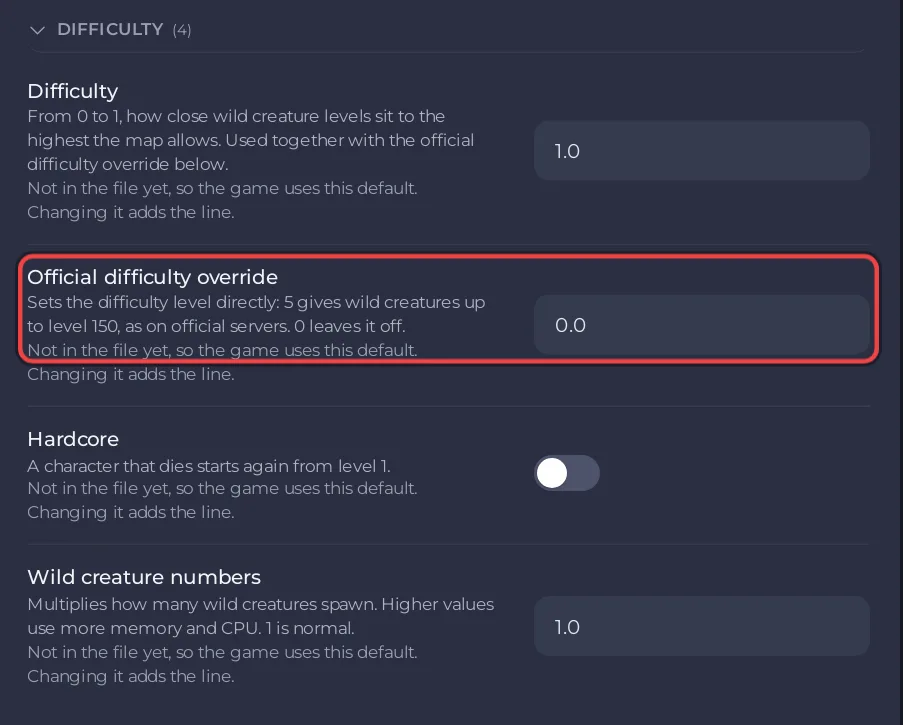
- Change the values and click Save & start.
The Difficulty group
| Setting | What the panel says | Default |
|---|---|---|
| Difficulty | From 0 to 1, how close wild creature levels sit to the highest the map allows. Used together with the official difficulty override. | 1.0 |
| Official difficulty override | Sets the difficulty level directly: 5 gives wild creatures up to level 150, as on official servers. 0 leaves it off. | 0.0 |
| Hardcore | A character that dies starts again from level 1. | off |
| Wild creature numbers | Multiplies how many wild creatures spawn. Higher values use more memory and CPU. | 1.0 |
Good to know
- To have every wild creature spawn again under the new settings, run Respawn Wild Dinos after the restart: How to respawn wild dinos on your ARK: Survival Ascended server.
- More wild creatures means more memory used: Why is my ARK: Survival Ascended server lagging?
- Damage and survival needs are in their own group: How to change damage, hunger and thirst on your ARK: Survival Ascended server.
- The labels and defaults follow the ARK wiki.


