%7B.s%7Banimation%3Ab%201.5s%20ease-out%20both%7D.d%7Banimation-delay%3A.16s%7D%7D%40keyframes%20b%7B0%25%7Bfill%3A%23F4F6FA%7D18%25%7Bfill%3A%23FFE08A%7D34%25%2C70%25%7Bfill%3A%23FF8A1F%7D80%25%7Bfill%3A%23FFE08A%7D100%25%7Bfill%3A%23FF8A1F%7D%7D%3C%2Fstyle%3E%3Cg%20transform%3D%22translate(143%20428.93)%20scale(3.885906)%22%3E%3Cg%20transform%3D%22translate(0%202)%22%20fill%3D%22%23706EF0%22%3E%3Cpath%20d%3D%22M0%200%20H48%20A40%2040%200%200%201%2048%2080%20V100%20H0%20Z%22%2F%3E%3Cpath%20transform%3D%22translate(91.75%200)%22%20d%3D%22M0%200%20L48%200%20L48%2050%20L76%2050%20L76%20100%20L0%20100%20Z%22%2F%3E%3Cpath%20transform%3D%22translate(173%200)%22%20d%3D%22M0%20100%20L58%20-4%20L116%20100%20Z%22%2F%3E%3Cpath%20transform%3D%22translate(264.25%200)%22%20d%3D%22M0%200%20L104%200%20L76%2050%20L76%20100%20L28%20100%20L28%2050%20Z%22%2F%3E%3Cg%20transform%3D%22translate(375%200)%22%3E%3Cpath%20d%3D%22M0%200%20L50%2038%20L50%200%20L100%200%20L100%20100%20L0%20100%20Z%22%20fill%3D%22%23F4F6FA%22%2F%3E%3Crect%20class%3D%22s%22%20x%3D%2247%22%20y%3D%2263%22%20width%3D%2219%22%20height%3D%2230%22%2F%3E%3Crect%20class%3D%22s%20d%22%20x%3D%2274%22%20y%3D%2263%22%20width%3D%2219%22%20height%3D%2230%22%2F%3E%3C%2Fg%3E%3Cpath%20transform%3D%22translate(484.75%200)%22%20d%3D%22M0%200%20L48%200%20L48%2037%20L52%2037%20L52%200%20L100%200%20L100%20100%20L52%20100%20L52%2063%20L48%2063%20L48%20100%20L0%20100%20Z%22%2F%3E%3Cpath%20transform%3D%22translate(588.5%200)%22%20d%3D%22M0%2050%20A53%2053%200%201%200%20106%2050%20A53%2053%200%201%200%200%2050%20Z%22%2F%3E%3Cpath%20transform%3D%22translate(698.25%200)%22%20d%3D%22M25%200%20H102%20V50%20H77%20A25%2025%200%200%201%2077%20100%20H0%20V50%20H25%20A25%2025%200%200%201%2025%200%20Z%22%2F%3E%3Cpath%20transform%3D%22translate(804%200)%22%20d%3D%22M0%200%20L90%200%20L90%2050%20L69%2050%20L69%20100%20L21%20100%20L21%2050%20L0%2050%20Z%22%2F%3E%3C%2Fg%3E%3C%2Fg%3E%3C%2Fsvg%3E)


Four options in Settings, Game Settings control how often Valheim saves your world and how many automatic copies of it the game keeps. Those copies are the Automatic copy entries you can rewind to on the Worlds page. They are separate from the Backups page of the panel, which holds copies you can download and restore.
The four options
| Option | What it does | Default |
|---|---|---|
| World Save Interval | How often the world is saved, in seconds. At least 60. | 1800, which is 30 minutes |
| Backup Count | How many automatic copies the game keeps. | 4 |
| Backup Shorttime | Seconds between the first automatic copies. | 7200, which is 2 hours |
| Backup Longtime | Seconds between the later automatic copies. | 43200, which is 12 hours |
With the defaults, the game keeps one copy that is about 2 hours old and three copies that are 12 hours apart.
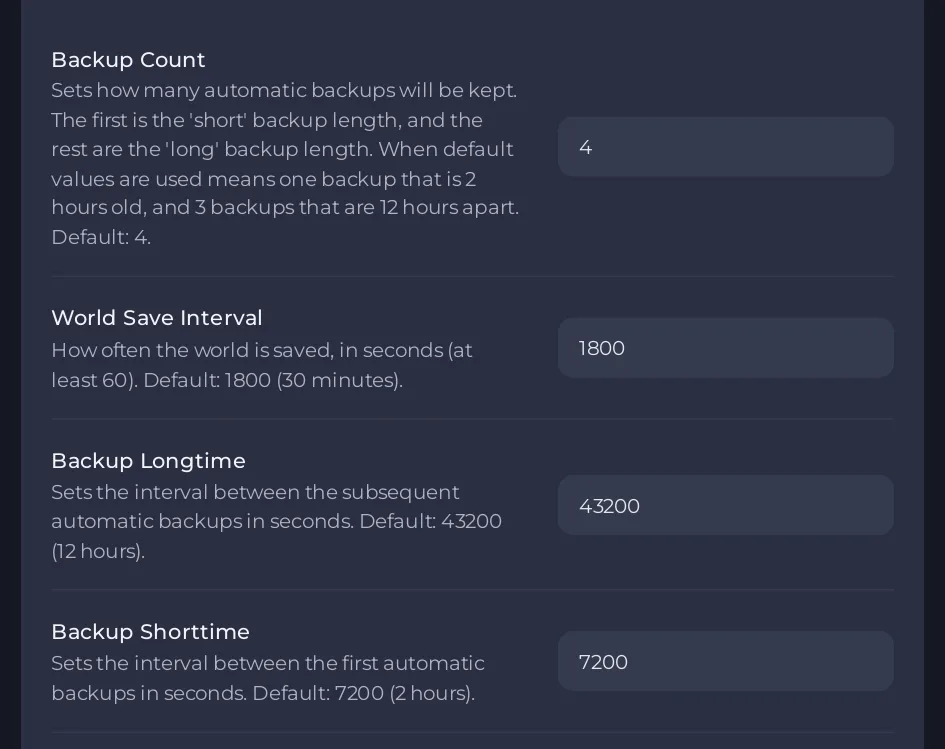
Change them
- Open your server in the panel and click Settings, then Game Settings.
- Click the option, type a whole number, then click outside the field or press Enter.
- Restart the server so the new numbers are used.
Where the copies show
On the Worlds page, the Rewind card of each world lists its copies as Automatic copy, with their time and size, and the text under the card title reads back your settings: how many copies the game keeps and how far apart. The first copy comes after the server has run 20 minutes. With Backup Count set to 1 or 0, the page says the game keeps no copies: set it to 2 or more to have copies to rewind to. See How to rewind your Valheim world to an earlier copy.
What this means for you
- The world is saved on the timer and when the server stops normally. If the server is killed, you lose what happened since the last save. A shorter World Save Interval means less to lose. See Valheim progress was lost after a crash or a stop.
- The copies sit next to the world on the server. Deleting a world on the Worlds page deletes its copies too.
- They are not a replacement for the panel's backups. A panel backup is stored away from the server and you can download it. See How to back up and restore your Valheim world.





