%7B.s%7Banimation%3Ab%201.5s%20ease-out%20both%7D.d%7Banimation-delay%3A.16s%7D%7D%40keyframes%20b%7B0%25%7Bfill%3A%23F4F6FA%7D18%25%7Bfill%3A%23FFE08A%7D34%25%2C70%25%7Bfill%3A%23FF8A1F%7D80%25%7Bfill%3A%23FFE08A%7D100%25%7Bfill%3A%23FF8A1F%7D%7D%3C%2Fstyle%3E%3Cg%20transform%3D%22translate(143%20428.93)%20scale(3.885906)%22%3E%3Cg%20transform%3D%22translate(0%202)%22%20fill%3D%22%23706EF0%22%3E%3Cpath%20d%3D%22M0%200%20H48%20A40%2040%200%200%201%2048%2080%20V100%20H0%20Z%22%2F%3E%3Cpath%20transform%3D%22translate(91.75%200)%22%20d%3D%22M0%200%20L48%200%20L48%2050%20L76%2050%20L76%20100%20L0%20100%20Z%22%2F%3E%3Cpath%20transform%3D%22translate(173%200)%22%20d%3D%22M0%20100%20L58%20-4%20L116%20100%20Z%22%2F%3E%3Cpath%20transform%3D%22translate(264.25%200)%22%20d%3D%22M0%200%20L104%200%20L76%2050%20L76%20100%20L28%20100%20L28%2050%20Z%22%2F%3E%3Cg%20transform%3D%22translate(375%200)%22%3E%3Cpath%20d%3D%22M0%200%20L50%2038%20L50%200%20L100%200%20L100%20100%20L0%20100%20Z%22%20fill%3D%22%23F4F6FA%22%2F%3E%3Crect%20class%3D%22s%22%20x%3D%2247%22%20y%3D%2263%22%20width%3D%2219%22%20height%3D%2230%22%2F%3E%3Crect%20class%3D%22s%20d%22%20x%3D%2274%22%20y%3D%2263%22%20width%3D%2219%22%20height%3D%2230%22%2F%3E%3C%2Fg%3E%3Cpath%20transform%3D%22translate(484.75%200)%22%20d%3D%22M0%200%20L48%200%20L48%2037%20L52%2037%20L52%200%20L100%200%20L100%20100%20L52%20100%20L52%2063%20L48%2063%20L48%20100%20L0%20100%20Z%22%2F%3E%3Cpath%20transform%3D%22translate(588.5%200)%22%20d%3D%22M0%2050%20A53%2053%200%201%200%20106%2050%20A53%2053%200%201%200%200%2050%20Z%22%2F%3E%3Cpath%20transform%3D%22translate(698.25%200)%22%20d%3D%22M25%200%20H102%20V50%20H77%20A25%2025%200%200%201%2077%20100%20H0%20V50%20H25%20A25%2025%200%200%201%2025%200%20Z%22%2F%3E%3Cpath%20transform%3D%22translate(804%200)%22%20d%3D%22M0%200%20L90%200%20L90%2050%20L69%2050%20L69%20100%20L21%20100%20L21%2050%20L0%2050%20Z%22%2F%3E%3C%2Fg%3E%3C%2Fg%3E%3C%2Fsvg%3E)


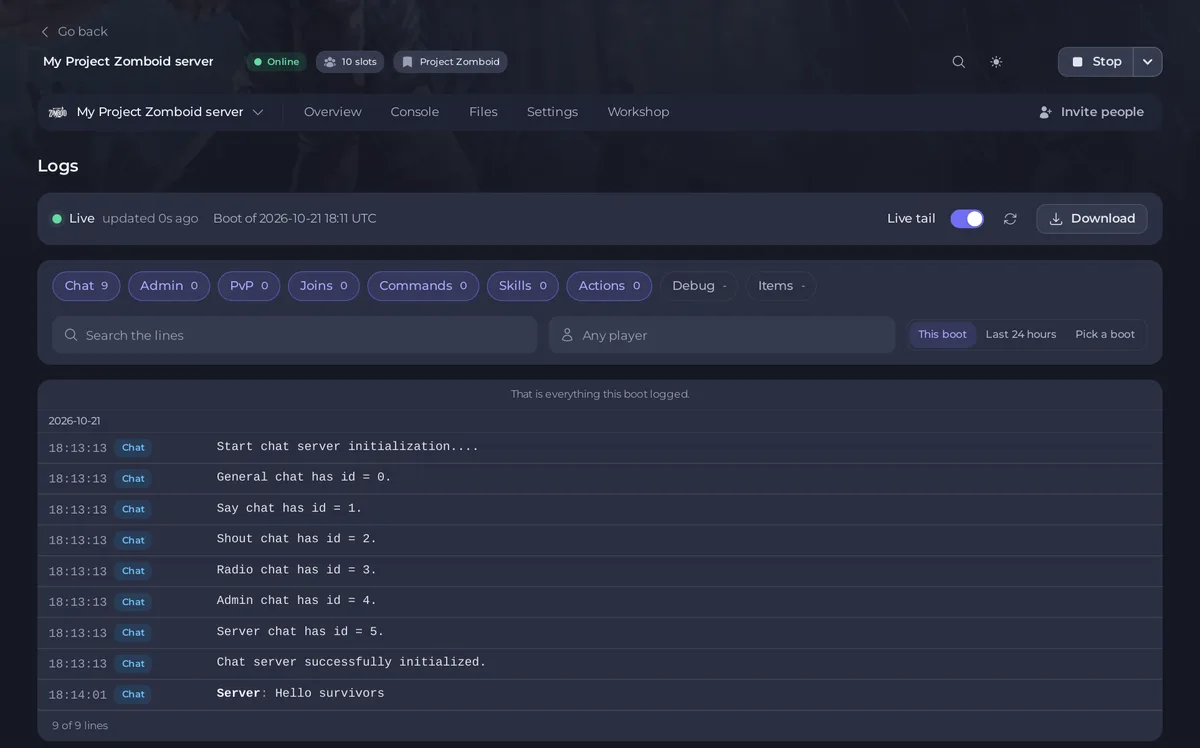
Click Logs in the left menu to read the log files Project Zomboid writes for each kind of event: chat, admin actions, PvP, joins, commands, skills, actions and more. Turn kinds on and off with the buttons at the top, search the lines, pick a player or a boot, and download a file. With Live tail on, new lines appear as the game writes them.
Open the page
- Open your server in the panel and click Logs in the left menu.
- The bar at the top says Live, when it was updated, and which boot you are reading, for example "Boot of" a date and time in UTC.
- The lines show below, newest at the bottom, each with its time and its kind.
Choose what you see
- The kinds: Chat, Admin, PvP, Joins, Commands, Skills, Actions, Debug and Items. Each button shows how many lines it has. Click a button to turn that kind on or off. "Debug and Items are large. They are read in 256 KB pieces, newest first."
- Search the lines finds a word.
- Any player narrows the lines to one player. Clear player shows everyone again.
- This boot, Last 24 hours or Pick a boot. The game starts a new set of logs each time the server starts. After a restart the page says "The server restarted. Showing its new boot."
- Load older lines reads further back. "That is everything this boot logged." means you reached the start.
On a line, the link "Open <name> in Players" opens that player on the Players page, and "Open on the live map" shows the spot where it happened.
Download a log
Click Download and choose the kind. Only kinds that are turned on are offered: "Turn on a kind of log to download its file." The file is the game's own log of that kind for the boot you are reading.
What each kind is for
| Kind | Use it to |
|---|---|
| Chat | Read what was said in the game's chat. |
| Admin | See kicks, bans, access level changes and other admin commands. Passwords are never shown. |
| PvP | See who hit or killed whom, when PvP is on. |
| Joins | See who connected and left, and when. |
| Commands, Actions, Skills, Items | Follow what players did in the game. |
| Debug | The game's own technical log, for support. |
Good to know
- Times are the game's clock, which on our servers is UTC.
- The page needs the permission to read file contents. Player links and SteamIDs also need console access.
- Before the first start the page says "This server has not started yet": the game writes its logs the first time it starts.
- A file too big to show here says "A file is too large to read here. Download it instead."
- The console of the server, with the start and stop lines, is a different place: How to use the Console on your Project Zomboid server.





