%7B.s%7Banimation%3Ab%201.5s%20ease-out%20both%7D.d%7Banimation-delay%3A.16s%7D%7D%40keyframes%20b%7B0%25%7Bfill%3A%23F4F6FA%7D18%25%7Bfill%3A%23FFE08A%7D34%25%2C70%25%7Bfill%3A%23FF8A1F%7D80%25%7Bfill%3A%23FFE08A%7D100%25%7Bfill%3A%23FF8A1F%7D%7D%3C%2Fstyle%3E%3Cg%20transform%3D%22translate(143%20428.93)%20scale(3.885906)%22%3E%3Cg%20transform%3D%22translate(0%202)%22%20fill%3D%22%23706EF0%22%3E%3Cpath%20d%3D%22M0%200%20H48%20A40%2040%200%200%201%2048%2080%20V100%20H0%20Z%22%2F%3E%3Cpath%20transform%3D%22translate(91.75%200)%22%20d%3D%22M0%200%20L48%200%20L48%2050%20L76%2050%20L76%20100%20L0%20100%20Z%22%2F%3E%3Cpath%20transform%3D%22translate(173%200)%22%20d%3D%22M0%20100%20L58%20-4%20L116%20100%20Z%22%2F%3E%3Cpath%20transform%3D%22translate(264.25%200)%22%20d%3D%22M0%200%20L104%200%20L76%2050%20L76%20100%20L28%20100%20L28%2050%20Z%22%2F%3E%3Cg%20transform%3D%22translate(375%200)%22%3E%3Cpath%20d%3D%22M0%200%20L50%2038%20L50%200%20L100%200%20L100%20100%20L0%20100%20Z%22%20fill%3D%22%23F4F6FA%22%2F%3E%3Crect%20class%3D%22s%22%20x%3D%2247%22%20y%3D%2263%22%20width%3D%2219%22%20height%3D%2230%22%2F%3E%3Crect%20class%3D%22s%20d%22%20x%3D%2274%22%20y%3D%2263%22%20width%3D%2219%22%20height%3D%2230%22%2F%3E%3C%2Fg%3E%3Cpath%20transform%3D%22translate(484.75%200)%22%20d%3D%22M0%200%20L48%200%20L48%2037%20L52%2037%20L52%200%20L100%200%20L100%20100%20L52%20100%20L52%2063%20L48%2063%20L48%20100%20L0%20100%20Z%22%2F%3E%3Cpath%20transform%3D%22translate(588.5%200)%22%20d%3D%22M0%2050%20A53%2053%200%201%200%20106%2050%20A53%2053%200%201%200%200%2050%20Z%22%2F%3E%3Cpath%20transform%3D%22translate(698.25%200)%22%20d%3D%22M25%200%20H102%20V50%20H77%20A25%2025%200%200%201%2077%20100%20H0%20V50%20H25%20A25%2025%200%200%201%2025%200%20Z%22%2F%3E%3Cpath%20transform%3D%22translate(804%200)%22%20d%3D%22M0%200%20L90%200%20L90%2050%20L69%2050%20L69%20100%20L21%20100%20L21%2050%20L0%2050%20Z%22%2F%3E%3C%2Fg%3E%3C%2Fg%3E%3C%2Fsvg%3E)


The Zombies group sets what the dead are like: how fast they move, how hard they hit, what they can see and hear, how the infection works and what they can break. How many zombies there are is Zombie Population under Game Settings, not here: How to change zombie population, respawn and loot respawn on your Project Zomboid server.
Open the editor
- Open your server in the panel and click the Settings tab.
- In the list on the left, under Config files, click Sandbox Settings. The file name is shown at the top.
- If the list says No config files yet, start the server once. The game writes its sandbox file the first time it runs.
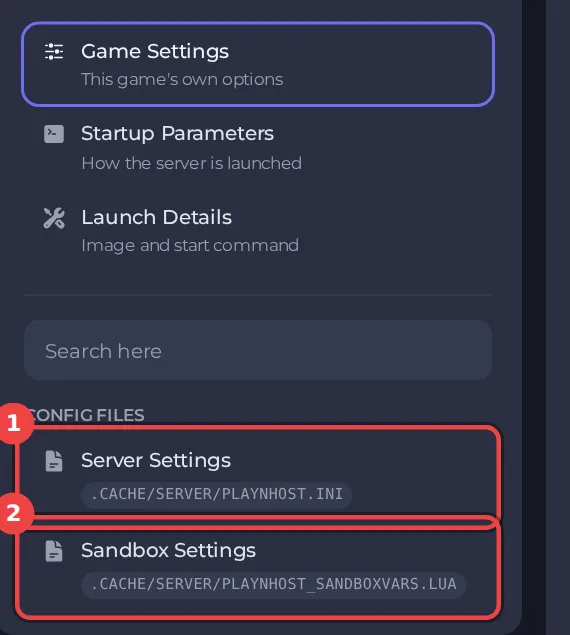
The editor only saves while the server is stopped. Stop the server, change the settings below, then click Save only or Save & start. The full steps are in How to change Project Zomboid sandbox settings in the panel. Headings such as Zombies appear in capitals in the editor. The editor shows Build 42 files only: on a Build 41 server it opens with a message that the file is from a different build, see Project Zomboid Sandbox Settings says the file is from a different build.
Every setting in Zombies
| Setting | What it does | Values | A new server starts with |
|---|---|---|---|
| Speed | How fast zombies move. | Sprinters, Fast Shamblers, Shamblers, Random | Random |
| Sprinters with random speed (%) | With Speed set to Random, the percentage of zombies that are sprinters. | A whole number from 0 to 100 | 0 |
| Strength | The damage zombies inflict per attack. | Superhuman, Normal, Weak, Random | Normal |
| Toughness | The difficulty of killing a zombie. | Tough, Normal, Fragile, Random | Random |
| How the infection spreads | How the Knox Virus spreads. | Blood and Saliva, Saliva Only, Everyone's Infected, None | Blood and Saliva |
| Time from infection to death | How quickly the infection takes effect. | Instant, 0-30 Seconds, 0-1 Minutes, 0-12 Hours, 2-3 Days, 1-2 Weeks, Never | 2-3 Days |
| Time from death to rising | How quickly infected corpses rise as zombies. | Instant, 0-30 Seconds, 0-1 Minutes, 0-12 Hours, 2-3 Days, 1-2 Weeks | 0-1 Minutes |
| Intelligence | Zombie intelligence. | Navigate and Use Doors, Navigate, Basic Navigation, Random | Basic Navigation |
| Memory | How long zombies remember a player after seeing or hearing them. | Long, Normal, Short, None, Random, Random between Normal and None | Normal |
| Sight | Zombie vision radius. | Eagle, Normal, Poor, Random, Random between Normal and Poor | Random between Normal and Poor |
| Hearing | Zombie hearing radius. | Pinpoint, Normal, Poor, Random, Random between Normal and Poor | Random between Normal and Poor |
| Active during | Whether zombies are more "active" during the day or night. "Active" zombies will use the speed set in the "Speed" setting. "Inactive" zombies will be slower, and tend not to give chase. | Both, Night, Day | Both |
| Crawl under cars | How often zombies can crawl under parked vehicles. | Crawlers Only, Extremely Rare, Rare, Sometimes, Often, Very Often, Always | Often |
| Break player buildings | If zombies can destroy player constructions and defenses. | On or off | On |
| Set off house alarms | If zombies trigger house alarms when breaking through windows or doors. | On or off | On |
| Drag players down | If multiple attacking zombies can drag you down and kill you. Dependent on zombie strength. | On or off | On |
| Fake dead zombies | Whether some dead-looking zombies will reanimate and attack the player. | World Zombies, World and Combat Zombies, Never | World Zombies |
| Distribution | How zombies are distributed across the map. | Urban Focused, Uniform | Urban Focused |
| Migrate to empty areas | Zombies can wander into parts of the map that have been cleared. | On or off | On |
The settings that change difficulty most
- Speed (Sprinters, Fast Shamblers, Shamblers or Random), Strength and Toughness.
- Sight, Hearing and Memory decide how easily zombies find and follow a player.
- How the infection spreads, Time from infection to death and Time from death to rising decide how dangerous a bite is.
For a quick change to the whole difficulty, apply a preset first: How to choose a sandbox preset for your Project Zomboid server.
Good to know
- Most sandbox rules apply from the next start. A few, such as the start date and the months since the outbreak, only matter when a new world is created.
- Four sandbox values are not in this editor, because the panel writes them at every start: Zombie Population, Zombie Respawn, Loot Respawn (hours) and Banned Item IDs. They are under Settings, then Game Settings: How to change zombie population, respawn and loot respawn on your Project Zomboid server.
- The column "A new server starts with" shows the value a new server has before you change anything (the game's Apocalypse rules). If you applied a preset, your values differ: How to choose a sandbox preset for your Project Zomboid server.
- Back up first if the world has progress in it: How to back up and restore your Project Zomboid world.





