%7B.s%7Banimation%3Ab%201.5s%20ease-out%20both%7D.d%7Banimation-delay%3A.16s%7D%7D%40keyframes%20b%7B0%25%7Bfill%3A%23F4F6FA%7D18%25%7Bfill%3A%23FFE08A%7D34%25%2C70%25%7Bfill%3A%23FF8A1F%7D80%25%7Bfill%3A%23FFE08A%7D100%25%7Bfill%3A%23FF8A1F%7D%7D%3C%2Fstyle%3E%3Cg%20transform%3D%22translate(143%20428.93)%20scale(3.885906)%22%3E%3Cg%20transform%3D%22translate(0%202)%22%20fill%3D%22%23706EF0%22%3E%3Cpath%20d%3D%22M0%200%20H48%20A40%2040%200%200%201%2048%2080%20V100%20H0%20Z%22%2F%3E%3Cpath%20transform%3D%22translate(91.75%200)%22%20d%3D%22M0%200%20L48%200%20L48%2050%20L76%2050%20L76%20100%20L0%20100%20Z%22%2F%3E%3Cpath%20transform%3D%22translate(173%200)%22%20d%3D%22M0%20100%20L58%20-4%20L116%20100%20Z%22%2F%3E%3Cpath%20transform%3D%22translate(264.25%200)%22%20d%3D%22M0%200%20L104%200%20L76%2050%20L76%20100%20L28%20100%20L28%2050%20Z%22%2F%3E%3Cg%20transform%3D%22translate(375%200)%22%3E%3Cpath%20d%3D%22M0%200%20L50%2038%20L50%200%20L100%200%20L100%20100%20L0%20100%20Z%22%20fill%3D%22%23F4F6FA%22%2F%3E%3Crect%20class%3D%22s%22%20x%3D%2247%22%20y%3D%2263%22%20width%3D%2219%22%20height%3D%2230%22%2F%3E%3Crect%20class%3D%22s%20d%22%20x%3D%2274%22%20y%3D%2263%22%20width%3D%2219%22%20height%3D%2230%22%2F%3E%3C%2Fg%3E%3Cpath%20transform%3D%22translate(484.75%200)%22%20d%3D%22M0%200%20L48%200%20L48%2037%20L52%2037%20L52%200%20L100%200%20L100%20100%20L52%20100%20L52%2063%20L48%2063%20L48%20100%20L0%20100%20Z%22%2F%3E%3Cpath%20transform%3D%22translate(588.5%200)%22%20d%3D%22M0%2050%20A53%2053%200%201%200%20106%2050%20A53%2053%200%201%200%200%2050%20Z%22%2F%3E%3Cpath%20transform%3D%22translate(698.25%200)%22%20d%3D%22M25%200%20H102%20V50%20H77%20A25%2025%200%200%201%2077%20100%20H0%20V50%20H25%20A25%2025%200%200%201%2025%200%20Z%22%2F%3E%3Cpath%20transform%3D%22translate(804%200)%22%20d%3D%22M0%200%20L90%200%20L90%2050%20L69%2050%20L69%20100%20L21%20100%20L21%2050%20L0%2050%20Z%22%2F%3E%3C%2Fg%3E%3C%2Fg%3E%3C%2Fsvg%3E)


The Map group has four on or off switches for the in-game maps: the mini-map, the world map, a fully revealed map, and whether a map needs light to be read. Do not confuse it with map mods, which add new places: How to add a map mod to your Project Zomboid server.
Open the editor
- Open your server in the panel and click the Settings tab.
- In the list on the left, under Config files, click Sandbox Settings. The file name is shown at the top.
- If the list says No config files yet, start the server once. The game writes its sandbox file the first time it runs.
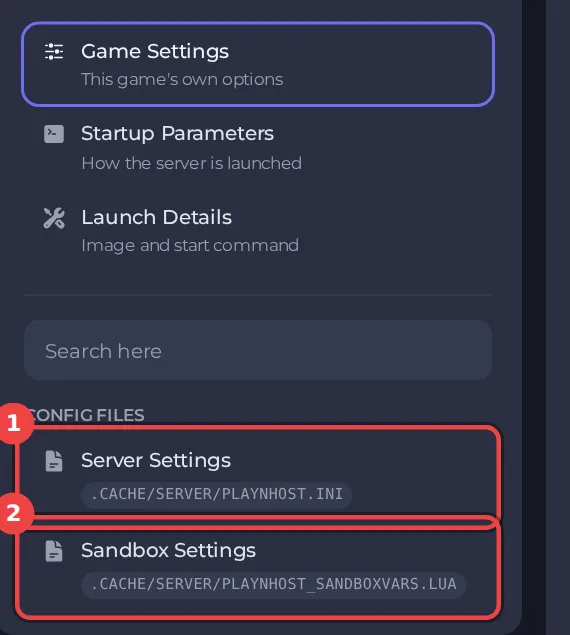
The editor only saves while the server is stopped. Stop the server, change the settings below, then click Save only or Save & start. The full steps are in How to change Project Zomboid sandbox settings in the panel. Headings such as Map appear in capitals in the editor. The editor shows Build 42 files only: on a Build 41 server it opens with a message that the file is from a different build, see Project Zomboid Sandbox Settings says the file is from a different build.
Every setting in Map
| Setting | What it does | Values | A new server starts with |
|---|---|---|---|
| Mini-map | If enabled, a mini-map window will be available. | On or off | Off |
| World map | If enabled, the world map can be accessed. | On or off | On |
| Whole map revealed | If enabled, the world map will be completely filled in on starting the game. | On or off | Off |
| Maps need light | If enabled, maps can't be read unless there's a source of light available. | On or off | On |
Good to know
- Most sandbox rules apply from the next start. A few, such as the start date and the months since the outbreak, only matter when a new world is created.
- Four sandbox values are not in this editor, because the panel writes them at every start: Zombie Population, Zombie Respawn, Loot Respawn (hours) and Banned Item IDs. They are under Settings, then Game Settings: How to change zombie population, respawn and loot respawn on your Project Zomboid server.
- The column "A new server starts with" shows the value a new server has before you change anything (the game's Apocalypse rules). If you applied a preset, your values differ: How to choose a sandbox preset for your Project Zomboid server.
- Back up first if the world has progress in it: How to back up and restore your Project Zomboid world.





