%7B.s%7Banimation%3Ab%201.5s%20ease-out%20both%7D.d%7Banimation-delay%3A.16s%7D%7D%40keyframes%20b%7B0%25%7Bfill%3A%23F4F6FA%7D18%25%7Bfill%3A%23FFE08A%7D34%25%2C70%25%7Bfill%3A%23FF8A1F%7D80%25%7Bfill%3A%23FFE08A%7D100%25%7Bfill%3A%23FF8A1F%7D%7D%3C%2Fstyle%3E%3Cg%20transform%3D%22translate(143%20428.93)%20scale(3.885906)%22%3E%3Cg%20transform%3D%22translate(0%202)%22%20fill%3D%22%23706EF0%22%3E%3Cpath%20d%3D%22M0%200%20H48%20A40%2040%200%200%201%2048%2080%20V100%20H0%20Z%22%2F%3E%3Cpath%20transform%3D%22translate(91.75%200)%22%20d%3D%22M0%200%20L48%200%20L48%2050%20L76%2050%20L76%20100%20L0%20100%20Z%22%2F%3E%3Cpath%20transform%3D%22translate(173%200)%22%20d%3D%22M0%20100%20L58%20-4%20L116%20100%20Z%22%2F%3E%3Cpath%20transform%3D%22translate(264.25%200)%22%20d%3D%22M0%200%20L104%200%20L76%2050%20L76%20100%20L28%20100%20L28%2050%20Z%22%2F%3E%3Cg%20transform%3D%22translate(375%200)%22%3E%3Cpath%20d%3D%22M0%200%20L50%2038%20L50%200%20L100%200%20L100%20100%20L0%20100%20Z%22%20fill%3D%22%23F4F6FA%22%2F%3E%3Crect%20class%3D%22s%22%20x%3D%2247%22%20y%3D%2263%22%20width%3D%2219%22%20height%3D%2230%22%2F%3E%3Crect%20class%3D%22s%20d%22%20x%3D%2274%22%20y%3D%2263%22%20width%3D%2219%22%20height%3D%2230%22%2F%3E%3C%2Fg%3E%3Cpath%20transform%3D%22translate(484.75%200)%22%20d%3D%22M0%200%20L48%200%20L48%2037%20L52%2037%20L52%200%20L100%200%20L100%20100%20L52%20100%20L52%2063%20L48%2063%20L48%20100%20L0%20100%20Z%22%2F%3E%3Cpath%20transform%3D%22translate(588.5%200)%22%20d%3D%22M0%2050%20A53%2053%200%201%200%20106%2050%20A53%2053%200%201%200%200%2050%20Z%22%2F%3E%3Cpath%20transform%3D%22translate(698.25%200)%22%20d%3D%22M25%200%20H102%20V50%20H77%20A25%2025%200%200%201%2077%20100%20H0%20V50%20H25%20A25%2025%200%200%201%2025%200%20Z%22%2F%3E%3Cpath%20transform%3D%22translate(804%200)%22%20d%3D%22M0%200%20L90%200%20L90%2050%20L69%2050%20L69%20100%20L21%20100%20L21%2050%20L0%2050%20Z%22%2F%3E%3C%2Fg%3E%3C%2Fg%3E%3C%2Fsvg%3E)


The Character group sets how fast players level up and how hard survival is: Experience rate, Free trait points, a Starter kit, how fast hunger, thirst and tiredness build, how bad injuries are, and how fast food rots.
Open the editor
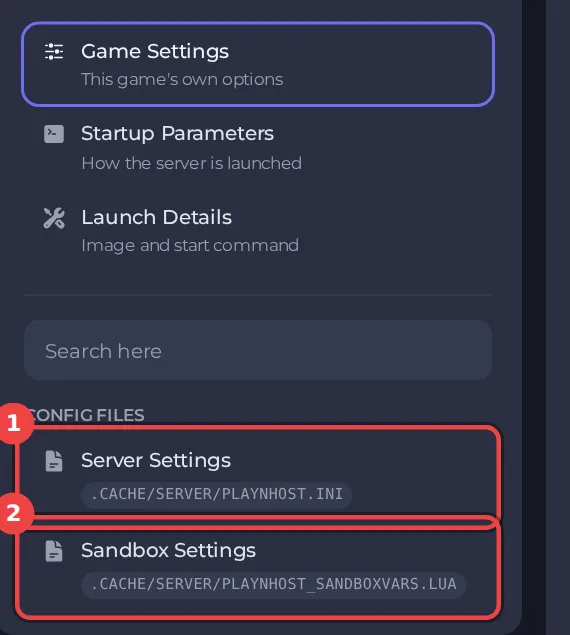
- Open your server in the panel and click the Settings tab.
- In the list on the left, under Config files, click Sandbox Settings. The file name is shown at the top.
- If the list says No config files yet, start the server once. The game writes its sandbox file the first time it runs.
The editor only saves while the server is stopped. Stop the server, change the settings below, then click Save only or Save & start. The full steps are in How to change Project Zomboid sandbox settings in the panel. Headings such as Character appear in capitals in the editor. The editor shows Build 42 files only: on a Build 41 server it opens with a message that the file is from a different build, see Project Zomboid Sandbox Settings says the file is from a different build.
Every setting in Character
| Setting | What it does | Values | A new server starts with |
|---|---|---|---|
| Experience rate | The rate at which all skills level up. 1 is normal, 2 is double. | A number from 0 to 1000 | 1.0 |
| Same rate for every skill | When enabled, all skills will use the Global Multiplier. | On or off | On |
| Free trait points | Adds free points during character creation. | A whole number from -100 to 100 | 0 |
| Starter kit | Spawn with Chips, a Water Bottle, a Small Backpack, a Baseball Bat, and a Hammer. | On or off | Off |
| Nutrition | Nutritional value of food affects the player's condition. Turning this off will stop the player gaining or losing weight. | On or off | On |
| Hunger, thirst and fatigue | How fast the player's hunger, thirst, and fatigue will decrease. | Very Fast, Fast, Normal, Slow, Very Slow | Normal |
| Endurance recovery | Recovery from being tired after performing actions. | Very Fast, Fast, Normal, Slow, Very Slow | Normal |
| Injury severity | The impact that injuries have on your body, and their healing time. | Low, Normal, High | Normal |
| Broken bones | If survivors can get broken limbs from impacts, zombie damage, falls etc. | On or off | On |
| Bites from behind | Chance of being bitten when a zombie attacks from behind. | Low, Medium, High | High |
| Hit several zombies at once | If certain melee weapons will be able to strike multiple zombies in one hit. | On or off | Off |
| Food spoilage | How fast that food will spoil, inside or outside of a fridge. | Very Fast, Fast, Normal, Slow, Very Slow | Normal |
| Fridge effectiveness | How effective a fridge will be at keeping food fresh for longer. | Very Low, Low, Normal, High, Very High, No decay | Normal |
| Reading speed (minutes per page) | The number of in-game minutes it takes to read one page of a skill book. | A number from 0 to 60 | 2.0 |
| All clothes at character creation | Allows you to select from every piece of clothing in the game when customizing your character. | On or off | Off |
| Easy climbing | Disables the failure chances when climbing sheet ropes or over walls. | On or off | Off |
| Corpses disappear after (hours) | How long, in hours, before dead zombie bodies disappear from the world. If 0, maggots will not spawn on corpses. | A number from -1 to 2147483647 | 216.0 |
| Rotting corpses make you sick | The impact that nearby decaying bodies has on the player's health and emotions. | None, Low, Normal, High, Insane | Normal |
A friendlier server
Raise Experience rate (2 is double), add Free trait points, turn on Starter kit and turn off Broken bones. Or apply the Rising preset and adjust from there: How to choose a sandbox preset for your Project Zomboid server.
Good to know
- Most sandbox rules apply from the next start. A few, such as the start date and the months since the outbreak, only matter when a new world is created.
- Four sandbox values are not in this editor, because the panel writes them at every start: Zombie Population, Zombie Respawn, Loot Respawn (hours) and Banned Item IDs. They are under Settings, then Game Settings: How to change zombie population, respawn and loot respawn on your Project Zomboid server.
- The column "A new server starts with" shows the value a new server has before you change anything (the game's Apocalypse rules). If you applied a preset, your values differ: How to choose a sandbox preset for your Project Zomboid server.
- Back up first if the world has progress in it: How to back up and restore your Project Zomboid world.





