%7B.s%7Banimation%3Ab%201.5s%20ease-out%20both%7D.d%7Banimation-delay%3A.16s%7D%7D%40keyframes%20b%7B0%25%7Bfill%3A%23F4F6FA%7D18%25%7Bfill%3A%23FFE08A%7D34%25%2C70%25%7Bfill%3A%23FF8A1F%7D80%25%7Bfill%3A%23FFE08A%7D100%25%7Bfill%3A%23FF8A1F%7D%7D%3C%2Fstyle%3E%3Cg%20transform%3D%22translate(143%20428.93)%20scale(3.885906)%22%3E%3Cg%20transform%3D%22translate(0%202)%22%20fill%3D%22%23706EF0%22%3E%3Cpath%20d%3D%22M0%200%20H48%20A40%2040%200%200%201%2048%2080%20V100%20H0%20Z%22%2F%3E%3Cpath%20transform%3D%22translate(91.75%200)%22%20d%3D%22M0%200%20L48%200%20L48%2050%20L76%2050%20L76%20100%20L0%20100%20Z%22%2F%3E%3Cpath%20transform%3D%22translate(173%200)%22%20d%3D%22M0%20100%20L58%20-4%20L116%20100%20Z%22%2F%3E%3Cpath%20transform%3D%22translate(264.25%200)%22%20d%3D%22M0%200%20L104%200%20L76%2050%20L76%20100%20L28%20100%20L28%2050%20Z%22%2F%3E%3Cg%20transform%3D%22translate(375%200)%22%3E%3Cpath%20d%3D%22M0%200%20L50%2038%20L50%200%20L100%200%20L100%20100%20L0%20100%20Z%22%20fill%3D%22%23F4F6FA%22%2F%3E%3Crect%20class%3D%22s%22%20x%3D%2247%22%20y%3D%2263%22%20width%3D%2219%22%20height%3D%2230%22%2F%3E%3Crect%20class%3D%22s%20d%22%20x%3D%2274%22%20y%3D%2263%22%20width%3D%2219%22%20height%3D%2230%22%2F%3E%3C%2Fg%3E%3Cpath%20transform%3D%22translate(484.75%200)%22%20d%3D%22M0%200%20L48%200%20L48%2037%20L52%2037%20L52%200%20L100%200%20L100%20100%20L52%20100%20L52%2063%20L48%2063%20L48%20100%20L0%20100%20Z%22%2F%3E%3Cpath%20transform%3D%22translate(588.5%200)%22%20d%3D%22M0%2050%20A53%2053%200%201%200%20106%2050%20A53%2053%200%201%200%200%2050%20Z%22%2F%3E%3Cpath%20transform%3D%22translate(698.25%200)%22%20d%3D%22M25%200%20H102%20V50%20H77%20A25%2025%200%200%201%2077%20100%20H0%20V50%20H25%20A25%2025%200%200%201%2025%200%20Z%22%2F%3E%3Cpath%20transform%3D%22translate(804%200)%22%20d%3D%22M0%200%20L90%200%20L90%2050%20L69%2050%20L69%20100%20L21%20100%20L21%2050%20L0%2050%20Z%22%2F%3E%3C%2Fg%3E%3C%2Fg%3E%3C%2Fsvg%3E)


A world grows every time someone explores. If it has become much bigger than the parts anyone uses, you can trim it: the panel deletes the chunks far from the centre that players hardly visited. The world, its backups and its downloads then get smaller. It works with Chunky, which the panel adds to your server if it is not there yet.
A trim cannot be undone. A trimmed chunk comes back as fresh terrain from the world seed the next time someone goes there, and anything built in it is gone. Choose your area with care.
Before you start
- Your server type must run Chunky. Pregeneration and trim need Paper, Purpur, Folia, Spigot, Fabric, Quilt, Forge or NeoForge. On Vanilla, Sponge or a proxy, change the server type first.
- Nobody can be online. A trim runs with an empty server, so nobody walks into a chunk while it is deleted. If players are online, the dialog tells you how many and asks you to try again when it is empty.
- The server restarts at the end, as Chunky requires, and autosave is off while Chunky works.
- It works on the active world only, the one your server loads. To trim another world, first choose Make this the active world in its menu.
- A backup is taken first, if your plan has a backup slot free. It is kept on the Backups page, so you can go back. If all your slots are used the dialog says so and asks you to delete a backup to free a slot. If your plan has no backup slots, no backup can be taken first. You can choose Trim without a backup, but think twice.
Trim a world
- Open your server in the panel, click Modding, open the Worlds tab, then click Your worlds.
- Open the actions menu of the active world and choose Trim unused chunks.
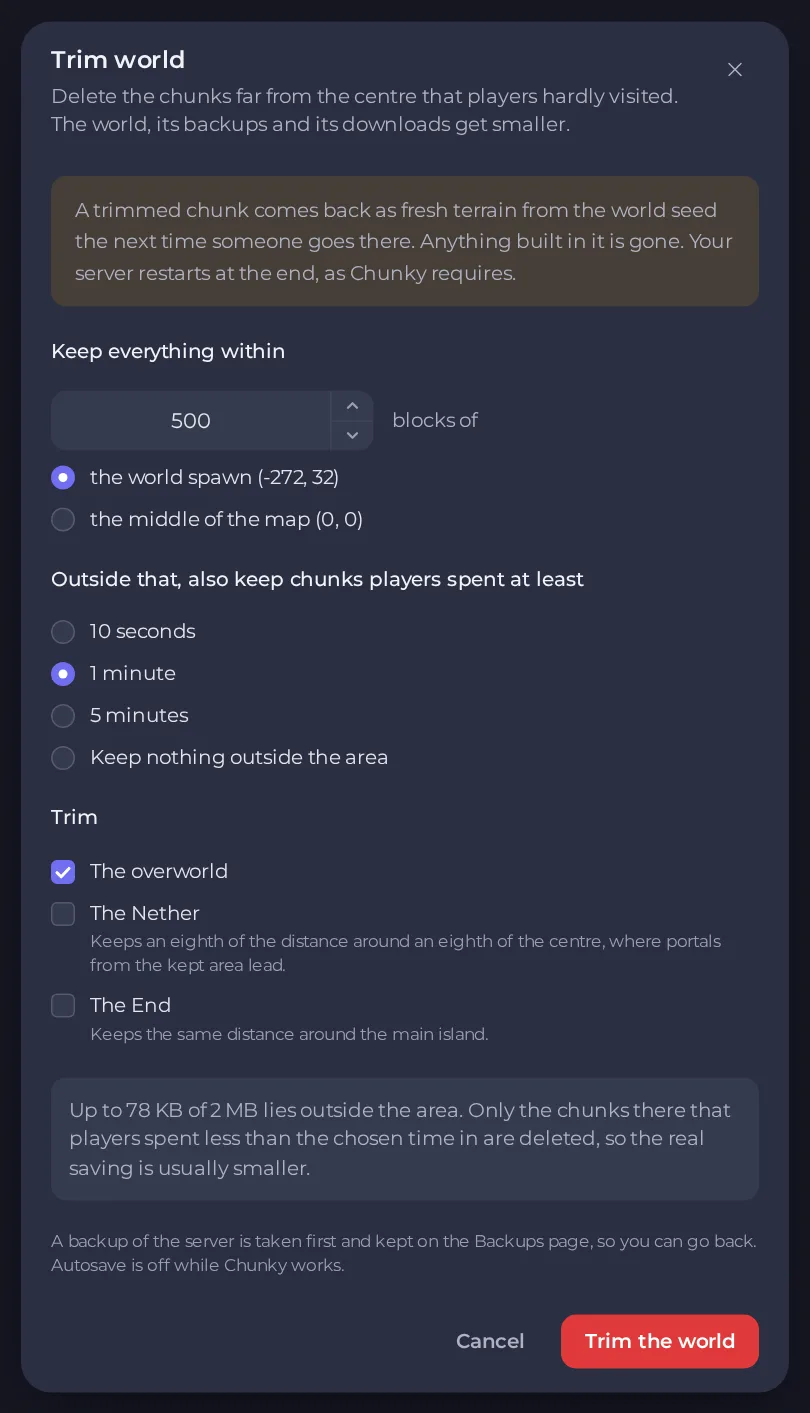
In the dialog Trim (with the world's name), choose:
- Keep everything within: how many blocks to keep around the centre, which is the world spawn or the middle of the map (0, 0).
- Outside that, also keep chunks players spent at least: 10 seconds, 1 minute or 5 minutes, or Keep nothing outside the area. A chunk that players spent at least that long in is kept even far from the centre. Only the chunks that were visited for less are deleted.
- Trim: The overworld, The Nether and The End. The Nether keeps an eighth of the distance around an eighth of the centre, where portals from the kept area lead. The End keeps the same distance around the main island.
- Read the preview. It says up to how much of the world lies outside the area. Only the chunks there that players spent less than the chosen time in are deleted, so the real saving is usually smaller. If nothing has been generated outside the area, it says a trim would delete nothing and asks you to choose a smaller distance.
- Click Trim the world.
Follow or stop it
A progress card, Trimming with the world's name, shows how far it has got. You can Stop it: Chunky stops and your server restarts, and what was trimmed before that stays trimmed.
Go back
If you did not like the result, restore the backup the trim took from the Backups page. See How to create, download and restore backups. A restore replaces everything on the server with the backup, so players' progress since then is lost too.
Related
- Make the land around spawn before players arrive: How to pregenerate your Minecraft world so exploring does not lag.
- Keep a copy outside PlayNHost first: How to download your Minecraft world for single-player or another server.
- Reset only the Nether or the End: How to back up, restore and reset your Minecraft world.
Need room for a bigger world? See Minecraft server hosting.





