

A Telegram bot gets 409 Conflict for one of two reasons: another copy of the bot is asking Telegram for messages with the same token, or a webhook is set on the bot while your code uses polling. Telegram lets only one of them receive the bot's messages. Read the end of the line in Console to know which one, then:
terminated by other getUpdates request: stop the other copy of your bot (on your PC, your old host or another server), then restart the bot here.- Cannot find the other copy? In @BotFather send
/mybots, choose your bot, API Token, then revoke it and paste the new token on the Bot page, pane Telegram. can't use getUpdates method while webhook is active: click Remove the webhook on the banner (or Remove webhook on the Telegram pane), then restart the bot.
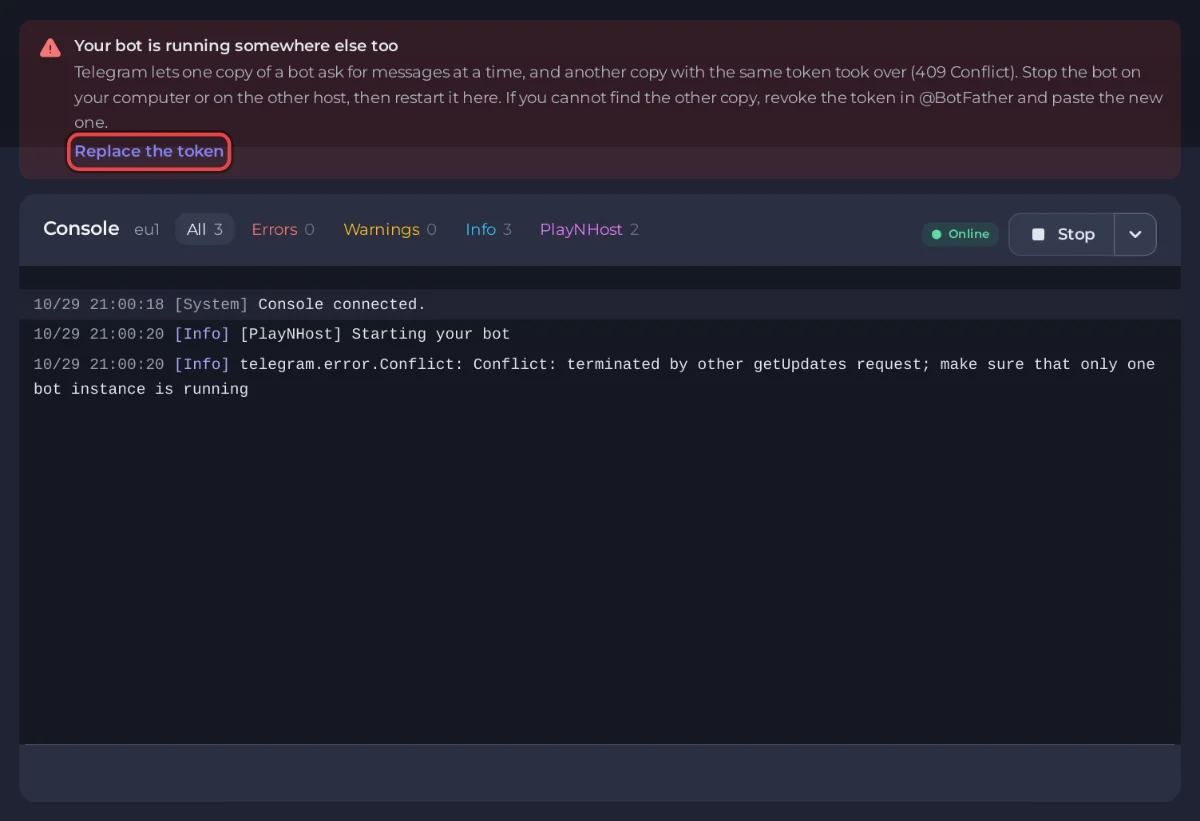
On a PlayNHost Telegram bot the panel reads the console for you and shows a banner above it with the cause and the button that fixes it. The chip on Overview reads Not receiving messages.
409: another copy of your bot is running
Telegram's text, inside your library's error:
Conflict: terminated by other getUpdates request; make sure that only one bot instance is runningHow it looks with each library:
| Library | Console line |
|---|---|
| python-telegram-bot | telegram.error.Conflict: Conflict: terminated by other getUpdates request; ... |
| aiogram 3 | Failed to fetch updates - TelegramConflictError: Telegram server says - Conflict: terminated by other getUpdates request; ... |
| pyTelegramBotAPI | A request to the Telegram API was unsuccessful. Error code: 409. Description: Conflict: terminated by other getUpdates request; ... |
| grammY | GrammyError: Call to 'getUpdates' failed! (409: Conflict: terminated by other getUpdates request; ...) |
| Telegraf | TelegramError: 409: Conflict: terminated by other getUpdates request; ... |
Telegram hands the messages to one copy at a time, so the two copies keep pushing each other out. python-telegram-bot, aiogram and pyTelegramBotAPI keep retrying: your bot looks running here, but it misses messages or answers nothing. grammY and Telegraf stop with the error instead.
The banner says Your bot is running somewhere else too. To fix it:
- Find the other copy and stop it: a terminal window or script on your PC, the old host you moved from (an always-on task, a deployment or a service), or a second server running the same code.
- Press Restart here and watch Console. The error stops when your bot is the only copy.
- If you cannot find the other copy, make a new token so the old one stops working everywhere: in @BotFather send
/mybots, choose your bot, API Token, then Revoke current token. - On the Bot page, pane Telegram, click Replace token, paste the new token and click Save token. The panel says The bot is still using the old token until it restarts.: click Restart now.
The banner's Replace the token button opens the same pane. The old token stops working at once, so any copy you forgot about can no longer read your bot's messages.
409: a webhook is set while your bot polls
Telegram's text:
Conflict: can't use getUpdates method while webhook is active; use deleteWebhook to delete the webhook firstA webhook tells Telegram to send your bot's messages to a web address. While one is set, code that polls (asks Telegram for new messages) gets this error. It usually stays from an old host that ran the bot on a webhook, or from code that once called setWebhook. On PlayNHost your bot uses polling: webhooks need a public HTTPS address, which these plans do not include yet.
The banner says A webhook is set on your bot. The Telegram pane of the Bot page also shows A webhook is set on this bot with the address it points to. To fix it:
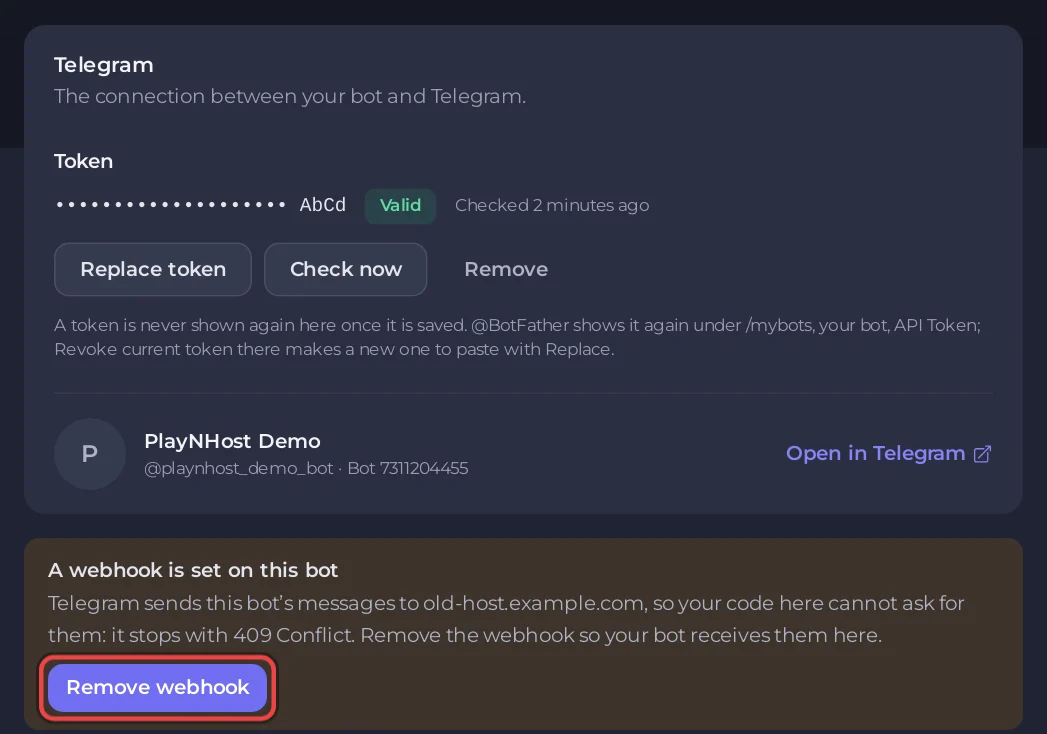
- Click Remove the webhook on the banner, or Remove webhook on the Telegram pane.
- Confirm in Remove the webhook? with Remove webhook. Telegram stops sending your bot's messages to that address and keeps the ones waiting, so your bot fetches them here.
- Restart the bot.
If a copy of your bot still runs elsewhere on that webhook, it stops receiving messages when you remove it. Stop that copy too, or it may set the webhook again when it restarts.
python-telegram-bot (run_polling()) and grammY (bot.start()) remove a webhook themselves when polling starts. aiogram does not: it keeps retrying on the 409. Use the button, or add one line before polling:
await bot.delete_webhook()
await dp.start_polling(bot)
Your code tries to set a webhook
If your code calls setWebhook, Telegram refuses it with Bad Request: bad webhook: ... and the banner says Your code tries to set a webhook. Replace the webhook start with the polling call of your library: run_polling() in python-telegram-bot, start_polling() in aiogram, bot.start() in grammY or launch() in Telegraf. The banner's Open Files button takes you to your code. Examples: How to move a Telegram bot to PlayNHost.
401 Unauthorized: the token is refused
Telegram answers 401 Unauthorized when the token was revoked in @BotFather or copied wrongly. Examples:
telegram.error.InvalidToken
TelegramUnauthorizedError: Telegram server says - Unauthorized
GrammyError: Call to 'getMe' failed! (401: Unauthorized)
TelegramError: 401: Unauthorized
Our starter bots print one plain line instead:
Telegram did not accept the bot token. Paste the current one from @BotFather on the Bot page, then restart.The banner says Telegram did not accept your bot token and the Telegram pane shows Telegram did not accept it. In @BotFather send /mybots, choose your bot, then API Token; on the pane click Replace token, paste it, click Save token, then Restart now. aiogram and pyTelegramBotAPI keep retrying on a refused token, so without the banner the bot would look running.
A token Telegram refuses is never saved. If you paste a Discord token, the panel says That is a Discord bot token.: copy the one @BotFather gave you.
429 Too Many Requests: flood control
Too Many Requests: retry after 22
telegram.error.RetryAfter: Flood control exceeded. Retry in 39.0 seconds
Your bot sent more messages than Telegram allows in a short time, and Telegram asks it to wait the number of seconds shown. Libraries wait and carry on, so this never stops the bot. The banner Telegram is slowing your bot down is a warning only. Send fewer messages at once: Telegram asks for about one message a second in a chat and 20 a minute in a group.
Your bot could not reach Telegram
This banner means one request from your bot to api.telegram.org failed. Most libraries try again on their own, so a single line is nothing to worry about. If your bot stays silent, restart it; if it keeps happening, open a support ticket.
Good to know
- When the bot stops because of a refused token, another copy or a webhook, the stop e-mail we send names the cause.
- More on the console: How to read your bot's console and logs. Setting up from the start: How to host a Telegram bot.


