

To kick or ban a player on your PlayNHost DayZ server, open the menu next to their name on the Active players card of the Overview page and choose Kick or Ban. The panel sends the command through BattlEye RCON, so the server needs an RCON Password in Game Settings. A ban from the panel is permanent until you lift it with an RCON tool.
Before you start
The Active players card names players only when RCON is on. If the card says This server does not publish their names., set an RCON Password under Settings, Game Settings, and restart: How to become admin on your DayZ server. The server must be running.
Kick or ban a player
- Open your server in the panel. You land on Overview.
- On the Active players card, open the menu next to the player. Its title is Actions for and the player's name.
- Choose Kick or Ban.
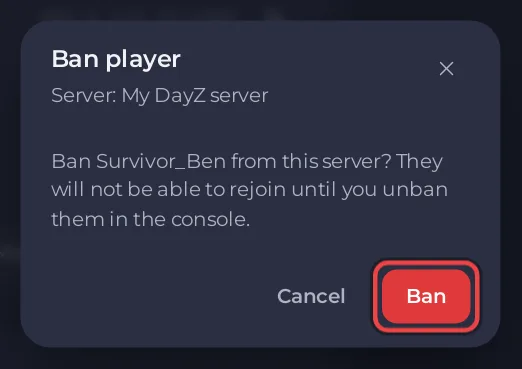
- Read the window (Kick player or Ban player) and confirm with Kick or Ban.
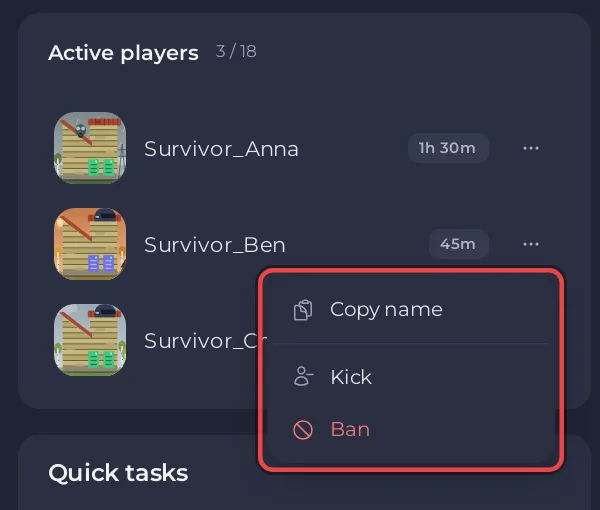
The panel shows Kicked or Banned and the player's name when it is done. A kicked player can rejoin straight away, as the Kick player window says. A banned player cannot rejoin.
What the panel sends to BattlEye: a kick with the reason Kicked by a server admin, and a ban of the player's BattlEye GUID with time 0, which BattlEye's documentation defines as permanent, and the reason Banned by a server admin.
If the panel refuses
<name> is not on the server any more.The player left before the command went out. Nothing was sent.Two players on the server have this exact name, and BattlEye cannot tell which one you mean. Use an RCon tool.An RCON tool works by player number, so it can tell them apart.BattlEye RCon did not answer. Check the server is running and the RCON password under Settings, then try again.The server is starting or stopped, or the RCON Password was changed without a restart.
How do I lift a ban?
The ban window says you can unban "in the console", but the DayZ console reads no commands. Lift a DayZ ban with a BattlEye RCON tool instead, such as BattleMetrics, connected with your server's IP, RCON Port and RCON Password. The commands are BattlEye's own, from its documentation:
- Send
bans. BattlEye lists every ban with a number. - Find the player's ban and send
removeBanfollowed by that number, for exampleremoveBan 3.
BattlEye keeps its bans in a bans.txt file in its working folder and loads it at every server start. Its documentation also lists writeBans, which writes the current ban list back to bans.txt.


