

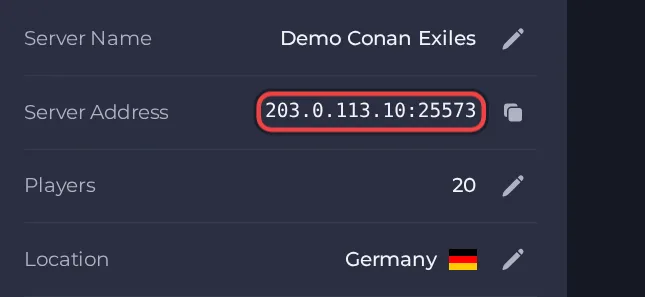
Your players join your Conan Exiles server with its Server Address, shown on the server's Overview page in the panel. Conan Exiles is an open-world survival and building game set in the world of Conan the Barbarian; a hosted server keeps your own private world and base running around the clock for you and your friends or clan.
Join in a few steps
- Open your server in the panel. If the status badge says Offline, click Start and wait until it says Online. See How to start, stop, restart and force-stop your server.
- On the Overview page, click the copy icon next to Server Address. It looks like
address:port.
- Launch Conan Exiles on the same platform and the same game version as the server.
- From the main menu choose to play online, then use the direct connect option.
- Type the Server Address from the server's Overview page (the address, a colon, then the port) and confirm.
- If you set a Server Password in the server's settings, enter it when asked. If it was left empty, no password is requested.
- If the server has mods, your game must have the same Steam Workshop mods installed and enabled, or the connection is refused or you are asked to fix the mismatch.
- Create a new character the first time you join. The server stores it in the world, so you keep it when you reconnect.
Ports
Players only use the port in the Server Address on the Overview page. The server also has a query port (used by the in-game server browser) and a remote console port (used by RCON tools). Both are set for you and cannot be changed, and you can see them on the Ports & Network page. A wrong query port only hides the server from the in-game browser, so connecting with the Overview address always works.
Game version
Players must run the same Conan Exiles version as the server. Update On Start is on by default, so each restart checks Steam for a newer server build and installs it first; after Funcom releases a patch, restart the server to match players who updated. If you turn Update On Start off, the server stays on the build it has until you turn it back on. The Linux server comes with the Conan Exiles Enhanced release, so players need the Enhanced game; Funcom documents that Enhanced can read old Legacy world databases but not the other way round.
If you cannot join
- The server must be Online. Check the badge at the top of the page.
- Copy the address again from the panel. A missing or mistyped port is the most common cause.
- Make sure every player runs a compatible game version and the same mods.
- Check the password, if you set one. See How to set up your Conan Exiles server.
- More checks: How to join your server and Conan Exiles server problems and fixes.





