

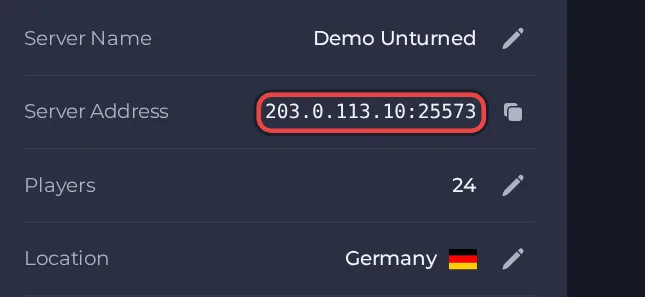
Your players join your Unturned server with its Server Address, shown on the server's Overview page in the panel. Unturned is a zombie-apocalypse survival game where you build, scavenge and raid, and a hosted server gives you and your friends a persistent world that stays online without anyone's PC running.
Join in a few steps
- Open your server in the panel. If the status badge says Offline, click Start and wait until it says Online. See How to start, stop, restart and force-stop your server.
- On the Overview page, click the copy icon next to Server Address. It looks like
address:port.
- Launch Unturned from your Steam library and open Connect Directly.
- If your server has a Steam Login Token set (Settings, then Game Settings), enter the address and port from the Server Address on the Overview page in the game's connect screen. Some versions of the game have separate fields for the address and the port, and others take them together as address:port.
- If you set a Server Password, enter it in the password field, then connect. You can also find your server by its Server Name in the Internet server list.
- If your server has no Steam Login Token, joining by address does not work: the game shows "This server is not logged in." instead of a Join button. Enter the Server Code in the same Connect Directly screen instead. The code is printed in the panel Console once the server has finished starting, and it changes every time the server restarts.
Ports
Players use the port in the Server Address shown on the Overview page. The game also uses the next port up for its game traffic. Both are set up for your server, so you only ever type the one in the Server Address.
Game version
The server checks for a game update every time it starts when Auto update is on, which is the default. Turn Auto update off only if you must stay on a specific build for mod compatibility. Players should keep their own game up to date through Steam.
If you cannot join
- The server must be Online. Check the badge at the top of the page.
- Copy the address again from the panel. A missing or mistyped port is the most common cause.
- Make sure every player runs a compatible game version.
- Check the password, if you set one. See How to set up your Unturned server.
- More checks: How to join your server and Unturned server problems and fixes.





