

Your players join your Space Engineers server with its Server Address, shown on the server's Overview page in the panel. Space Engineers is a voxel sandbox about building ships, stations and bases in space and on planets, and a hosted server keeps your shared world running so friends can join any time without the host being online.
Join in a few steps
- Open your server in the panel. If the status badge says Offline, click Start and wait until it says Online. See How to start, stop, restart and force-stop your server.
- On the Overview page, click the copy icon next to Server Address. It looks like
address:port.
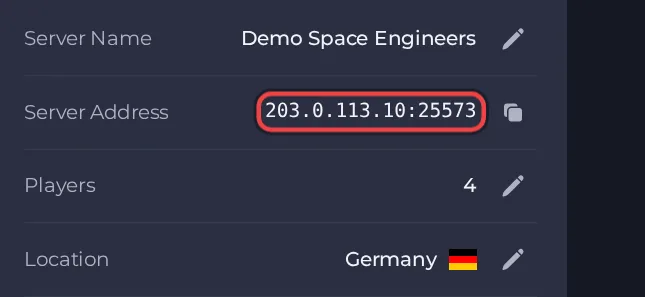
- Launch Space Engineers from Steam on your PC.
- On the main menu, click Join Game to open the server browser.
- Click Direct Connect, paste the server address with its port in the form address:port, and connect.
- Alternative: open the Servers tab in Join Game and search for your Server Name. If your server does not appear there, use Direct Connect as above.
Ports
Players use the address and port shown on the server's Overview page, nothing else. This server type has no join password setting, so anyone who has the address can join.
Game version
The game version on the player's PC must match the server. With Auto Update on, the server installs the newest build every time it starts, so after a Space Engineers update just restart the server. With Auto Update off the server stays on its current build and players on the newer game cannot join.
If you cannot join
- The server must be Online. Check the badge at the top of the page.
- Copy the address again from the panel. A missing or mistyped port is the most common cause.
- Make sure every player runs a compatible game version.
- More checks: How to join your server and Space Engineers server problems and fixes.





