%7B.s%7Banimation%3Ab%201.5s%20ease-out%20both%7D.d%7Banimation-delay%3A.16s%7D%7D%40keyframes%20b%7B0%25%7Bfill%3A%23F4F6FA%7D18%25%7Bfill%3A%23FFE08A%7D34%25%2C70%25%7Bfill%3A%23FF8A1F%7D80%25%7Bfill%3A%23FFE08A%7D100%25%7Bfill%3A%23FF8A1F%7D%7D%3C%2Fstyle%3E%3Cg%20transform%3D%22translate(143%20428.93)%20scale(3.885906)%22%3E%3Cg%20transform%3D%22translate(0%202)%22%20fill%3D%22%23706EF0%22%3E%3Cpath%20d%3D%22M0%200%20H48%20A40%2040%200%200%201%2048%2080%20V100%20H0%20Z%22%2F%3E%3Cpath%20transform%3D%22translate(91.75%200)%22%20d%3D%22M0%200%20L48%200%20L48%2050%20L76%2050%20L76%20100%20L0%20100%20Z%22%2F%3E%3Cpath%20transform%3D%22translate(173%200)%22%20d%3D%22M0%20100%20L58%20-4%20L116%20100%20Z%22%2F%3E%3Cpath%20transform%3D%22translate(264.25%200)%22%20d%3D%22M0%200%20L104%200%20L76%2050%20L76%20100%20L28%20100%20L28%2050%20Z%22%2F%3E%3Cg%20transform%3D%22translate(375%200)%22%3E%3Cpath%20d%3D%22M0%200%20L50%2038%20L50%200%20L100%200%20L100%20100%20L0%20100%20Z%22%20fill%3D%22%23F4F6FA%22%2F%3E%3Crect%20class%3D%22s%22%20x%3D%2247%22%20y%3D%2263%22%20width%3D%2219%22%20height%3D%2230%22%2F%3E%3Crect%20class%3D%22s%20d%22%20x%3D%2274%22%20y%3D%2263%22%20width%3D%2219%22%20height%3D%2230%22%2F%3E%3C%2Fg%3E%3Cpath%20transform%3D%22translate(484.75%200)%22%20d%3D%22M0%200%20L48%200%20L48%2037%20L52%2037%20L52%200%20L100%200%20L100%20100%20L52%20100%20L52%2063%20L48%2063%20L48%20100%20L0%20100%20Z%22%2F%3E%3Cpath%20transform%3D%22translate(588.5%200)%22%20d%3D%22M0%2050%20A53%2053%200%201%200%20106%2050%20A53%2053%200%201%200%200%2050%20Z%22%2F%3E%3Cpath%20transform%3D%22translate(698.25%200)%22%20d%3D%22M25%200%20H102%20V50%20H77%20A25%2025%200%200%201%2077%20100%20H0%20V50%20H25%20A25%2025%200%200%201%2025%200%20Z%22%2F%3E%3Cpath%20transform%3D%22translate(804%200)%22%20d%3D%22M0%200%20L90%200%20L90%2050%20L69%2050%20L69%20100%20L21%20100%20L21%2050%20L0%2050%20Z%22%2F%3E%3C%2Fg%3E%3C%2Fg%3E%3C%2Fsvg%3E)


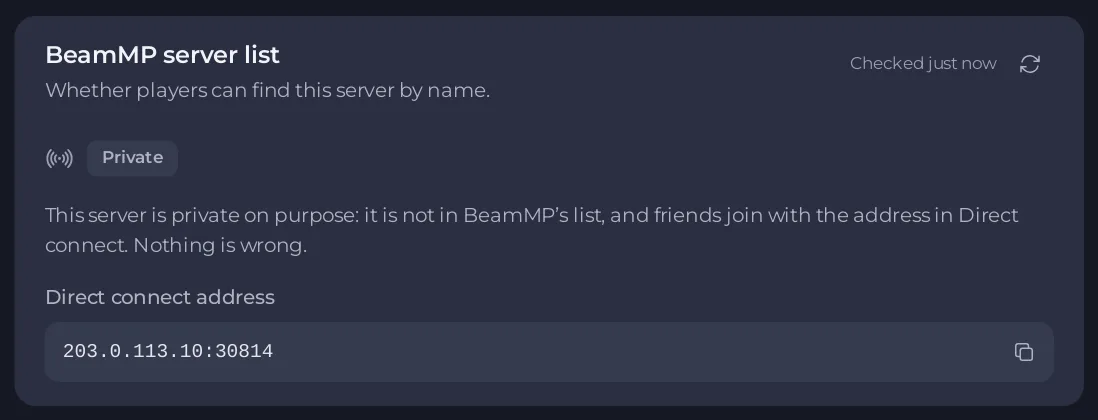
Look at the BeamMP server list card on your server's Overview page. It checks BeamMP's public list for your server's address and says why it is or is not there. When BeamMP's list is only slow or not answering, players can still join with Direct connect and the address.
Read the card
The card's badge says one of these. It checks again every 30 seconds; Check again checks now.
| Badge | What it means | What to do |
|---|---|---|
| Listed | Players see your server like this in the launcher. | Nothing. |
| Starting | BeamMP lists a new server within 1 to 3 minutes of its start. | Wait. |
| Private | The server is private on purpose. Nothing is wrong. | To list it, turn Private off: How to make your BeamMP server private. |
| No key | The server does not start without a key. | Your BeamMP server will not start without an auth key |
| Key refused | BeamMP did not accept the key, and the card shows BeamMP's reason. | BeamMP refused your server auth key |
| BeamMP not answering | The server could not reach BeamMP's servers. | Wait: it comes back by itself. Direct connect works meanwhile. |
| Server off | A stopped server is not in the list. | Start it. |
| Not listed | The server has run for a few minutes and is not in the list. | Read the checks, below. |
| Unknown | The panel cannot reach the machine your server runs on right now. | It checks again by itself. |
When it says Not listed
The card lists what it could check:
A key is saved and has the right shape.The server is set to public.The server is runningand for how long.BeamMP accepted the server's key., or that the Console does not show BeamMP's answer yet.The panel looks foryour addressin the list.BeamMP's list was readwith how many servers,and this address is not in it.A server with this name is listed at another address: another server, perhaps your old host, uses the same name.
If every check is fine, restart the server once and look again in three minutes. BeamMP's own lines are on the Console page; Open the Console takes you there.
Players search for the wrong name
Players search for Server Name from Game Settings, which is also on the Play with friends card, without colour codes. The name at the top of Overview is only for you in the panel.
Changes that wait for a restart
When the server is listed and you changed the name, map, tags or slots, the card says Saved, not live yet and lists what is waiting. Click Restart now, or Restart with a warning when players are on: it warns them in chat one minute and ten seconds before.
Good to know
BeamMP's list did not answer just now. This is the last answer the panel has.means the card shows an older answer for a moment.- When BeamMP's list does not answer at all, the panel says it cannot tell. It never guesses.
- Tags decide which filters show your server: How to choose tags for your BeamMP server.





