

 MINECRAFT HOSTING
 GAME SERVERS
 Game Panel
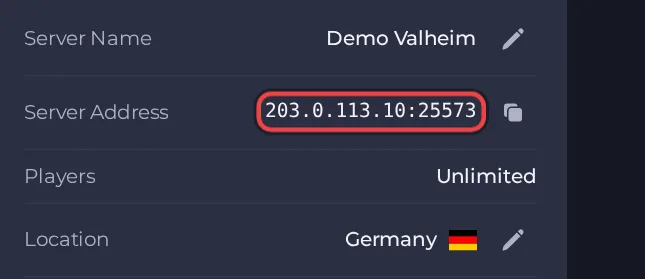
Your players join your Valheim server with its Server Address, shown on the server's Overview page in the panel. Valheim is a co-op Viking survival and exploration game for 1 to 10 players (left early access as version 1.0 on 9 September 2026); a hosted dedicated server keeps your world running around the clock so friends can join without anyone having to host from their own PC.
Join in a few steps
- Open your server in the panel. If the status badge says Offline, click Start and wait until it says Online. See How to start, stop, restart and force-stop your server.
- On the Overview page, click the copy icon next to Server Address. It looks like
address:port.
- Note the six-digit join code printed in the Console tab. Check it again after every restart.
- Launch Valheim and choose Join Game from the main menu.
- To join by join code (needed for console players, and the reliable route when crossplay is on): in Join Game press Add server, paste the join code, then enter the server password when asked.
- To join by address instead: use the Join IP button, type the address and port from the Server Address on the Overview page, then enter the server password when asked. Iron Gate says this works on crossplay servers too.
- If you want a Steam-only server joined by address, open Settings, then Game Settings, set Enable Crossplay to off and restart. Console players can no longer join once crossplay is off.
Ports
Players only use the game port from the Server Address on the Overview page. Valheim also uses the next port up for queries. Both are set up for you, so nothing needs opening. With crossplay on, the server registers with Microsoft PlayFab, prints a join code and traffic goes through a relay; Iron Gate says crossplay servers can still be reached by public IP and port, by join code, or from the server list, but not by a local or loopback IP.





