

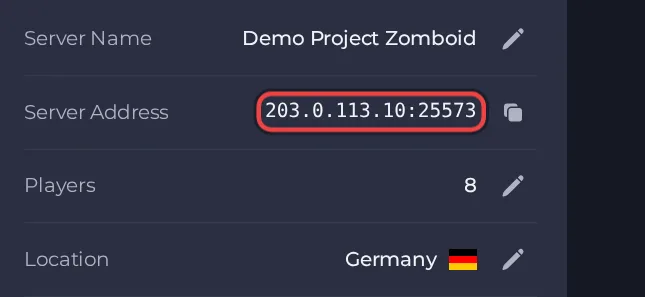
Your players join your Project Zomboid server with its Server Address, shown on the server's Overview page in the panel. Project Zomboid is an open-world zombie survival sandbox by The Indie Stone (Early Access on Steam); a hosted server gives you a persistent shared world that friends can join at any time, with your own mods, zombie and loot settings.
Join in a few steps
- Open your server in the panel. If the status badge says Offline, click Start and wait until it says Online. See How to start, stop, restart and force-stop your server.
- On the Overview page, click the copy icon next to Server Address. It looks like
address:port.
- Start Project Zomboid and click Join on the main menu.
- Open the Favorites tab and add a new entry: type the address in the IP field and the port after the colon in the Port field.
- Enter the username and password you want to play with. A new account is created the first time you join with them, on a server that accepts new players.
- If the server has a password, enter it where the screen asks for it. The server owner sets it as described in the set-up guide.
- Click Save, select the new entry in the list and join.
Ports
Players only need the port in the Server Address on the Overview page. The server uses other ports internally; you never type them.
Game version
Players should run the same game build as the server. By default our server runs the current public release. The Beta Branch setting can pin an older build, for example b41multiplayer for Build 41, but a change to it only takes effect on a reinstall, which replaces the game files and keeps the world. Ask support to do the reinstall for you, and take a backup first. Steam Auto Update is off by default; turn it on to check for and install a new build at each start, which makes a start after a game update take a few minutes longer.
If you cannot join
- The server must be Online. Check the badge at the top of the page.
- Copy the address again from the panel. A missing or mistyped port is the most common cause.
- Make sure every player runs a compatible game version and the same mods.
- More checks: How to join your server and Project Zomboid server problems and fixes.





