

Your players join your FiveM server with its Server Address, shown on the server's Overview page in the panel. FiveM is a modification framework for Grand Theft Auto V that lets players join custom multiplayer servers, and a hosted FiveM server runs your own roleplay, racing or freeroam community with the scripts (resources) you choose, online around the clock.
Join in a few steps
- Open your server in the panel. If the status badge says Offline, click Start and wait until it says Online. See How to start, stop, restart and force-stop your server.
- On the Overview page, click the copy icon next to Server Address. It looks like
address:port.
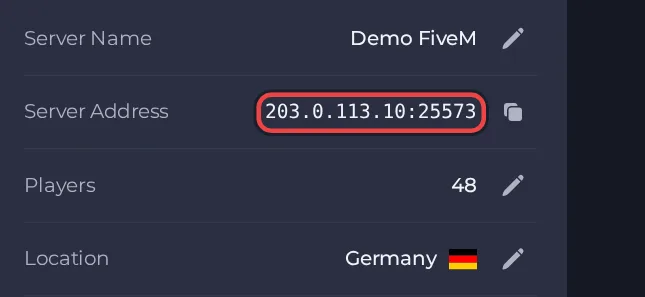
- If you have not entered your Cfx.re license key yet, do that first and then start the server: set it under Settings, then Game Settings. Without a key the server does not start and stays offline, so nobody can join.
- Make sure you own Grand Theft Auto V on the PC and have the FiveM client installed. FiveM is a separate launcher, the Rockstar launcher alone is not enough.
- Start FiveM and wait for it to reach its main menu.
- Press F8 to open the FiveM console.
- Type connect followed by a space and your Server Address, for example connect address:port, then press Enter.
- Alternatively, use the direct connect option of the FiveM client and enter the same address and port.
Ports
Players join with the address and port shown as the Server Address on the Overview page. If you turn on txAdmin, it uses its own separate web port that only you need, players never use it.
Game version
Players do not install server updates, the FiveM client updates itself. On our server, Auto-update server is on by default and checks for a newer server build every time the server starts, following the build channel set in fivem version (recommended by default). Cfx.re stops accepting server builds that fall outside their support window, and such a server drops off the server list, so keep auto-update on unless you have a reason to pin a build. A pinned build number is never updated automatically. If you use the sv_enforceGameBuild setting in your config, it chooses the GTA V game build that players must use.
If you cannot join
- The server must be Online. Check the badge at the top of the page.
- Copy the address again from the panel. A missing or mistyped port is the most common cause.
- Make sure every player runs a compatible game version.
- More checks: How to join your server and FiveM server problems and fixes.





