

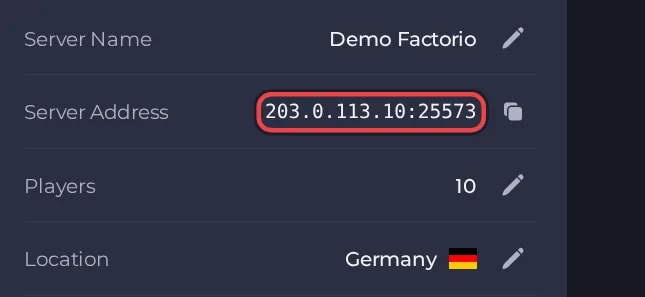
Your players join your Factorio server with its Server Address, shown on the server's Overview page in the panel. Factorio is a factory-building and automation game, and a hosted server gives you and your friends a persistent shared factory that keeps running and saving without anyone having to host from their own PC.
Join in a few steps
- Open your server in the panel. If the status badge says Offline, click Start and wait until it says Online. See How to start, stop, restart and force-stop your server.
- On the Overview page, click the copy icon next to Server Address. It looks like
address:port.
- Launch Factorio on your computer.
- From the main menu, open Multiplayer.
- Choose Connect to address.
- Type the server address exactly as shown on the server's Overview page, including the port after the colon.
- If you set a Server password, enter it when the game asks. Then click to connect.
- If the server uses mods, the game offers to synchronise your mods with the server. Confirm it and wait for the download to finish before joining.
Ports
Players connect to the server's main game port, which Factorio uses over UDP only. Always use the port shown in the Server Address on the Overview page. The optional RCON remote console needs its own second port that you add yourself under Ports & Network, and players never use it.
Game version
Every player must have exactly the same game version and the same mods as the server. With Factorio Version set to latest and Auto-update server switched on, the server checks for a new stable build every time it starts, which is the same stable build the Factorio client updates itself to. A pinned version number is never updated, and saves and mods are never touched by an update. Experimental builds only suit players who also run the experimental client. A save made in a newer Factorio version than the server's cannot be loaded.
If you cannot join
- The server must be Online. Check the badge at the top of the page.
- Copy the address again from the panel. A missing or mistyped port is the most common cause.
- Make sure every player runs a compatible game version and the same mods.
- Check the password, if you set one. See How to set up your Factorio server.
- More checks: How to join your server and Factorio server problems and fixes.





