

Your players join your Don't Starve Together server with its Server Address, shown on the server's Overview page in the panel. Don't Starve Together is a co-op wilderness survival game by Klei in which friends gather resources, build bases and fend off monsters through the seasons; a hosted server keeps one world and its caves running around the clock without anyone having to host from their own PC.
Join in a few steps
- Open your server in the panel. If the status badge says Offline, click Start and wait until it says Online. See How to start, stop, restart and force-stop your server.
- On the Overview page, click the copy icon next to Server Address. It looks like
address:port.
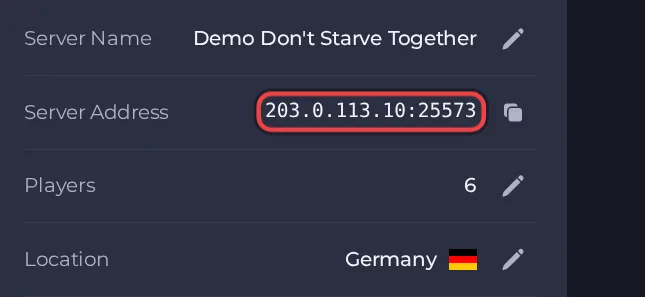
- Launch Don't Starve Together from Steam and wait for the main menu.
- Click Browse Games to open the server list.
- Search for the name you set under Cluster Name in Settings, then Game Settings, and select your server. A new server only appears after it has finished loading, so wait for the panel to show it online first.
- If you set a cluster password in the server's cluster.ini file, enter it when the game asks. If you did not set one, no password is asked.
- Pick your character and join. To visit the caves, play in the surface world and climb down a cave entrance; the game moves you to the caves part of the same server.
- If the server does not show in Browse Games, press the tilde key (~) to open the in-game console and type c_connect with the address in double quotes, then a comma and the port, all inside round brackets, for example c_connect("1.2.3.4", 12345). Use the address and port from your Server Address, then press Enter. If your server has a cluster password, add it as a third item in double quotes, for example c_connect("1.2.3.4", 12345, "yourpassword").
Ports
Players use the port in the Server Address. The server also runs the caves as a second world on its own second port, which the panel assigns to your server and shows as Caves Port in Game Settings. Players never type it, but it must stay reachable for them to enter the caves.
Game version
The server and every player's game should be on the same game version. Auto-update server is off by default for new servers: switch it on and restart the server after Don't Starve Together updates so the server runs the current build. Turn it off only if you must stay on a specific build for mod compatibility.
If you cannot join
- The server must be Online. Check the badge at the top of the page.
- Copy the address again from the panel. A missing or mistyped port is the most common cause.
- Make sure every player runs a compatible game version and the same mods.
- More checks: How to join your server and Don't Starve Together server problems and fixes.





