

Most of what you want to change on a Soulmask server is on one page of the panel.
Open Game Settings
- Open your server in the panel and click the Settings tab.
- Click Game Settings.
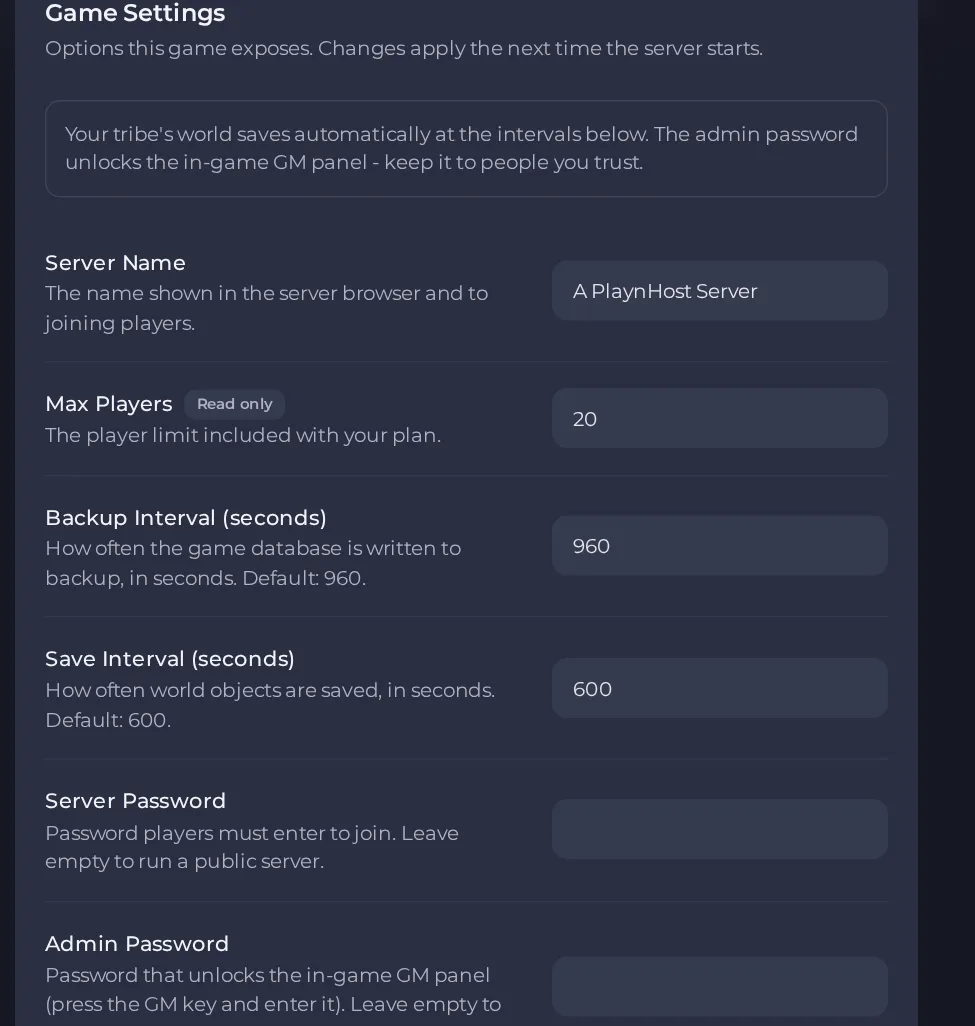
- Change a value and click outside the field, or press Enter. The panel saves it. Switches save as soon as you flip them.
- Restart the server so the change takes effect. See How to start, stop, restart and force-stop your server.
Options most owners change first
- Server Name. The name shown in the server browser and to joining players, up to 85 characters, no double quotes or backslashes.
- Server Password. Password players must enter to join. Leave it empty for a public server. Up to 32 characters, no spaces, quotes, asterisks or question marks.
- Admin Password. Unlocks the in-game GM panel. Leave it empty to keep GM tools disabled, and keep it different from the Server Password.
- Max Players. Read-only and set to the player limit included with your plan.
- Save Interval (seconds). How often world objects are saved. The default is 600 seconds. Do not set it to 0.
- Backup Interval (seconds). How often the game database is written to backup. The default is 960 seconds. Do not set it to 0.
- Auto Update. Checks for a game update each time the server starts.
- Extra Arguments. Extra launch flags, for example -pve. Up to 32 characters. Leave empty unless you know the flag you need.
- Steam Workshop Mods. Comma-separated Steam Workshop mod numbers, digits and commas only. See the mods section.
These settings are applied when the server starts, so change them under Settings, then Game Settings, and restart the server for them to take effect.
Every option is listed in Soulmask server settings: every option explained.





