

Your players join your Left 4 Dead 2 server with its Server Address, shown on the server's Overview page in the panel. Left 4 Dead 2 is Valve's cooperative zombie shooter (four survivors per campaign, plus Versus, Scavenge and Survival modes); a hosted server gives you an always-on game of your own with your chosen campaign, game mode, difficulty and password.
Join in a few steps
- Open your server in the panel. If the status badge says Offline, click Start and wait until it says Online. See How to start, stop, restart and force-stop your server.
- On the Overview page, click the copy icon next to Server Address. It looks like
address:port.
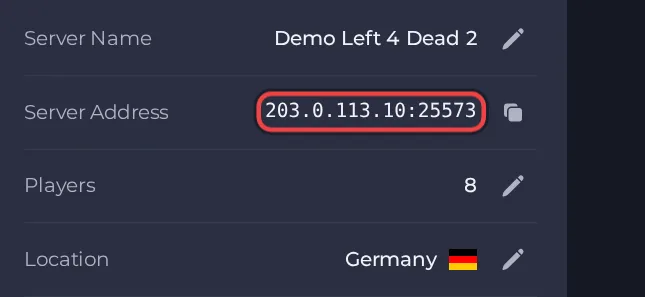
- Launch Left 4 Dead 2 from Steam and open Options, then Keyboard/Mouse, and turn on Allow Developer Console.
- Press the tilde (~) key to open the console.
- Type connect followed by the Server Address from your Overview page, for example connect address:port, and press Enter.
- If you set a Join password, type this instead of the plain connect line: connect address:port; password "yourpassword" (with your own address, port and password). Left 4 Dead 2 has a known game bug where the password is ignored or the password window hangs, so do not rely on the Join password to keep strangers out.
- If you get refused straight away, check that Lobby connections only is switched off under Settings, then Game Settings, then restart the server and try again.
Ports
Players join with the single game port shown in the Server Address on the Overview page. It is a UDP port, and no second port is needed to play.
Game version
Client and server must be on the same game build. With Auto Update on (the default) the server checks for a game update every time it starts, so restart the server after Valve ships a patch.
If you cannot join
- The server must be Online. Check the badge at the top of the page.
- Copy the address again from the panel. A missing or mistyped port is the most common cause.
- Make sure every player runs a compatible game version.
- Check the password, if you set one. See How to set up your Left 4 Dead 2 server.
- More checks: How to join your server and Left 4 Dead 2 server problems and fixes.





