

Your players join your Garry's Mod server with its Server Address, shown on the server's Overview page in the panel. Garry's Mod is a sandbox physics game with many community gamemodes (Sandbox, Trouble in Terrorist Town, DarkRP and more), and a hosted server gives you and your friends a persistent place to play them with your own addons.
Join in a few steps
- Open your server in the panel. If the status badge says Offline, click Start and wait until it says Online. See How to start, stop, restart and force-stop your server.
- On the Overview page, click the copy icon next to Server Address. It looks like
address:port.
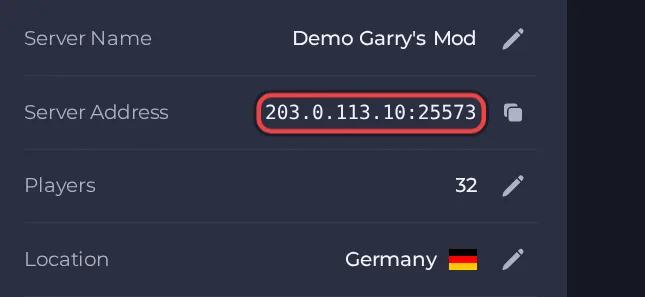
- Launch Garry's Mod on Steam and wait for the main menu.
- Open the in-game console (if it is off, enable it in the game's options) and type connect followed by the Server Address, for example connect address:port, then press Enter.
- If the server has a Workshop collection, let the addons finish downloading when you join. The first join takes longer than later ones.
Ports
Players use the single address:port shown as the Server Address. The server is started on exactly that port and refuses to fall back to another one, so there is no second port to give players.
Game version
The game on your PC and the server must be on the same build. With Auto Update on (the default) the server checks for a game update every time it starts, so restart it after Garry's Mod updates. If you turn Auto Update off, players whose game has updated cannot join until you turn it back on and restart.
If you cannot join
- The server must be Online. Check the badge at the top of the page.
- Copy the address again from the panel. A missing or mistyped port is the most common cause.
- Make sure every player runs a compatible game version.
- More checks: How to join your server and Garry's Mod server problems and fixes.





