

Most of what you want to change on a FiveM server is on one page of the panel.
Open Game Settings
- Open your server in the panel and click the Settings tab.
- Click Game Settings.
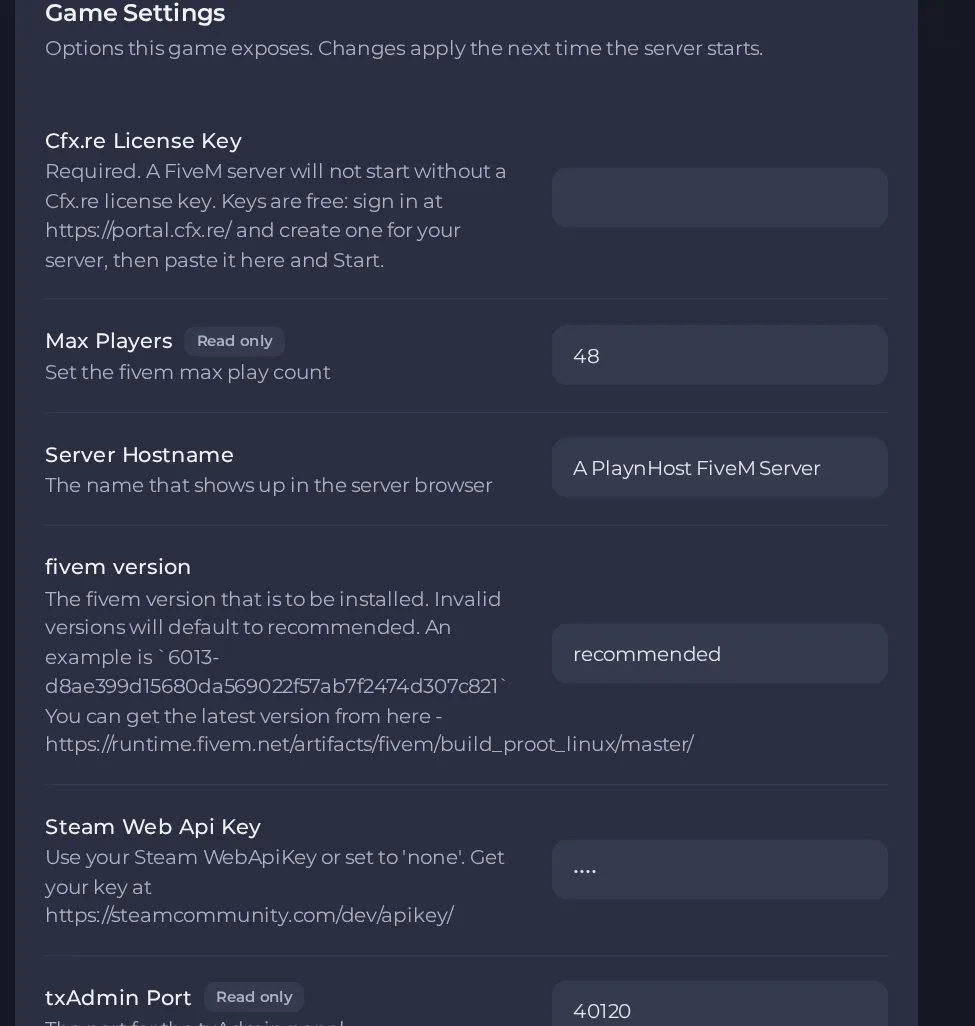
- Change a value and click outside the field, or press Enter. The panel saves it. Switches save as soon as you flip them.
- Restart the server so the change takes effect. See How to start, stop, restart and force-stop your server.
Options most owners change first
- Cfx.re License Key. Required. The server will not start without it. Keys are free: sign in at portal.cfx.re, create a key for your server and paste it here. Only letters, numbers, dashes and underscores are accepted, up to 33 characters.
- Server Hostname. The name shown in the server browser. Change it here rather than in server.cfg, because it is written into server.cfg on every start.
- Max Players. Set by your plan and not editable. It is written into server.cfg on every start.
- Auto-update server. Checks for a new server build on every start so the server stays joinable. Your resources, server.cfg and txAdmin data are not touched by an update.
- fivem version. The build channel or number. recommended is the default, latest follows the newest build, and a specific build number pins the server to that build.
- Resources to start. A comma separated list of resource folder names. Each one gets an ensure line written into server.cfg on every start, so uploading a resource and adding its name here is enough.
- Steam Web Api Key. Optional. A Steam Web API key lets the server see players' Steam identifiers. The value is none unless you need Steam identifiers, so leave it as none otherwise.
- Enable txadmin. Runs txAdmin, the browser-based admin panel for FiveM. While it is on, txAdmin runs its own server configuration and server.cfg is no longer executed at start.
- Game Name. Leave it on fivem for a FiveM server.
Change these under Settings, then Game Settings, and restart the server. Cfx.re License Key, Server Hostname, Steam Web Api Key and Max Players are written into server.cfg every time the server starts, so anything you type over those lines in the file is replaced. The Resources to start list is also applied on each restart. Edit other lines of server.cfg while the server is stopped.
Every option is listed in FiveM server settings: every option explained.





