

Your players join your Counter Strike 2 server with its Server Address, shown on the server's Overview page in the panel. Counter-Strike 2 is Valve's free-to-play competitive team shooter; a hosted server lets you run your own community matches (competitive, casual, wingman, deathmatch, arms race or plugin-driven custom modes) with your own map, rules and player list.
Join in a few steps
- Open your server in the panel. If the status badge says Offline, click Start and wait until it says Online. See How to start, stop, restart and force-stop your server.
- On the Overview page, click the copy icon next to Server Address. It looks like
address:port.
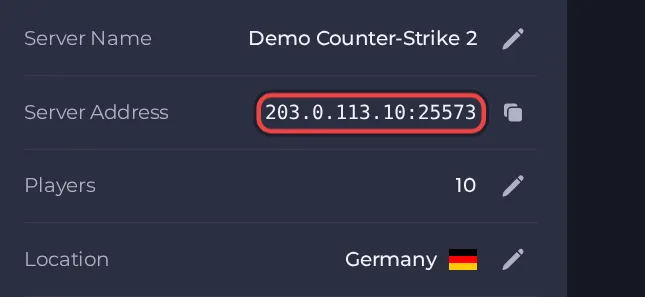
- Launch Counter-Strike 2 and open Settings, then Game, and set Enable Developer Console to Yes.
- Press the tilde (~) key during or outside a match to open the console.
- Type connect followed by the Server Address from your Overview page, for example connect address:port, and press Enter.
- If you set a Join password, type connect address:port; password yourpassword instead, using your own address, port and password.
- If the game says the server is restricted to LAN or cannot be reached from the internet, the server has no Steam Game Server Login Token yet. Create one, paste it into Steam Game Server Login Token under Settings, then Game Settings, and restart the server.
Ports
Players join with the port shown in the Server Address on the Overview page. A second port, used only for spectators and demo recording (SourceTV), comes with the server and cannot be changed; players do not type it to play.
Game version
Every player needs the current Counter-Strike 2 game build, which Steam normally installs automatically. The server checks for a game update every time it starts while Auto-update server is on (the default), so restart the server after Valve ships a patch. Valve's servers refuse an out-of-date server build, so leave Auto-update server on unless you are deliberately holding a build for plugin compatibility. A Steam Game Server Login Token is required for players outside your local network to join at all.
If you cannot join
- The server must be Online. Check the badge at the top of the page.
- Copy the address again from the panel. A missing or mistyped port is the most common cause.
- Make sure every player runs a compatible game version.
- Check the password, if you set one. See How to set up your Counter Strike 2 server.
- More checks: How to join your server and Counter Strike 2 server problems and fixes.





